Showing posts with label AMD Catalyst. Show all posts

Saturday, January 19, 2013

AMD Catalyst Display Driver 13.1 Adds Official Support for Ubuntu 12.10 (Quantal Quetzal)


ATI/AMD Catalyst Driver 13.1 for Linux-based systems has been released recently that brings various bug fixes and improvements. AMD has stated that this release fixes most of the problems encountered with Steam for Linux and it brings support for Ubuntu 12.10 (Quantal Quetzal) and XServer 1.13. You can review the release notes for AMD 13.1 here.

The PPA from xorg-edgers is available for the following Ubuntu/Linux Mint distributions:


  • Ubuntu 13.04/12.10/12.04
  • Linux Mint 14/13
A- Automatic Installation (Recommended)

You can install the driver from PPA using this sequence of commands:

sudo add-apt-repository ppa:xorg-edgers/ppa 
sudo apt-get update 
sudo apt-get install fglrx-installer

After finishing the installation, you need to remove the xorg-edgers PPA using these commands before rebooting your system:

sudo add-apt-repository --remove ppa:xorg-edgers/ppa 
sudo apt-get update 

B- Manual Installation

If you prefer to install the driver manually, you can go through all these steps, but I can't confirm that this may work for all users:

   1. Uninstalling The Current AMD Driver

Before starting the installation of this new driver, you need to remove your current driver using these commands:

sudo sh /usr/share/ati/fglrx-uninstall.sh 
sudo apt-get remove --purge fglrx fglrx_* fglrx-amdcccle* fglrx-dev* xorg-driver-fglrx

Or

cd /usr/share/ati 
sudo sh ./fglrx-uninstall.sh

   2. Installing Dependencies

First of all, let's install some dependencies needed for creating the Debian packages out of the .run file. Open the terminal and enter these commands:

sudo apt-get install cdbs fakeroot build-essential dh-make debconf execstack dh-modaliases 
sudo apt-get install debhelper dkms libqtgui4 libstdc++6 libelfg0 unzip

Users of amd64 platforms (64-bit) need also to install these packages:

sudo apt-get install ia32-libs-multiarch i386 lib32gcc1 ia32-libs libc6-i386 ia32-libs

   3. Installing The AMD Driver

Via the terminal, download AMD Catalyst driver 13.1 with these commands:

mkdir -p ~/amd-driver && cd amd-driver 
wget -c http://goo.gl/gKM8v -O amd-catalyst-13.1-linux-x86_64.zip 
unzip -oq amd-catalyst-13.1-linux-x86_64.zip

Generate now Debian packages for your distribution with the following command:

sudo sh amd-driver-inst*.run --buildpkg `lsb_release -is`/`lsb_release -cs`

Install the driver with these commands:

sudo dpkg -i *.deb 
sudo aticonfig --initial 
sudo reboot

Friday, December 14, 2012

Install AMD Catalyst 12.12 from PPA in Ubuntu 12.10/12.04 and Linux Mint 14/13


AMD Catalyst 12.12 has just been released, coming with more bug fixes and is based on fglrx 9.01. We don't know much about this new release, but it generally improves support for more AMD graphics cards and Steam client for Linux.

In this tutorial, we will see how to install AMD Catalyst 12.12 from PPA or manually via the driver's .run file as shown below. The PPA is available for the following Ubuntu/Linux Mint distributions:


  • Ubuntu 13.04/12.10/12.04
  • Linux Mint 14/13
AMD Catalyst 12.12 Installation

   1. Automatic Installation

Open the terminal and issue these commands:

sudo add-apt-repository ppa:xorg-edgers/ppa 
sudo apt-get update 
sudo apt-get install fglrx-installer

It's recommended that you remove the xorg-edgers PPA to avoid installing unwanted packages on your system. You can remove it with these commands:


sudo add-apt-repository --remove ppa:xorg-edgers/ppa 
sudo apt-get update

   2. Manual Installation

Before installing a new AMD driver, we need first to uninstall the current one. To do this, run these two commands from the terminal:

sudo sh /usr/share/ati/fglrx-uninstall.sh 
sudo apt-get remove --purge fglrx fglrx_* fglrx-amdcccle* fglrx-dev* xorg-driver-fglrx

For manual installation of the AMD Catalyst 12.12 driver, issue this sequence of commands:

sudo apt-get install unzip 
cd /tmp && wget -c http://goo.gl/ytSAn -O 9.01-121106a-150335C-EDG_Direct.zip 
unzip 9.01*EDG*.zip 
chmod +x amd*9.01*.run 
sudo sh amd*9.01*.run

When you finish the installation, run these commands:

sudo aticonfig --initial -f 
sudo reboot

Tuesday, October 23, 2012

Install AMD Catalyst 12.10 Driver On Ubuntu 12.10/12.04/Linux Mint 13


AMD Catalyst 12.10 has just been released which brings some few changes and improvements compared to previous version (12.9). As usual, there is no release notes for the AMD Catalyst 12.10 driver for Linux and to know its effectiveness, the user has to test it. In this article, we will see how to install the driver in Ubuntu 12.10/12.04 and Linux Mint 13 or older.

Current Driver Removal

Open the terminal and issue these commands:

sudo sh /usr/share/ati/fglrx-uninstall.sh

sudo apt-get remove --purge fglrx fglrx_* fglrx-amdcccle* fglrx-dev* xorg-driver-fglrx

AMD Catalyst 12.10 Installation

Via the terminal, run these commands:

sudo apt-get install unzip

cd /tmp && wget -c http://goo.gl/Bbeki -O catalyst-12.10-x86.x86_64.zip

unzip catalyst-12.10-x86.x86_64.zip

chmod +x amd-driver-installer-catalyst-12.10-x86.x86_64.run

sudo sh amd-driver-installer-catalyst-12.10-x86.x86_64.run

Then follow setup instructions:


Finally, run this command:

sudo aticonfig --initial -f

If you prefer to install from PPA, you can run these commands:

sudo add-apt-repository ppa:xorg-edgers/ppa
sudo apt-get update
sudo apt-get install fglrx-installer

If you failed in installing the driver, you can check this guide.

Wednesday, October 10, 2012

How To Repair A Failed AMD Catalyst Driver Installation On Ubuntu 12.10/12.04/Linux Mint 13


We have previously seen an article for installing correctly the Nvidia driver under Ubuntu/Linux Mint using Recovery Mode. Today we will focus on AMD drivers in which we will see two methods for fixing an incompatible driver installation of AMD Catalyst driver (12.x) that resulted in system crash, graphics problems, or boot failure.

We will try our best to show you how to install the AMD Catalyst driver correctly on your system without any troubles and I hope this article find your satisfaction. Whether you are working on a laptop or computer, these instructions are workable for the following Linux distributions:


  • Ubuntu 12.10 (Quantal Quetzal)
  • Ubuntu 12.04 (Precise Pangolin)
  • Linux Mint 13 
Method 1

If you are able to reach the login screen, press CTRL+ALT+F2 to enter CLI mode, then enter your login credentials and kill Xserver with this command:

sudo service lightdm stop

Uninstall now the current AMD driver with these commands:

sudo sh /usr/share/ati/fglrx-uninstall.sh

sudo apt-get remove --purge fglrx fglrx_* fglrx-amdcccle* fglrx-dev* xorg-driver-fglrx

These commands also allow to delete current AMD driver:

cd /usr/share/ati

sudo sh ./fglrx-uninstall.sh

Let's now install some dependencies with these commands:

sudo apt-get install cdbs fakeroot build-essential dh-make debconf

sudo apt-get install debhelper dkms libqtgui4 libstdc++6 libelfg0 execstack dh-modaliases

For 64-bit systems, you need to install also these dependencies:

sudo apt-get install ia32-libs-multiarch i386 lib32gcc1 ia32-libs libc6-i386 ia32-libs

Now download the latest stable version of AMD driver (currently 12.8) with these commands:

cd ~/; mkdir catalyst12.8; cd catalyst12.8/

wget -c http://goo.gl/ZZkYR -O amd-driver-installer-12-8-x86.x86_64.zip

unzip amd-driver-installer-12-8-x86.x86_64.zip

chmod +x amd-driver-installer-8.982-x86.x86_64.run

Now create Debian packages out of the downloaded *.run file with this command for Ubuntu 12.04 (Precise Pangolin):

sudo sh amd-driver-inst*.run --buildpkg Ubuntu/precise

For Ubuntu 12.10 (Quantal Quetzal), run this command:

sudo sh amd-driver-inst*.run --buildpkg Ubuntu/quantal

At the end of this operation, three deb packages will be created which are:

- fglrx_8.982-0ubuntu1_i386.deb
- fglrx-amdcccle_8.982-0ubuntu1_i386.deb
- fglrx-dev_8.982-0ubuntu1_i386.deb

You can list them in the terminal with this command:

ls *.deb


Install all these deb packages with this command:

sudo dpkg -i *.deb

Then finish the installation with this command:

sudo aticonfig --initial

Reboot now your system:

sudo reboot

To verify if the driver is well installed, run this command:

fglrxinfo

Method 2

If you can't reach the login menu to be able to enter CLI mode, you can use instead the Recovery Mode by following these instructions:

- Hold down the Shift key after powering on your computer or laptop to enable the Grub boot menu and boot into Recovery Mode:


- In the next screen enable networking:


- Select now "Drop to root shell prompt" and press Enter:


- Your filesystem is read-only, to enable read/write permissions, run this command:

mount -rw -o remount /

- Now use all commands given in Method 1 to install the AMD driver.

Sunday, September 16, 2012

How To Install AMD Catalyst 12.9 Driver On Ubuntu 12.10/12.04/11.10/Linux Mint 13


AMD has recently released Catalyst 12.9 driver which adds support to Ubuntu 12.10 (Quantal Quetzal) and  Linux 3.5 kernel series. The driver is based on the fglrx 9.00 release and brings more changes, bug fixes, and improvements. The release notes for AMD Catalyst Driver 12.9 is not available currently, but you can get some information about this latest release here.

We will see here two types of driver installation (automatic & manual), but let's first uninstall the current AMD driver with these commands:

sudo sh /usr/share/ati/fglrx-uninstall.sh

sudo apt-get remove --purge fglrx fglrx_* fglrx-amdcccle* fglrx-dev* xorg-driver-fglrx

Manual Installation

To install AMD Catalyst 12.9 under Ubuntu 12.10/12.04/11.10 or Linux Mint 13 or older, run the following commands from the terminal:

sudo apt-get install unzip

cd /tmp && wget -O amd-12.9-9.00-EDG_Direct.zip http://goo.gl/mHnCA

unzip amd-12.9-9.00-EDG_Direct.zip

chmod +x amd-driver-installer-9.00-x86.x86_64.run

sudo sh amd-driver-installer-9.00-x86.x86_64.run

Then follow setup instructions in the window that will appear:


When the installation is complete, run this command:

sudo aticonfig --initial -f

Finally, reboot your system to activate the new driver. If you have failed installing the driver via GUI mode, you can install it using Recovery Mode as described here.

Automatic Installation

Note: PPA has not been updated so far, but the driver will be updated very soon. You can check  it from time to time here.

To install the driver provided by xorg-edgers, open the terminal and run the following commands:

sudo add-apt-repository ppa:xorg-edgers/ppa
sudo apt-get update
sudo apt-get install fglrx-installer

Friday, August 17, 2012

Install AMD Catalyst 12.8 On Ubuntu 12.04/Linux Mint 13


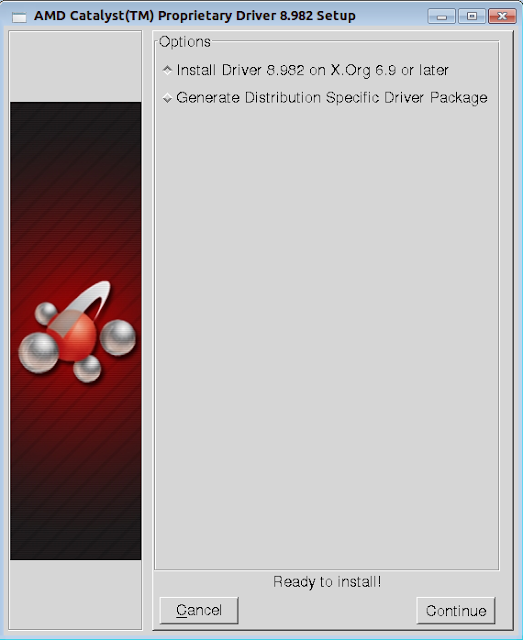
AMD has released the Catalyst 12.8 driver for Linux systems recently bringing some improvements and bug fixes. This driver is based on the fglrx 8.982 release and it improves support for Ubuntu 12.04 LTS. In this tutorial, we will as usual help you install the AMD Catalyst 12.8 driver under Ubuntu/Linux Mint systems.

AMD Catalyst 12.8 Driver  Installation

Uninstall first the old driver with the following commands:

sudo sh /usr/share/ati/fglrx-uninstall.sh

sudo apt-get remove --purge fglrx fglrx_* fglrx-amdcccle* fglrx-dev* xorg-driver-fglrx

To install Catalyst 12.8 on Ubuntu 12.10/12.04/11.10/Linux Mint 13 or older, open the terminal and run the following commands (for both i386 & amd64 platforms):

cd /tmp && wget -O amd-driver-installer-12-8-x86.x86_64.zip http://goo.gl/ZZkYR

unzip amd-driver-installer-12-8-x86.x86_64.zip

chmod +x amd-driver-installer-8.982-x86.x86_64.run

sudo sh amd-driver-installer-8.982-x86.x86_64.run

A window will pop-up which will guide you in installing the driver on your system:


When you finsih the installation, run this command:

sudo aticonfig --initial -f

Finally, reboot your system to get this driver working.