Showing posts with label Web Browser. Show all posts

Sunday, April 7, 2013

Install Tor Browser Bundle 2.3.25-6 From PPA in Ubuntu/Linux Mint


Tor Browser Bundle 2.3.25-6 has been released recently bringing updates for the following features:


  •     Update Firefox to 17.0.5esr
  •     Update NoScript to 2.6.59


As a reminder, Tor Browser Bundle isa  multiplatform software that allows users to browse the web in anonymity. You can check for more information about it here. In this tutorial, we will see how to install Tor Browser Bundle from PPA which is supported by these Ubuntu/Mint distros:


  • Ubuntu 13.04/12.10/12.04
  • Linux Mint 14/13
If you prefer a manual installation, you can download it from here.

Tor Browser Bundle 2.3.25-6 Installation

Open the terminal and enter these commands for 32-bit architectures:

sudo add-apt-repository ppa:upubuntu-com/tor 
sudo apt-get update 
sudo apt-get install tor-browser 
sudo chown $USER -Rv ~/.tor-browser/
For 64-bit architectures, run these commands:

sudo add-apt-repository ppa:upubuntu-com/tor64 
sudo apt-get update 
sudo apt-get install tor-browser 
sudo chown $USER -Rv ~/.tor-browser/
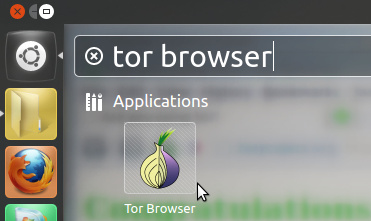
Use now Unity dash to search and open the software:


Thursday, January 10, 2013

Install/Upgrade to Tor Browser Bundle 2.3.25-2 from PPA in Ubuntu 12.10/12.04 and Linux Mint 14/13


Tor Browser Bundle 2.3.25-2 has been released recently and all users are required to upgrade. This latest release has addressed problems with TurkTrust certificates and it brings the following updates:


  •     Update Firefox to 10.0.12esr
  •     Update Libevent to 2.0.21-stable
  •     Update HTTPS Everywhere to 3.1.2
  •     Update NoScript to 2.6.4.2

You can find the official release notes here. For manual installation, you can download Tor Browser Bundle from here. For easier installation via PPA, you can see below. The PPA is available for these Ubuntu/Linux Mint distros:

  • Ubuntu 13.04/12.10/12.04/11.10
  • Linux Mint 14/13/12
Tor Browser Bundle Installation

Open the terminal and enter these commands for 32-bit systems:

sudo add-apt-repository ppa:upubuntu-com/tor 
sudo apt-get update 
sudo apt-get install tor-browser 
sudo chown $USER -Rv ~/.tor-browser/

For 64-bit systems, enter these commands:

sudo add-apt-repository ppa:upubuntu-com/tor64 
sudo apt-get update 
sudo apt-get install tor-browser 
sudo chown $USER -Rv ~/.tor-browser/

Start it from Unity Dash:


Or from the terminal with this command:

tor-browser

Monday, November 12, 2012

5 Best Firefox Add-ons for Bloggers


Firefox is one of the best web browsers available today. The main reason for its popularity is the large community support and Add-ons/plugins which are available for the users. Firefox add-ons are available for nearly all user groups with different interests. There are a number of firefox add-ons or plugins which are available for bloggers. Some of The Best Firefox add-on for Bloggers are:
1. SEO Quake: This is a highly recommended firefox add-on for the bloggers. This plugin shows various ranks such as page rank, alexa rank etc of all the results which are shown in the Google for a particular search query. This add-on is best suited for both newbies and professionals who would be benefitted by the effectiveness and the competitive ability of the SEO efforts.
2. ScribeFire Blog Editor: This is a fully featured blog text editor that seamlessly integrates in your Firefox and allows you to edit and create posts for your blog. There are a number of features which are offered by this tool such as editing and dropping formatted text from the pages, publishing to one or more blogs, upload images and much more.
3. Yoono: This is another simple and easy to install sidebar firefox add-on that helps you a lot in your social media sharing. There are a number of buttons that connect you to your Facebook, Twitter, LinkedIn, MySpace and other social accounts all at one place. This sidebar helps you to share your posts and other content across these social networks in an instant. This plugin also helps you to connect to your account and doesn’t let you miss any of the critical update. The plugin is also available for the Android, Google Chrome, iPhone and other platforms.
 
4. KGen: This is great firefox add-on that would help you in analyzing the keywords of the page you are viewing along with their distribution and the weight of the keyword in the page. This tool can be a handy tool to view your competitor’s keyword strategy. The plugin also generates various statistics about your page so that you can improve your blog’s quality. Kgen is a must recommended tool for the marketers/bloggers who rely on keyword position and weighing for their business.
5. Easy Comment: All bloggers and search engine optimizers know that the blog commenting is an integral part of any SEO campaign or activity. It is really time consuming and frustrating to fill out the details every time you visit some blog for commenting purposes. The easyComment allows you to fill out the comment forms with your details such as Name, Email and homepage URL automatically. Whenever you land up on a page, all your details would be filled up automatically and you only have to think about your message.

Sunday, November 11, 2012

Install Tor Browser Bundle 2.2.39-5 From PPA In Ubuntu 12.10/12.04/Linux Mint 13


Tor Browser Bundle has been updated to version 2.2.39-5. You can now install it from our PPA under the following Linux distributions:


Ubuntu 12.10/12.04/11.10 
Linux Mint 13/12

Tor Browser Bundle 2.2.39-5 Installation

Open the terminal and issue these commands for 32-bit systems:

sudo add-apt-repository ppa:upubuntu-com/tor 
sudo apt-get update 
sudo apt-get install tor-browser 
sudo chown $USER -R ~/.tor-browser/

For 64-bit systems, run these commands:

sudo add-apt-repository ppa:upubuntu-com/tor64 
sudo apt-get update 
sudo apt-get install tor-browser 
sudo chown $USER -R ~/.tor-browser/

For manual installation, you can download Tor Browser Bundle from here.

Sunday, October 28, 2012

Mozilla firefox 16.0.2 released


Mozilla firefox 16.0.2 final is now available for download.This is a security fix release.
what’s new in this firefox 16.0.2?
Fixed Security Vulnerability in Firefox 16.0.1.
Fixes for Location object issues.This is a critical Vulnerability.

Download Mozilla firefox 16.0.2

Thursday, October 25, 2012

Tor Browser Bundle 2.2.39-4 Released, PPA Installation Available For Ubuntu/Linux Mint


Tor Browser Bundle has been updated to version 2.2.39-4 which brings these new changes:


    Update Firefox patches to prevent crashing 
    Update HTTPS Everywhere to 3.0.2 
    Update NoScript to 2.5.8
To download Tor Browser Bundle for Linux, click here. Or you can use the PPA below for easier installation. The PPA is available for these Linux distributions:

  • Ubuntu 12.10/12.04/11.10
  • Linux Mint 13/12
Tor Browser Bundle Installation

To install Tor Browser Bundle on Ubuntu/Linux Mint, run the following commands:

    - i386/32-bit

sudo add-apt-repository ppa:upubuntu-com/tor

sudo apt-get update

sudo apt-get install tor-browser

sudo chown $USER -R ~/.tor-browser/

   - amd64/64-bit

sudo add-apt-repository ppa:upubuntu-com/tor64

sudo apt-get update

sudo apt-get install tor-browser

sudo chown $USER -R ~/.tor-browser/

Use the Unity dash to start the application or run this command from the terminal:

 tor-browser

Saturday, October 13, 2012

Install Tor Browser Bundle (v2.2.39-1) From PPA On Ubuntu 12.10/12.04/Linux Mint 13


Tor Browser Bundle is a standalone package that allows to browse the web anonymously that will protect your online privacy from traffic analysis and network surveillance. This package includes the Tor application, a GUI called Vidalia, and a customized version of Firefox having various add-ons to ensure better online anonymity.


 The latest version of Tor Browser Bundle is 2.2.39-1 which fixed many bugs and security issues compared to the previous version. If you prefer to download and use Tor Browser Bundle manually, you can download it from here. To install it from PPA, you can use the commands given below. The PPA is compatible with following Linux distributions:

  • Ubuntu 12.10/12.04/11.10
  • Linux Mint 13/12
Tor Browser Bundle Installation

Open the terminal and issue these commands:

   1. 32-bit Systems

sudo add-apt-repository ppa:upubuntu-com/tor
sudo apt-get update
sudo apt-get install tor-browser
sudo chown $USER -R ~/.tor-browser/

   2. 64-bit Systems

sudo add-apt-repository ppa:upubuntu-com/tor64
sudo apt-get update
sudo apt-get install tor-browser
sudo chown $USER -R ~/.tor-browser/

You can later start it via Unity dash:


Or from the terminal with this command:

tor-browser

Tuesday, September 4, 2012

New Chromium Stable And Development PPAs For Ubuntu 12.04

A quick tip for Chromium users who are using Ubuntu 12.04: the Chromium PPAs (Stable, Beta, Dev and Daily) haven't been updated since Chromium 18 but if you want to use the latest Chromium browser in Ubuntu, there are two new PPAs you can use, thanks to Alex Shkop.


The two Chromium PPAs are for Ubuntu 12.04 LTS Precise Pangolin only for now, one for the latest stable Chromium (version 21) and one for the development builds (version 23 at the time I'm writing this post).

Add the stable PPA and install Chromium in Ubuntu 12.04 using the following commands:
sudo add-apt-repository ppa:a-v-shkop/chromium
sudo apt-get update
sudo apt-get install chromium-browser
Or, if you want the latest dev builds in Ubuntu 12.04 Precise Pangolin, use the following commands:

sudo add-apt-repository ppa:a-v-shkop/chromium-dev
sudo apt-get update
sudo apt-get install chromium-browser
 

Wednesday, August 29, 2012

Download Mozilla Firefox 15.0 for Linux


Mozilla has uploaded a few minutes ago, August 27th, the Mozilla Firefox 15.0 web browser and Mozilla Thunderbird 15.0 email client for all supported platforms, including Linux. Because the official release is supposed to be tomorrow, August 28th, there is no release announcement for Mozilla Firefox 15.0, but you can download the final version right now (see download link at the end of the article) from the official Mozilla FTP servers.
Highlights of Mozilla Firefox 15.0:
· Initial native support for PDF files;
· Supports version 3 of the SPDY networking protocol;
· Better performance, by enhancing WebGL with compressed textures;
· Add-ons now eat less memory;
· Integrated JavaScript debugger into developer tools;
· Added a new layout view to Inspector;
· Implemented the CSS word-break property;
· Implemented high precision event timer;
· Added a new responsive design tool, to allow web developers to easily switch between mobile and desktop views of sites;
· Added native support for the Opus audio codec;
· Added media attribute support to the element;

· Added support for the played attribute to the
For other Linux users, Mozilla distributes Firefox 15.0 as binary and source packages for both 32-bit and 64-bit architectures.

Download Mozilla Firefox 15.0 

Tuesday, August 21, 2012

How to Install Firefox 15 on Ubuntu


The following tutorial will teach Ubuntu users how to "unofficially" update their systems to the Mozilla Firefox 15.0 web browser.

Mozilla Firefox 15 has not yet been released, it is in Beta state at the moment, but it will bring features such as initial native support for PDF files, support for SPDY networking protocol v3, better performance by enchancing WebGL (including compressed textures), better memory usage for add-ons, and much more.

Canonical will most likely update its supported Ubuntu operating system to Firefox 15 as soon as Mozilla releases it at the end of the month, but if you want it now, follow our step-by-step (with screenshots) tutorial.

Mozilla Firefox 15.0 can be installed in the following Ubuntu operating systems: Ubuntu 12.04 LTS (Precise Pangolin), Ubuntu 11.10 (Oneiric Ocelot), Ubuntu 11.04 (Natty Narwhal) and Ubuntu 10.04 LTS (Lucid Lynx).

Step 1 - Add the Firefox 15.0 repository

No matter what Ubuntu operating system (see above supported OSes) you are running, open a terminal and paste the following command:

sudo add-apt-repository ppa:mozillateam/firefox-next

Review image

Hit the Enter key, type your password when asked and hit the Enter key. Hit Enter again when asked.

Don't close the terminal window! Proceed to the next step.

Step 2 - Install Firefox 15.0 on Ubuntu

Now paste the following command in the same terminal window:

sudo apt-get update && sudo apt-get install -y firefox

Your current Firefox installation will be overwritten. Wait for the installation to finish and close the terminal window.

That's it! The new Mozilla Firefox 15.0 is now fully installed in your Ubuntu machine. You'll need to restart Firefox for the changes to take effect.

Review image

In time, your Mozilla Firefox web browser will automatically upgrade to newer versions, so make sure you update your system regularly.

If you have problems with the tutorial, do not hesitate to comment below!

Sunday, August 19, 2012

Install Tor Browser Bundle From PPA On Ubuntu 12.10/12.04/11.10/Linux Mint 13


Tor Browser is a standalone bundle available for many platforms that uses the Tor network to protect your privacy by hiding your online traces such as not letting websites you visit know your physical location as well as allowing users to visit blocked websites.

Tor Browser Bundle for Linux can be easily installed under Ubuntu/Linux Mint. You need to download the appropriate archive file from here, extract it, then double click "start-tor-browser" to start it. Or you can use our custom PPA to install Tor Browser as described below.

Tor Browser Bundle Installation

Install Tor Browser under Ubuntu 12.10/12.04/11.10 or Linux Mint 13 or older with these commands for 32-bit/i386 platforms:

sudo add-apt-repository ppa:upubuntu-com/tor
sudo apt-get update
sudo apt-get install tor-browser

For 64-bit/amd64 systems, install with these commands:

sudo add-apt-repository ppa:upubuntu-com/tor64
sudo apt-get update
sudo apt-get install tor-browser

Change now folder ownership of Tor Browser to your current user with this command:

sudo chown $USER -R ~/tor-browser/

You can now start Tor Brower from the Unity dash:


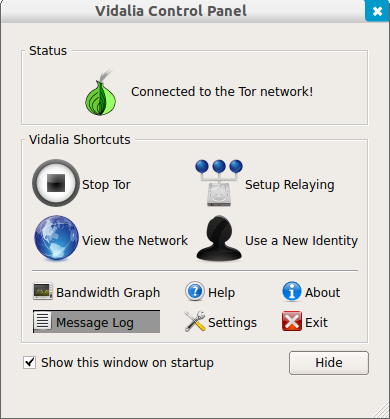
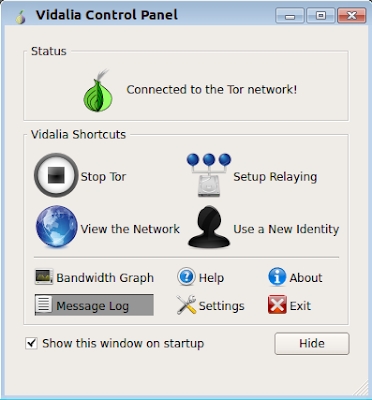
If the connection is well established, you may get this status:


Tor Browser will then start automatically. You can now enjoy browsing the web securely and anonymously!

Wednesday, August 1, 2012

Install Google Chrome 21 Stable On Ubuntu 12.04/Linux Mint 13


Google has recently made available the stable version of Chrome 21 which comes with more new features and improvements especially for developers and gamers. Here are some of the features that you will find in this latest release:


  • getUserMedia JavaScript API Support (allows applications to access your webcam/microphone without using additional plugins)
  • HTML 5 getUserMedia API Support
  • Better Integration with Google Cloud Print 
  • Better support for Gamepad Javascript API 
You can have more information in this video:
 
 If you want to install Google Chrome 21 in Ubuntu 12.10/12.04/11.10 or Linux Mint 13 or older, you can either download the appropriate Debian package from here and install it with Ubuntu Software Center, or install the web browser via your terminal as follows:


32-bit/i386 systems:

cd /tmp && wget -O google-chrome_i386.deb http://goo.gl/itppy


sudo dpkg -i google-chrome*.deb

64-bit/amd64 systems:

cd /tmp && wget -O google-chrome_amd64.deb http://goo.gl/iXDWk


sudo dpkg -i google-chrome*.deb

Monday, July 23, 2012

Firefox 15 Beta Tackles Memory Leaks


Mozilla has released a beta version of the next version of its Firefox browser with better memory management and significant speed improvements.
"Firefox 15 prevents most memory leaks caused by add-ons, including Firebug," Nicholas Nethercote writes in a Mozilla blog. Firebug is a Firefox add-on for debugging web pages.
"For many users with add-ons installed, this will significantly reduce Firefox’s memory consumption, without requiring upgrades to those add-ons," he adds. "For those users, Firefox 15 is likely to be faster (sometimes drastically so) and less likely to crash, especially if they have multiple add-ons installed and/or keep Firefox running for a long time between restarts."

Rest here

Wednesday, July 18, 2012

Firefox 14 Officially Lands in Ubuntu


With today's updates, Canonical upgraded the default web browser and default email client in all its supported Ubuntu operating systems to Mozilla Firefox 14.0.1 and Mozilla Thunderbird 14.0, respectively.

The Firefox 14 web browser was officially released yesterday, July 17th, bringing Awesome Bar URL auto-complete functionality, HTTPS support for Google searches, plugins can be loaded only on click, improved site identity manager to prevent spoofing on SSL connections with favicons, Pointer Lock API, new API to prevent your monitor from sleeping, and text-transform & improved font-variant CSS for Turkic and Greek languages.

On the other hand, Mozilla Thunderbird 14.0 brings only one feature: support for the Ubuntu One cloud storage implemented in the Filelink feature.

All Ubuntu 12.04 LTS, Ubuntu 11.10, Ubuntu 11.04, and Ubuntu 10.04 LTS users can update their Firefox web browser and Thunderbird email client to version 14.0 right now, by using the Update Manager software.

Other Linux users can download Mozilla Firefox 14.0.1, as well as Mozilla Thunderbird 14.0 binary and source packages right now from Softpedia. Also, don't forget to visit our always up-to-date Firefox Extensions section and Thunderbird Extensions section for the latest add-ons!

Monday, July 16, 2012

Firefox 16 now with Address Bar Word Highlighting


Sometimes it is the little things that are worth talking about. When you enter a phrase or word in Firefox’s address bar, you receive a listing with suggestions in a menu that opens up automatically. Depending on your configuration of the feature, you may see history items or bookmarks listed in the window. We have previously detailed how you can modify the Firefox address bar so that nothing, only bookmarks or history items, or both are displayed in it. Privacy is one reason why you may want to modify the settings but there are others, for instance to load bookmarks faster in the browser by only displaying bookmarks in the results.
Search terms that you enter into the address bar are automatically highlighted.In Firefox 15 and earlier, the browser added an underline to the matching terms and changed the font style to bold automatically. You see an example of this behavior in the screenshot below.

Rest here

Tuesday, July 10, 2012

Remove Linux Mint custom search in Chromium


The web browsers in the software repository of Linux Mint are usually set to use some custom search engines. For example,  Yahoo search and DuckDuckGo are used as the default search engines in Firefox, the preinstalled web browser of Linux Mint 13. ( learn how to change the default search engines of Firefox in Linux Mint 13)

If you install the Chromium browser in Linux Mint, you will find it uses the Linux Mint custom search for Google. If you dont like this custom search in Chromium, here is how to change it:

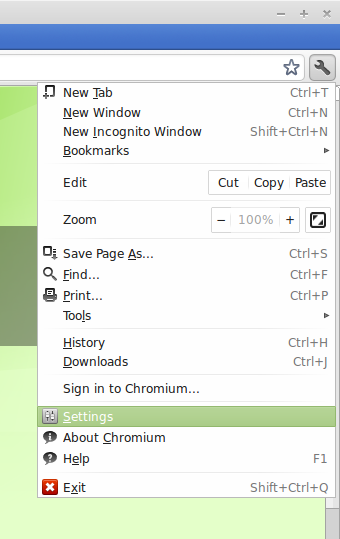
Open Chromium and click on the wrench icon on the top right corner, on the drop down menu, click on "Settings":


Remove Linux Mint custom search in Chromium

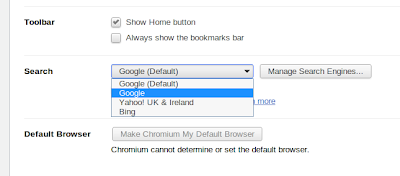
In the settings page, scroll to the Search category and click on the drop down box to select the default search engine. The first (default) one is the Linux Mint custom search of Google. To use the normal google search engine, you should pick the second option:

Change Linux Mint custom search in Chromium

You can also select Yahoo or Bing in the drop down menu if you want.

In case you want to use another search engine, like DuckDuckGo, click on the "Manage Search Engines" button on the right and you will be presented to the Search Engines Settings page. In this page, go to the Other Search Engine part and add DuckDuckGo to it. It should look like this:

Edit Linux Mint custom search in Chromium

The url to paste into the url box is:
http://duckduckgo.com/?t=lm&q=%s

After that, hit enter and you will have a new line for DuckDuckGo in the other search engines section. Hover the mouse over that line and you will see the "make default" button, click on it and Chromium will use DuckDuckGo as the search engine.

To install Chromium in Linux Mint, you can search for it in the Software Center or run the following command in the terminal:
sudo apt-get install chromium-browser

Friday, July 6, 2012

Pros & Cons Of Google Chrome Version For iOS


A few days back at the I/O conference in San Francisco, Google introduced its web browser Google Chrome version for iOS (An operating system that runs on Apple devices) which is now available for free at the app stores. The launch was so jubilant for the apple users that the newly launched iOS version of Chrome instantly sky rocketed straight to the top at the free apps chart in US.

When it comes on web browsing on APPLE’s iOS based devices, the mainly used browsers are very few consisting of Safari by Apple & Opera Mini by Opera but the launch of Google Chrome version of iOS has inflicted new life into this skewed browsing competition.  The alternative browser by Chrome has come up with many features but to name best of all,
  1. It lets you synchronize your Google Chrome Bookmarks, Open Tabs, Passwords and Browsing history between your Apple device and other devices. This synchronization would take place automatically. I.e. if you are signed in to your Google account than you would be able to see and easily access all the other tabs opened in Chrome browser on other devices, at your Apple device.
  2. Instead of opting for standard version of Chrome browser, a separate more protected version can also be used to overcome your privacy concerns. While in Safari you have to enable the privacy browsing option manually
  3.  You can open up unlimited tabs on Chrome browser compared to Safari where the number is limited to 9 only
  4. You can also request for a full desktop version of a website being opened up through your Chrome version of Apple devices
  5. You can also search through Google Chrome browser by using your VOICE. All you need to do just tap on the little micro phone logo in the URL bar
Apart from these astounding features, Google Chrome version of iOS is not without few demerits,
  1. Chrome version for iOS is not as quick as the native Safari browser. When you will try to open up sites that contain Ajax, Ads, Web 2.0 style content or
    even try to load Java Script then you can feel the performance difference
  2. You can not change your default browser from Safari to Chrome in Apple devices unless you feel like jail-breaking it
These were the pros and cons of Google Chrome version of iOS based Apple devices. Though Google version has promising features along with few glitches but despite that we have to say, Google attempt to creep into Apple territory has succeeded at the moment.

Tuesday, July 3, 2012

Download Chrome Browser for iPhone and iPad


At Google I/O 2012, Chrome for iPhone and iPad is released and that’s available free for download via App Store. Chrome for iOS allows users to sync personalized Chrome from their computer to their iDevices to bring it on the go

Chrome for iPhone and iPad features fast search, sign in option, simple and intuitive experience with privacy constraints.


Download Chrome for iPhone
Download Chrome for iPad

Mozilla Is Moving Quickly Ahead with Firefox OS Phones


The Mozilla Foundation is moving ahead with its plans to become a big player in the smartphone business, and is retaining its focus on emerging markets, according to a new post. We've previously covered the company's Boot to Gecko platform -- an open, web-centric operating environment centered on the Gecko rendering engine -- and we covered Mozilla's alliance with Telefonica and Qualcomm to develop smartphones based on Boot to Gecko. In the latest post, Mozilla stresses that its smartphones will be based on open standards, and there are new details about how they will be positioned.
According to the Mozilla post:
"Industry support is growing behind Mozilla’s plans to launch a new fully open mobile ecosystem based on HTML5. The operating system, which Mozilla today confirmed will use its Firefox brand, will power the launch of smartphones built entirely to open Web standards, where all of the device’s capabilities can be developed as HTML5 applications."
"Mapping to key Firefox footprints around the globe, leading operators Deutsche Telekom, Etisalat, Smart, Sprint, Telecom Italia, Telefónica and Telenor  are backing the open Firefox OS as an exciting new entrant to the smartphone marketplace. They have also identified the potential of the technology to deliver compelling smartphone experiences at attainable prices."
What really jumps out of this missive is the impressive list of telecom partners that will be backing Mozilla. If Mozilla can become entrenched in Latin America with Telefonica alone--one of the biggest telecom giants--it will have momentum as it launches its smartphone strategy.
There are also important new hardware details:
"Device manufacturers TCL Communication Technology (under the Alcatel One Touch brand) and ZTE today announced their intentions to manufacture the first devices to feature the new Firefox OS, using Snapdragon™ processors from Qualcomm Incorporated, the leader in smartphone platforms. The first Firefox OS powered devices are expected to launch commercially in Brazil in early 2013 through Telefónica’s commercial brand, Vivo."
If you doubted Mozilla's seriousness about smartphones before, it's time to change your stance. Judging from the post, Mozilla means to heavily emphasize the Firefox brand with its smartphones, and HTML 5. And, the company has also made clear that new smartphones will come in at very low prices. This should be something to watch.

Tuesday, June 26, 2012

Firefox 14 Released for Android


The latest version of popular web browser Firefox is updated to version 14 on Google Play Store. With this new version the user interface and experience of Firefox Mobile browser for Android is drastically improved. According to Mozilla, the new Firefox 14 is twice as much faster than default Android browser. With more speed, Flash and HTML5 support the Firefox for Android is nearly as complete web browser as its desktop counterpart. According to Mozilla the revamped user interface is much more faster than before, now you can more quickly zoom, pan and launch the browser.

The new Firefox 14 for Android have good support for flash which is nice (even though I hate it) and more HTML5 support which was previously only on Beta version of Firefox on Google Play Store. More features include “awesome screen” which displays all bookmarks, history and supported passwords with synchronizing option of-course. The synchronization options are much more like Safari in iOS6 and Chrome where all of your bookmarks and browsing data is saved on the cloud server. These synchronization options are nice to have if you want to stick to Firefox on all platforms (except iOS of-course).
The Firefox 14 for Android is good little awesome browser and most recommended if you are using Firefox Sync. Also Firefox is planning a Tablet revamped version of Firefox for Android which will bring good web user experience across Android Tablets.

 Download Firefox 14 for Android from Google Play Store