Showing posts with label Lubuntu. Show all posts
Saturday, October 28, 2017
Lubuntu 17.10
Simon Quigley has announced the release of Lubuntu 17.10, a desktop distribution built from Ubuntu packages, but featuring the Lightweight X11 Desktop Environment (LXDE) which is suitable for older computers: "Thanks to all the hard work from our contributors, Lubuntu 17.10 has been released. With the code name 'Artful Aardvark', Lubuntu 17.10 is the 13th release of Lubuntu, with support until July of 2018. What has improved since 17.04? We now ship with Linux kernel 4.13; general bug-fix release as we prepare to switch to LXQt; LXDE components have been updated with bug fixes; the artwork has received an update; the latest release of Audacious, version 3.9, is included by default; Hardinfo has been updated to the latest upstream snapshot." Also available is the Lubuntu "Next" variant, an experimental build of Lubuntu with the LXQt desktop: "Alongside Lubuntu 17.10 featuring LXDE, the Lubuntu team is proud to announce an early adopter's release of Lubuntu Next, featuring the LXQt 0.11.1 desktop environment which is the Qt 5 port of LXDE." Read the release announcement and release notes for more details. Download (SHA256, signature, pkglist): lubuntu-17.10-desktop-amd64.iso (921MB, torrent), lubuntu-17.10-desktop-i386.iso (929MB, torrent). Also available from OSDisc.
Friday, October 19, 2012
Lubuntu 12.10
Lubuntu 12.10, a new version of the lightweight Ubuntu variant featuring the LXDE desktop environment, is out: "The Xubuntu team is glad to announce the immediate release of Xubuntu 12.10, code-named Quantal Quetzal. Xubuntu 12.10 will be supported for 18 months. New features: Xfce 4.10; completely rewritten offline documentation; in the application menu, all settings-related launchers are now grouped under the Settings Manager; updated artwork, including new wallpaper, documentation looks and updates to LightDM, Greybird and Ubiquity slideshow; new versions of Catfish and Parole. Notable bug fixes: no more window traces or 'black on black' in installer." For more information please see the release announcement and the release notes. Download (SHA256): lubuntu-12.10-desktop-i386.iso (692MB, torrent), lubuntu-12.10-desktop-amd64.iso (699MB, torrent).
Etichete:
Linux,
Lubuntu,
LXDE,
Quantal Quetzal
Tuesday, October 9, 2012
How To Install The LAMP Server Using Tasksel In Ubuntu 12.10/12.04/Linux Mint 13
Few months ago we have seen the installation of LAMP server under Ubuntu, you can check it here. Today, we will also see another method for installing the LAMP web server using Taksel under Ubuntu 12.10/12.04/Linux Mint 13 or older.
Gettinsg Started
Open the terminal and install firstly Tasksel with this command:
sudo apt-get -y install tasksel
Start now Tasksel with this command:
sudo tasksel
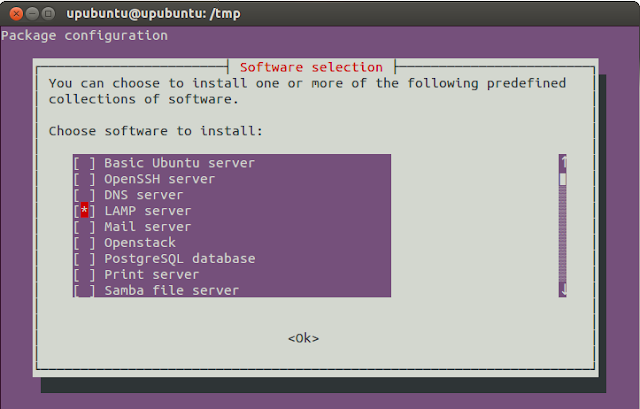
Select now "LAMP server" from the given list using your spacebar and press Enter:

After you finish the installation of the LAMP server, check if it is working by opening one of these links (use IP server if needed):
http://localhost/
or
http://127.0.0.1/
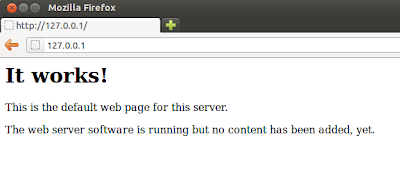
You must see this page:

If nothing appears, try to restart Apache with this command:
sudo /etc/init.d/apache2 restart
You can also install LAMP server with this command:
sudo tasksel install lamp-server
To test if PHP is well installed, run these commands:
echo "" | sudo tee /var/www/test.php
sudo /etc/init.d/apache2 restart
Then open this link:
http://localhost/test.php
Finally, your PHP files and projects must be placed in this folder:
/var/www/
You can access it with root privileges using this command:
sudo nautilus /var/www/
Wednesday, August 15, 2012
How To Install VirtualBox Guest Additions From CLI Under Ubuntu 12.04/Linux Mint 13 (Guest OS)
If you find difficulties installing guest additions via the VM "Devices" menu, you can easily follow this tutorial which will help you use the command line under Ubuntu/Linux Mint running as guest to install VirtualBox "Guest Additions", which is a set of tools and system applications that allow the user to copy/paste between host and guest, enable full screen resolution, and it also includes device drivers (graphics card, keyboard, wireless cards, etc.) to ensure better usability and performance for the guest OS.
The tutorial is workable for Ubuntu 12.10/12.04/11.10 or older (applicable also for Ubuntu derivatives such as Kubuntu, Xubuntu, etc.), and any Ubunu-based system like Linux Mint 13/12 or older. Open the terminal and install VirtualBox guest additions with these commands:
sudo apt-get install virtualbox-guest-additions
sudo apt-get install virtualbox-guest-dkms virtualbox-guest-x11 virtualbox-guest-utils
After installing all packages mentioned above, restart the virtual machine to enable guest additions.
Etichete:
Kubuntu,
Linux,
Linux Mint,
Lubuntu,
Ubuntu,
VirtualBox,
Xubuntu
Monday, August 6, 2012
Run "apt-get update" and "apt-get upgrade" In One Command Under Ubuntu/Linux Mint
In this tutorial, we will see two methods that will allow us to combine two frequently used terminal commands in a single command under a system running Ubuntu/Linux Mint. We will help you run "apt-get update" and "apt-get upgrade" with one command called "update", which will be easier to write and will save you time.
Method 1
Open the terminal (CTRL+ALT+T) and run this command:
> ~/.bash_aliases; gedit ~/.bash_aliases
For Linux Mint, run this command:
> ~/.bash_aliases; pluma ~/.bash_aliases
Add now these lines:
alias update='sudo apt-get update; sudo apt-get upgrade'

Save your file and close it, then restart your terminal by closing and opening it again. You can now run two commands using this one:
update
Method 2
Open the terminal and run this command:
sudo gedit /usr/local/bin/update
For Linux Mint, run this command:
sudo pluma /usr/local/bin/update
Add now this line:
sudo apt-get update; sudo apt-get upgrade

Save your file and exit, then give execution permission to this file with this command:
sudo chmod +x /usr/local/bin/update
Run now this command to test your script:
update
I hope you find this tip useful!
Friday, August 3, 2012
Vote for the Official Wallpaper of Lubuntu 12.10
More than a month ago, Lubuntu developers have started a contest to determine the wallpaper that's going to be used in version 12.10 of their operating system.
A special website was created to manage the voting and the candidates. Users can follow a few simple rules in order to vote:
1) Choose your FIVE favourite wallpapers.
2) Cast your vote!
3) Spread the word, the poll will be running until August 20th.
By the time we have published this story, there were 2350 votes. This contest is public, erveryone can vote! Results of this contest are also public and can be checked online here.
The Lubuntu project started in March 2009, with the purpose of creating a lighter and less resource demanding alternative to the Xubuntu operating system, using the LXDE desktop environment.
Download Lubuntu 12.10 Alpha 3
Monday, July 23, 2012
Peppermint OS Three
Kendall Weaver has announced the release of Peppermint OS Three, a major new version of the project's lightweight desktop Linux distribution based on Lubuntu: "We are proud to announce the release of Peppermint OS Three in both 32-bit and 64-bit builds. This version is based on Lubuntu 12.04 and, as always, uses some features from the ever-awesome Linux Mint. Here's a quick overview of some of the details associated with this release: the Chromium stable repository is now enabled by default; a very light theme and default artwork; fewer default web applications in the menu as we feel that we'd rather not clog everything up by default; ships with GWoffice by default - this is a desktop Google Docs client that is lightweight and runs completely independent of Chromium; GIMP 2.8 is in the Peppermint repository; Linux Mint's update manager...." See the full release announcement for further information. Download (MD5): Peppermint-3-20120722-i386.iso (533MB), Peppermint-3-20120722-amd64.iso (539MB).
Etichete:
Linux,
Linux Mint,
Lubuntu
Subscribe to:
Posts (Atom)