
Showing posts with label Server. Show all posts
Showing posts with label Server. Show all posts
Friday, April 5, 2013
Ubuntu's Unity Next Running On Mir Display Server
Canonical developers have hit the milestone of being able to run their "Unity Next" desktop atop the Mir Display Server. The work is still very early, but it shows for Ubuntu Touch they can swap out Android's SurfaceFlinger for Mir.
Unity Next is the next-generation implementation of Canonical's multi-form-factor desktop for Ubuntu written in Qt/QML. The Mir Display Server is still very primitive and not feature complete nor even on par with Wayland's features, but when using the latest code along with the out-of-tree Qt Mir back-end, it's possible to start running Unity Next.
Thomas Voß of Canonical posted proof of this early feat for switching out Android's SurfaceFlinger for the Mir compositor whereby they are leveraging the HWC 1.1 hardware compositor. The short video of Unity Next on Mir from the Google Nexus 4 smart-phone is embedded below.

Monday, January 21, 2013
Install Ubuntu Server Manager Utility in Ubuntu/Linux Mint
Ubuntu Server Manager is a Graphical-User-Interface to install and manage (Apache 2, MySQL, Proftpd, Samba, Monitorix, SSH, Nagios, Webmin) and to monitor the server log activity.
There are several other options for services like: Net activity viewer, Update dynamic IP, Putty for ssh, Open Ports to see server open connections, Logs, Clear logs option, Localhost scan using Nmap, Perform scan of IP/Domain name using Nmap, RKhunter to check if system is effected with rootkit, Firewall configuration option, Open apache www default folder as root, Webalizer to generate report of site.
This utility only manage local machine.
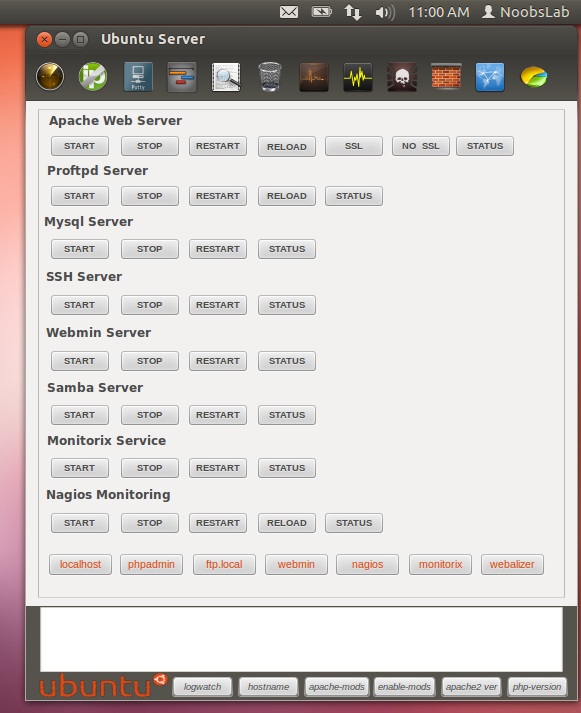
To install services Go to Help & Install > About & Install Servers

Installation and removal of services

To install Ubuntu-Server-Manager in Ubuntu/Linux Mint open Terminal (Press Ctrl+Alt+T) and copy the following commands in the Terminal:
That's it
- wget -O usm.deb http://goo.gl/QECjX
- sudo dpkg -i usm.deb && sudo rm usm.deb
Source: Ubuntu Server Mananger
Thursday, October 25, 2012
Proxmox 2.2 "Virtual Environment"
Martin Maurer has announced the release of Proxmox 2.2 "Virtual Environment" edition, an open-source virtualization platform for running virtual appliances and virtual machines, based on Debian GNU/Linux: "Hi all. We just released Proxmox VE 2.2, including countless improvements and a lot of exiting new features, like live snapshots for KVM guests. Version 2.2 release promotion: Get a reduction of 22% on your Premium, Standard or Basic Support subscriptions. You can easily host all your virtualized servers with Proxmox VE 2.2 and get a replacement for VMware vSphere, Microsoft Hyper-V or Citrix XenServer. No license costs, no vendor lock-in, affordable support and full open-source system. Support is available in English and German." See the release announcement and release notes for additional details. Download the 64-bit installation CD image from here: proxmox-ve_2.2-7f9cfa4c-28.iso (397MB, MD5, torrent).
Saturday, October 13, 2012
Twitter joins the Linux Foundation - another thumb up for Linux servers

If you use both Linux and Twitter, you should surely tweet this, following the footsteps of other giants like Broadcom, Nvidia and Samsung, Twitter has joined the Linux Foundation confirming the growing stature Linux in the world of dedicated web servers and global data centers.
“Linux and its ability to be heavily tweaked is fundamental to our technology infrastructure,” said Chris Aniszczyk, manager of open source for the social networking giant. “By joining the Linux Foundation we can support an organization that is important to us and collaborate with a community that is advancing Linux as fast as we are improving Twitter.”
And, Twitter needs an operating system that can handle intensive computing, especially since it now serves 40 million active users and 400 million tweets per day. It’s also available globally in 30 languages.
PC World reports that a full 80 percent of respondents to a new Linux Foundation survey said that not only have they added dedicated Linux servers in the past 12 months, they also plan to add more in the next 12 months and over the next five years.
Click here to read more about this on PCworld. And dont forget to tweet this.
Tuesday, September 18, 2012
Superb Mini Server 2.0.0
Superb Mini Server (SMS) 2.0.0, a major new version of the Slackware-based server distribution, has been released: "Superb Mini Server version 2.0.0 released (Linux kernel 3.2.29). SMS 2.0.0 core is based on Slackware 'current' which means that Slackware packages are compatible with SMS as long as they are not dependant on Qt 4 as SMS uses qQt 3. SMS packages are not compatible with Slackware though. Once more we choose Apache HTTPD 2.2.23 and PHP 5.3.17 as our default web server for greater stability and compatibility with all web applications. Apache httpd 2.4.3 and PHP 5.4.7 are available under testing. Major changes include switch to OpenSSL 1.0.x and GnuTLS 3.x. For our print server we move to CUPS 1.6.1, so you may need to modify settings in your already installed printers with new Gutenprint drivers." Read the rest of the release announcement for more details. Download: SMS.Native.CD-2.0.0-Install.iso (685MB, MD5), SMS64.Native.CD-2.0.0-Install.iso (643MB, MD5).
Tuesday, September 4, 2012
Demand for Linux hosting servers increased in Q2 despite the downfall of the whole server market
According to the recent report published by IDC this week, worldwide server market revenues decreased 4.8 percent year-over-year in Q2 2012. This is the third consecutive quarter of year-over-year revenue declines for the server market. The market is "working its way through a number of technology transitions impacting customer demand for x86, Unix and mainframe-class systems," said Matt Eastwood, group vice president and general manager for enterprise platforms at IDC, in a released statement. "Economic uncertainty is weighing on the market and the sales cycle is lengthening."

Unix hosting servers and non-x86 servers had the poorest showing this quarter. Unix hosting server revenue declined 20.3 percent year over year. Non-x86 server revenue declined 19.4 percent year over year. However, bladed hosting servers and Linux dedicated servers saw improved demand. IDC attributes the increase of Linux hardware revenue (a 1.7 percent year-over-year gain) to the growing demands of high-performance computing and cloud infrastructure deployments. Bladed server factory revenue was up 6.3 percent year over year, as were bladed server shipment numbers (up 4.1 percent from Q2 2011).
Hewlett-Packard Co. and IBM Corp. shared the No. 1 spot for factory revenue share this quarter, although both companies saw year-over-year factory revenue declines (of 5 percent and 8.2 percent, respectively). Dell Inc. took third place in factory revenue share, helped by a 5.9 percent revenue increase compared with Q2 2011.
Thursday, August 23, 2012
Codethink launches little Linux ARM servers with 8 quad-core CPUs per node
Codethink, a Linux consulting company headquartered in the UK, has launched a new ARM-based linux dedicated server product called the Baserock Slab. Each individual node includes eight quad-core ARM CPUs. Two nodes can fit in a single 1U slot, for a total of 64 cores per rack unit.

The company says that it can fit up to 76 nodes in a full-size rack, for a total of 2,432 cores, without requiring specialized power or cooling infrastructure. The eight System on Module (SoM) boards in each Slab node use Marvell Armada XP ARMv7 chips clocked at 1.33GHz and have 2GB of RAM. The servers are compatible with Codethink’s own custom Linux environment and Debian. The company’s website says that support for additional distributions, including Ubuntu, will arrive soon.
ARM linux dedicated hosting servers like the Baserock Slab offer high density computing with relatively low power consumption compared to conventional x86 servers. Codethink markets the Baserock Slab as an option for energy-efficient cloud computing, ARM build infrastructure, or server appliances. There are a number of products from other vendors that offer even higher density, such as HP’s Redstone server platform, which packs 288 quad-core Calxeda SoCs in a single 4U chassis.
Such configurations are potentially useful for handling certain kinds of heavily distributed workloads, but it’s still not clear whether they are truly cost-effective in common cloud usage scenarios.
From Arstechnica
Thursday, August 16, 2012
How to configure a Linux hosting server
This tutorial provides you with a step by step configuration for a simple Linux hosting server. Fedora core is chosen for this tutorial, however configuration for other distributions may vary. Fedora is free Linux distribution which is developed by Fedora Project and sponsored by Red Hat.
FIAIF Firewall
FIAIF is an open source firewall; Firewall let us close or open access to or from specific ports or IP addresses to make our server secure. If we leave all the ports open on the server hackers might use the open ports to attack to the server, so we only keep the ports open which we use, for example we keep port 80 open for apache web server. Details about ports we need to open are in the explanation of FIAIF in this document.Apache 2.2 web server
Apache is open source software which accepts HTTP (Hypertext Transfer Protocol) requests from clients and response back using web pages such as HTML documents. So if we are going to run a web site, we need to install web server. Browser sends address to the web server; web server sends back the response to the browser and then browser display the content.
Read the full article here
Wednesday, August 1, 2012
How to install Ubuntu server 12.04
A linux hosting server is the best choice for you if you are planning to build a web hosting company, small business servers, or simply host your own website at home, since linux dedicated servers have been known to be extremely reliable and rarely crashes so there's less downtime. Among Linux distros, Ubuntu is very well known and well supported. Ubuntu Server 12.04 LTS Precise pangolin has been released announced by canonical in London April 26th 2012 and now support for five years. in addition, Ubuntu Server 12.04 LTS Precise Pangolin now includes support for the Xen Hypervisor (version 4.1.2), Xen Cloud Platform (XCP) packages and XCP OpenStack plug-ins.
I just found a nice,well written article with a lot of screenshots about how to install Ubuntu server 12.04 LTS on Ubuntuguideserver.com and I believe it will be very helpful for you.
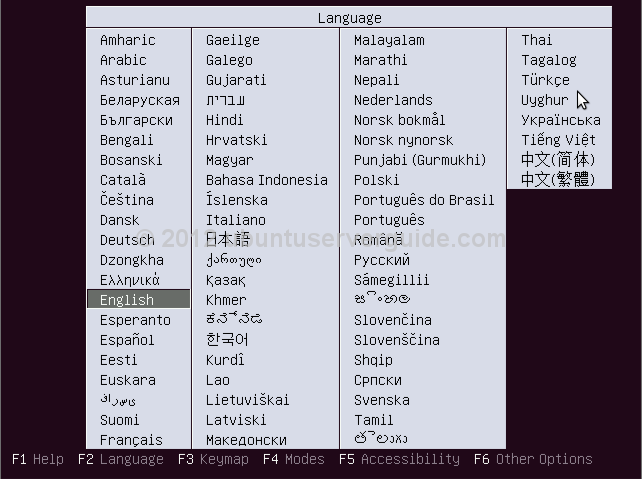
Read the full article at Ubuntuserverguide.com
Wednesday, July 18, 2012
4 Ways to Recover From a Crashed or Frozen X Server on Linux

The X server on Linux provides your graphical desktop. If it crashes, you’ll lose all unsaved work in graphical programs, but you can recover from the crash and restart the X server without restarting your computer.
X server crashes can be caused by bugs with graphics drivers – the proprietary AMD or NVIDIA graphics drivers, for example – hardware problems, or other software bugs.
Ctrl+Alt+Backspace
The Ctrl+Alt+Backspace keyboard shortcut traditionally restarted the X server on Linux. However, after complaints – particularly from new Linux users that accidentally hit this key combination and lost all their work — this shortcut was disabled by default. To enable it on Ubuntu, Fedora, or any other distribution using a GNOME-based desktop, you can use the Keyboard Layout utility.

Switch Virtual Consoles
You can use the Ctrl+Alt+F1 keyboard shortcut (and other F-key keyboard shortcuts) to switch to a different virtual console from your X server. (Ctrl+Alt+F7 usually takes you back to X – the exact F key depends on your Linux distribution.)Once you have, you can log into the virtual console and run the appropriate command to restart your X server. The command you’ll need depends on the display manager you’re using. On Ubuntu, which uses the LightDM display manager, you’d use the following command:
sudo service lightdm restart

SSH Into Computer
If you can’t kill the X server locally, you can kill it over the network. Assuming you have an SSH server set up and running on your Linux system, you can log in from another computer and run the appropriate command to restart the X server. Just sign in via SSH to access a remote console and use the appropriate command to restart your display manager – on Ubuntu, it’s the sudo service lightdm restart command above.
Use the Magic SysRq Key
We’ve covered using the magic SysRq key in the past – the SysRq is is generally the same as the Print Screen key. Assuming you want to kill the X server locally – not over the network – your system may not be responding to key presses, including the Ctrl+Alt+F1 keyboard shortcut. This can occur because the X server has taken control of the keyboard. To take control away from the X server, use the following key combination:Alt+SysRq+rAfter you have, you can try pressing Ctrl+Alt+F1 to access a virtual console. You can also use the Alt+SysRq+k combination, which kills all programs on your current virtual console, including your X server.
If you want to restart your computer, you can also use the magic SysRq key to cleanly restart your system – see our full post on the magic SysRq key for more information.
Wednesday, June 20, 2012
Open-Xchange 6.20.5 Has Been Announced

Open-Xchange, a provider of business-class open source collaboration software for enterprises and SaaS providers, has announced that Open-Xchange Server 6.20.5 is now available for download.
Open-Xchange 6.20.5 includes important updates for Open-Xchange Server 6 (OX6), OX SE (Server Edition), OX ASE (Advanced Server Edition), OX SE for UCS (Server Edition for Univention Corporate Server), and OXtender 2 for Microsoft Outlook.
Highlights of Open-Xchange 6.20.5:
· Mail module is no longer disabled if user is overquota;
· Default folder check, if an over-quota error is encountered, works properly;
· Facebook oauth always claims the password has changed. This has been fixed;
· Email for Resources are marked as [Resource];
· Users were unable to add Facebook account as a Social Messaging account. This has been repaired;
· Numerous other bugfixes.
A complete changelog can be found in the official announcement.
Download Open-Xchange 6.20.5
Subscribe to:
Posts (Atom)