Wednesday, August 1, 2012

Install Android 4.1 Jelly Bean Theme For Ubuntu 12.04/Linux Mint 13


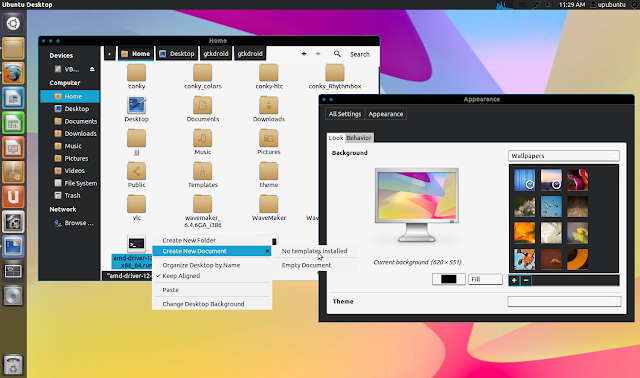
GtkDroid is a new GTK3 theme inspired by the new Android 4.1 Jelly Bean OS. The theme is compatible with both Unity and Gnome Shell. In this tutorial we will help you install it under Ubuntu 12.10/12.04/11.10 and Linux Mint 13 or older. Here is a screenshot of GtkDroid under Ubuntu 12.04 (Precise Pangolin):


GtkDroid Installation

The theme is available in two different styles (dark & light), you can install them all with these commands:

sudo add-apt-repository ppa:upubuntu-com/gtk3
sudo apt-get update
sudo apt-get install gtkdroid

To enable the default style, run these commands:

gsettings set org.gnome.desktop.interface gtk-theme 'Jellybean-GTK'


gconftool-2 --set --type string /apps/metacity/general/theme 'Jellybean-GTK'

To enable the light version of GtkDroid, run these commands:

gsettings set org.gnome.desktop.interface gtk-theme 'Jellybean-GTK-Light'


gconftool-2 --set --type string /apps/metacity/general/theme 'Jellybean-GTK-Light'

Note: Icon theme used with GtkDroid is Faenza.

Theme Home Page

How to permanently disable menubar in Gnome Terminal


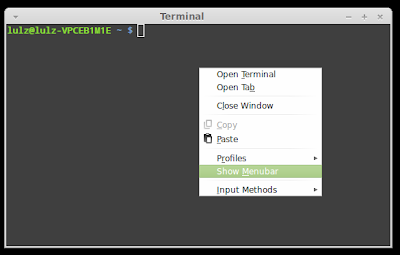
Normally, when you right click on the Gnome terminal, there will be the option to turn on/ off the Menubar. When you click on this option, the menubar in the Gnome terminal will disappear.


However, if you close this terminal and start another one, the menubar will appear again and you will have to turn it off once more.

In this article, I will show you how to permanently disable this menubar.

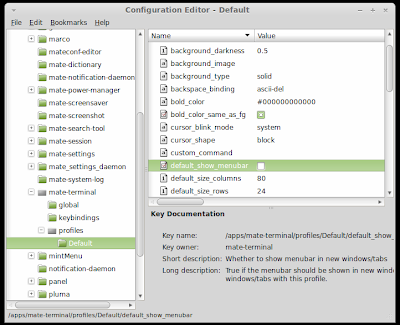
If you use Linux Mint MATE, just hit Alt + F2 then type "mateconf-editor" to open the configuration window. After that, go to apps > mate-terminal > profiles > Default then uncheck the "default_show_menubar" option and everything is done:


If you are using Ubuntu or Linux Mint Cinnamon, you will have to install gconf-editor first, just open the terminal and run the following command:
sudo apt-get install gconf-editor

After that, hit Alt + F2 and typ "gconf-editor" to open the Configuration Editor window and go to apps > gnome-terminal > profiles > Default and uncheck the "default_show_menubar" just like what you would do in MATE. And next time you open the Gnome terminal, you wont see the menubar again.

Kickstarter Indie Bundle Brings Games to Linux


The Kickstarter initiative has helped a lot of developers to find funding for their projects, and now, a group of indie game developers are asking for the help of the community once again.

The developers have gathered in a project called Kickstarter Indie Bundle. They are asking for money to develop a total of nine game, but only four of those will make it to Linux.

The first game is Metagolf, a platform action game for 1 to 4 players. It’s like Mini-Golf but crazier since everyone is playing at the same time with the same golf ball.

The second game is called Ensign-1, a space combat game that aims to give the player limitless freedom. You aren't limited to merely piloting a single fighter throughout the course of battle. You can dock and board frigates, capital ships, and even asteroid bases.

The third game is Christmas Magic, a unique combination of a story book and a game for the whole family or for short breaks from work.

The forth and last one is TRI (only possible for Linux, I'm not sure the developers will have the money to port it). The game is a freeform 3D platformer with environmental puzzles inspired by games like Portal, Thief, and Zelda.

You can find more details about the game on the official Kickstarter website.

KDE Software Compilation 4.9 Officially Released


After six month of hard work, the KDE Software Compilation 4.9 is finally here, as announced by KDE e.V. and the developers behind the KDE project a few minutes ago, August 1st.

KDE Software Compilation 4.9 brings beautiful new features, lots of performance improvements, as well as various software updates.

Highlights of KDE Software Compilation 4.9:

• Improved Dolphin file manager with back/forward buttons and in-line file renaming;
• Improve Konsole terminal app with text selection using KDE Web Shortcuts;
• Improved KWin window manager;
• Deep integration of Activities throughout the Workspaces;
• Okular can now store and print annotations with PDF documents;
• Improved bookmarking, search, and text selection in Okular ;
• Added Last.fm support in Juk (includes scrobbling, cover-fetching and MPRIS2 support);
• Added support to group all off-line users in Kopete;
• Improved Kontact;
• Added Pairs, a new memory game;
• Added Rocs, a graph theory app;
• Improved Kstars;
• Upgraded KDE Games;
• Qt Quick improvements;
• Faster access of network shares (including NFS, SSHFS and Samba);
• Faster desktop search by fixed many annoying bugs in Soprano and Nepomuk;
• Stability and performance improvements.

For more details, please check the official announcement for KDE Software Compilation 4.9. Also, check out the screenshots attached below!


 Download KDE Software Compilation 4.9.0

Fedora 18 Adopts ownCloud


ownCloud, the popular open source enterprise file sync and share project, will be available on Fedora 18, completing an impressive list of other important Linux distributions.

The developers of ownCloud think that Ubuntu, Fedora, and SUSE will have a better way of securing, syncing, and sharing their data across platforms.

“The (Fedora) Engineering Steering Committee has also signed off … a plan to add the client and server software for the ownCloud cloud platform; this allows users to host and access files and personal data, such as addresses and calendar entries, from a range of devices.”


ownCloud 4 can now mount external files systems, including Dropbox, FTP and Google Drive, enabling users to have all their file sync and share tools in a single ownCloud interface.

The community edition of ownCloud now has over 450,000 users, and it’s open source.

Install Google Chrome 21 Stable On Ubuntu 12.04/Linux Mint 13


Google has recently made available the stable version of Chrome 21 which comes with more new features and improvements especially for developers and gamers. Here are some of the features that you will find in this latest release:


  • getUserMedia JavaScript API Support (allows applications to access your webcam/microphone without using additional plugins)
  • HTML 5 getUserMedia API Support
  • Better Integration with Google Cloud Print 
  • Better support for Gamepad Javascript API 
You can have more information in this video:
 
 If you want to install Google Chrome 21 in Ubuntu 12.10/12.04/11.10 or Linux Mint 13 or older, you can either download the appropriate Debian package from here and install it with Ubuntu Software Center, or install the web browser via your terminal as follows:


32-bit/i386 systems:

cd /tmp && wget -O google-chrome_i386.deb http://goo.gl/itppy


sudo dpkg -i google-chrome*.deb

64-bit/amd64 systems:

cd /tmp && wget -O google-chrome_amd64.deb http://goo.gl/iXDWk


sudo dpkg -i google-chrome*.deb