Sunday, August 26, 2012

Happy 21st Birthday, Linux


Well, another year has passed and Linux is getting older and older, as it now turns 21 years old, today, on August 25th.

Actually I like to think that Linux is getting younger by the year, as it gains more and more new technologies and support for newer hardware, all in order to catch up with its competition.

What is Linux? How Linux is built? These questions are easily answered by the video posted above, courtesy of The Linux Foundation.

Why use Linux? Simply because it has FREEDOM written all over it! Freedom in everything you do every day and freedom for all your electronic devices.

But let’s not be selfish here and think about all the big companies that use Linux everyday to make your life easier and most likely cheaper, starting with major airlines and finishing with your usual bus operating companies. Hell, the whole Internet is powered by Linux!

Happy Birthday, Linux!

Saturday, August 25, 2012

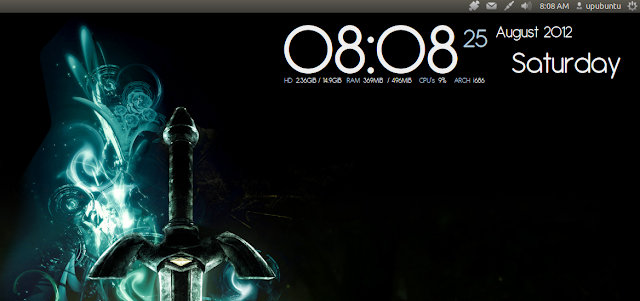
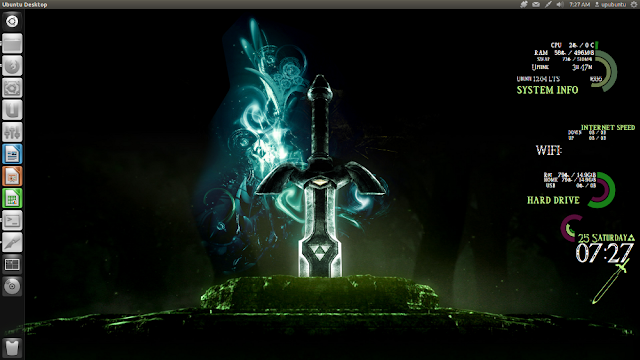
Spice Up Your Desktop With These Two Amazing Conky Scripts - Ubuntu 12.04/Linux Mint 13


In this tutorial we will see two amazing conky desklets that can render your desktop more attractive, but make sure you choose a wallpaper that fits with the design of each conky desklet. These conky scripts can run on many desktop environments such as Gnome Shell, Unity, Cinnamon, etc. If you haven't already installed Conky on Ubuntu 12.04/Linux Mint 13 or older, use the following commands from the terminal:

sudo apt-get install conky conky-all

1. Gotham Conky Mod


a.  Installation For Multi-core Processors

Open the terminal and run the following commands:

cd ~/ && wget -O gothma_conky.zip http://goo.gl/x2Gho

unzip -q gothma_conky.zip && cd gothma_conky

mkdir -p ~/.fonts

cp Antipasto.ttf ~/.fonts

You can start the script with this command:

conky -c ~/gothma_conky/conkyrc

b. Installation For Single Core Processors

Run these commands:

cd ~/ && wget -O gothma_conky_single.zip http://goo.gl/yVdci

unzip -q gothma_conky_single.zip && cd gothma_conky

mkdir -p ~/.fonts

cp Antipasto.ttf ~/.fonts

You can start the script with this command:

conky -c ~/gothma_conky/conkyrc

2. The Legend of Zelda Conky


You can install this desklet with these commands:

cd ~/ && wget -O conky-zelda.zip http://goo.gl/Los2A

unzip -q conky-zelda.zip && cd conky-zelda

mkdir -p ~/.fonts

cp Triforce.ttf ~/.fonts

mkdir -p ~/conky

cp rings-v1.2.1.lua ~/conky

To start the script, run this command:

conky -c ~/conky-zelda/.conkyrc

To kill all running Conky desklets, you can use this command:

killall conky

Conky Sources:

- Gotham Conky Mod
- The Legend of Zelda Conky

Slackware Linux 14.0 RC3


The third (and probably last) release candidate for Slackware Linux 14.0 is ready for testing: "This is Slackware 14.0 release candidate 3 and it is hopefully the last stop on our long road to a stable Slackware release soon. After hearing that the 3.4.x kernel series will have long-term support, I tested 3.4.9 hoping that it would prove stable enough to use that as the release kernel, but there are problems with an oops in clocksource.c every few boots. Given that the 3.2.x series has been very stable, it seems prudent to stick with that for release, and 3.2.28 is going to be the release kernel. So, one more round of testing." See the distribution's changelog for this announcement and notes about recent updates and several security corrections. Quick links to the unofficial weekly builds of Slackware "Current" dated 21 August: slackware-current-21_Aug_2012-DVD.iso (2,329MB, MD5), slackware64-current-21_Aug_2012-DVD.iso (2,284MB, MD5).

Chakra GNU/Linux 2012.08


Anke Boersma has announced the of Chakra GNU/Linux 2012.08, a major new release incorporating the KDE 4.9.0 desktop: "The Chakra project team is proud to announce the first 'Claire' release; this codename will follow the KDE SC 4.9 series and will be dedicated to the memory of Claire Lotion. Claire 2012.08 is bringing some exciting new features, like the port of the excellent Pardus tool 'Kaptan' to Chakra named 'Kapudan', it will allow the user to easily make all kinds of selections on first boot into their newly installed system. We are also very proud to show the excellent work the Art team has done with the new 'Dharma' theme, which even carries over into the latest GRUB 2, which now has a graphical theme. A Simple Pacman update notifier named 'spun' was also added." Check out the release announcement if you need more details or if you'd like to see the distribution's new default look. Download (64-bit computer systems only): chakra-2012.08-Claire-x86_64.iso (1,576MB, MD5).

Friday, August 24, 2012

Linux Mint 14 Will Be Named Nadia


Clement Lefebvre, father of the Linux Mint project, proudly announced a few minutes ago, August 24th, that the codename for the upcoming Linux Mint 14 operating system will be Nadia.

Linux Mint 14 (Nadia) will be available for download at the end of November 2012, and it will be shipped with separate MATE, Cinnamon, KDE and Xfce editions. However, it has not yet been decided which desktop environment will be the default for Linux Mint 14.

The developer says that Nadia, Linux Mint 14, will be compatible with Maya, Linux Mint 13. The distro will probably be based on Canonical's upcoming Ubuntu 12.10 (Quantal Quetzal) operating system, due for release on late October.

"Linux Mint 14 will be named "Nadia" and should be available at the end of November 2012. In Kim Stanley Robinson’s Mars Trilogy, Nadezhda “Nadia” Chernyshevski is Maya’s best friend," explained the Linux Mint developer.

"Nadia is pronounced NAH-d’-yah. It is the English form of Nadya, which itself is the pet form of Nadezhda and is Russian for "hope". It’s also a variant of Nadiyya which, in Arabic, means "moist, tender, delicate"," Clement Lefebvre in the blog announcement.

As usual, Linux Mint 14 will be supported on both 32-bit and 64-bit architectures. It will feature Firefox 16, Thunderbird 16, Linux kernel 3.5, and many more.

About Linux Mint

Linux Mint is and will always be an elegant, easy-to-use, up-to-date, 100% free and comfortable Linux operating system based on the very popular Ubuntu OS.

It offers paid commercial support to companies and individuals. Also, free community support is available from the forums and the IRC channel.


Download Linux Mint


How To Install and Configure the Xbox 360 Wired/Wireless Controller under Ubuntu 12.04/Linux Mint 13


If you find difficulties running your XBOX 360 controller, then this tutorial will help you install it on a computer running Ubuntu/Linux Mint, and also show you how to configure it. This tutorial is workable for both wired or wireless X-Box 360 controllers.

Getting Started

To be able to use your Xbox 360 wired/wireless controller under Ubuntu 12.04 (Precise Pangolin) or Linux Mint 13, you need first to install some required packages. So, open the terminal and run this command:

sudo apt-get install --install-recommends jstest* joystick xboxdrv

Connect now your game controller to your PC via USB (wired) or connect your XBOX 360 PC wireless gaming receiver for your wireless controller, then run this command to start the configuration:

jstest-gtk

In the window that shows up, select your controller (Microsoft X-Box 360 pad, Generic X-Box pad, etc.) and click Properties:


Note If your controller is not listed, try to click the "Refresh" button.

A new window will pop-up which will help you calibrate your gaming controller, remap the buttons of your game controller (changing the order of axis and buttons), etc.


After you finish your configuration, save your new settings and close the window. You will be able now to use your Xbox 360 controller to play games under Ubuntu/Linux Mint.