Thursday, November 8, 2012
Ubuntu 13.04 (Raring Ringtail) Download Daily Build ISO Images
The first daily images ( daily build ) ISO the next version of Ubuntu, Raring Ringtail had been provided by Canonical and are available for download. The ISO images of Daily Build Ubuntu 13.04 are available for 32-bit architecture, 64-bit, amd64 + mac, PowerPC and Armhf OMAP4 . At this time, only the tester and the Ubuntu developers should download and install the ISO Daily Build Ubuntu 13.04 and we, as good tester, we started the download in order to follow the development of the new system Canoical.
Currently there is nothing so interesting, except for the fact that there are Nautilus 3.6.2 , Mozilla Firefox 17 , Mozilla Thunderbird 17 and LibreOffice 3.6.2 ! For those interested, here is the link to download the Daily Build:
Nvidia wakes up Performance Doubled for Games on Linux!
Linus Torvalds as we all know by now is the one who started our adventure by Linux old-timers, nothing less than the ‘ inventor of the Linux kernel. The evolution of the system operation has progressed hand by hand, but there is a manufacturer that Torvalds just does not go down: we’re talking about nVidia, one of leading manufacturers of GPU (you remember the umbrella gesture that Torvalds, in no uncertain terms, he turned the company?)
Well, perhaps it was just that, perhaps it was the ‘ advent of Steam on Linux might have been about countless loss precisely because the lack of support for the operating system of penguins but we arrived … time to nVidia have a breakthrough, but this time, it seriously. According to a post appeared on the official website of nVidia the performances of the video driver R310 (current version 310.14) would be significantly increased compared to the last series, the 304, there is even talk of a doubling of the speed of running and a drastic reduction in load times for games . Everything tested using Steam for Linux. Here’s what we read on the official website of nVidia:
Into NVIDIA today-announced the latest NVIDIA ® GeForce ® drivers – R310 – double the performance (1) and dramatically reduce game loading times for Those gaming on the Linux operating system.
The result of almost a year of development by NVIDIA, Valve and other game developers, the new GeForce R310 drivers are designed to give GeForce customers the best possible Linux-based PC gaming experience – and showcase the enormous potential of the world’s biggest open- source operating system.
Into (1) Comparing performance of 142.7 fps driver 304.51 versus 310.14 driver performance of 301.4 fps in beta build of Left for Dead 2. All tests run on the same system using Intel Core i7-3930K CPU@3.20GHz with 8 GB memory, GeForce GTX 680 and Ubuntu 4.12 32-bit.
Well well well, it will be yet another false start or nVidia, a little ‘for Linus and a bit’ for the advent of Steam on Linux, this time really want to put the effort?
Best 25 Most Popular Games for Linux Steam
Linux and Steam are now united in marriage, but maybe it is a little ‘difficult to understand what are the titles available in the world of penguin . For this reason, in this article we intend to bring all the games available for Linux at the time, amounted to a total of 25 titles that you will find listed below:
-
Unity of Command: Stalingrad Campaign
http://store.steampowered.com/app/218090/?snr=1_7_7_230_150_1 -
Team Fortress 2
http://store.steampowered.com/app/440/?snr=1_7_7_230_150_1 -
The Book of Unwritten Tales
http://store.steampowered.com/app/215160/?snr=1_7_7_230_150_1 -
Amnesia: The Dark Descent
http://store.steampowered.com/app/57300/?snr=1_7_7_230_150_1 -
World of Goo
http://store.steampowered.com/app/22000/?snr=1_7_7_230_150_1 -
Trine 2
http://store.steampowered.com/app/35720/?snr=1_7_7_230_150_1 -
Superbrothers: Sword & Sworcery EP
http://store.steampowered.com/app/204060/?snr=1_7_7_230_150_1 -
Dynamite Jack
http://store.steampowered.com/app/202730/?snr=1_7_7_230_150_1 -
Frozen Synapse
http://store.steampowered.com/app/98200/?snr=1_7_7_230_150_1 -
SpaceChem
http://store.steampowered.com/app/92800/?snr=1_7_7_230_150_1 -
Waveform
http://store.steampowered.com/app/204180/?snr=1_7_7_230_150_1 -
Darwinia
http://store.steampowered.com/app/1500/?snr=1_7_7_230_150_1 -
Dungeons of Dredmor
http://store.steampowered.com/app/98800/?snr=1_7_7_230_150_1 -
Serious Sam 3: BFE
http://store.steampowered.com/app/41070/?snr=1_7_7_230_150_1 -
Cubemen
http://store.steampowered.com/app/207250/?snr=1_7_7_230_150_1 -
Aquaria
http://store.steampowered.com/app/24420/?snr=1_7_7_230_150_1 -
Solar 2
http://store.steampowered.com/app/97000/?snr=1_7_7_230_150_1 -
Space Pirates and Zombies
http://store.steampowered.com/app/107200/?snr=1_7_7_230_150_1 -
Steel Storm: Burning Retribution
http://store.steampowered.com/app/96200/?snr=1_7_7_230_150_1 -
eversion
http://store.steampowered.com/app/33680/?snr=1_7_7_230_150_1 -
Uplink
http://store.steampowered.com/app/1510/?snr=1_7_7_230_150_1 -
Galcon Fusion
http://store.steampowered.com/app/44200/?snr=1_7_7_230_150_1 -
And Yet It Moves
http://store.steampowered.com/app/18700/?snr=1_7_7_230_150_1 -
Cogs
http://store.steampowered.com/app/26500/?snr=1_7_7_230_150_1 -
Uplink/Darwinia Pack
http://store.steampowered.com/sub/113/?snr=1_7_7_230_150_2
GNOME MPlayer 1.0.7 Run and Install it on Linux Mint/Ubuntu
The new version of GNOME MPlayer , the 1.0.7 release is available from October 30, but today only a PPA – among other things dedicated to Lubuntu – has been updated and it will allow us to easily install GNOME MPlayer 1.0.7 also on Ubuntu . Among the new features are support for the MPRIS v2 and integration into tone menu of Ubuntu , along with many other improvements. For the uninitiated, MPlayer is a multimedia player for GNOME GTK2/GTK3 that, besides playing audio and video files, supports DVD chapters and MKV , recovery of covers from Amazon.com for audio files and many other useful functions.
Here are the changes in version 1.0.7 GNOME MPlayer:
- Implemented MPRIS2
- Support for the anamorphic aspect ratio (2.39:1)
- Screensaver inhibit rework (inhibits screensaver When a video is playing)
- Use the GTK3 symbolic icons when running in GTK3 mode
- y, g, and J hotkeys hotkeys to match mplayer
- Many bug fixes, including: scroll wheel fix, preferences & dconf issue fixes, fixes and more keyboard shortcuts.
The official changelog is available at this address .
Install GNOME MPlayer 1.0.7 on Linux Mint/Ubuntu
To install on L / Ubuntu 12.10 GNOME MPlayer 1.0.7, just open the terminal and type:Into sudo add-apt-repository ppa: gilir / LubuntuInto That’s all, see you soon!
sudo apt-get update sudo apt-get install
gnome-mplayer
How To Enable The ALT-TAB Behavior In GNOME Classic - Ubuntu 12.10/12.04
In this tutorial, we will help you enable the ALT-TAB feature in Gnome Classic for Ubuntu 12.10/12.04. This feature is disabled by default under Gnome Classic and can be easily enabled via CCSM (CompizConfig Settings Manager).
1. Installing and Accessing Gnome Classic
If you haven't already installed GNOME Classic, you can do with this command under Ubuntu 12.10/12.04:
sudo apt-get install gnome-shell
Log out now the current session and select "GNOME Classic" from the session menu and log back in:
2. Enabling The ALT-TAB Behavior
Install first CCSM with this command from the terminal:
sudo apt-get install compizconfig-settings-manager compiz-plugins
Start now CCSM with this command:
ccsm
In the left pane of the window, click Window Management, then in the right side of the window, check on "Application Switcher":
You have now enabled the ALT-TAB behavior!
KDE 4.9.3 Released! Run and Install it on Kubuntu
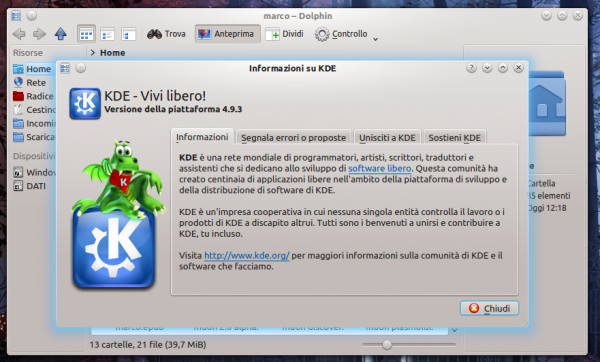
KDE 4.9.3 has been released and is also available from a few hours in the Kubuntu PPA . We begin first by new in this version: 4.9.3 KDE basically introduces no new features but focuses only on bug fixes and translation updates , a safe and pleasant update for everyone. The list of fixes 86 include improvements editor Kate and Kontact , so it is mostly a series of updates regarding the applications. The official announcement, for those interested, can be found at this address .
Installing KDE 4.9.3 on Kubuntu
First I want to clarify that the PPA is currently only updated for Kubuntu 12.10 even if, in the next few days, it could be updated to Kubuntu 12.04! All you have to do to install KDE 4.9.3 is to open the terminal and type:sudo add-apt-repository ppa: kubuntu-ppa/ppaAnd you will end, after the reboot, KDE updated to version 4.9.3
sudo apt-get update sudo apt-get
dist-upgrade
Subscribe to:
Posts (Atom)