Showing posts with label Windows. Show all posts

Friday, February 8, 2013

Wine 1.5.23


A new development release of Wine 1.5.23 has been announced. Changes in this release include:
  • HTTPS support no longer dependent on OpenSSL.
  • Support for event handling in the Mac driver.
  • A functional Netstat built-in application.
  • A bunch of C++ runtime math functions.
  • Various bug fixes.
Download: [ Wine 1.5.23 ]

Monday, January 21, 2013

Wine 1.5.22


A new development release of Wine has been announced bringing us to version 1.5.22. The new items in this release include:
  • New version of the Gecko engine.
  • Beginnings of the Mac graphics driver.
  • Support for ARM64 platforms.
  • Fixes for RTL text in Uniscribe.
  • Various bug fixes.
Download: [ Wine 1.5.22 ]

Thursday, October 25, 2012

Skype 6 released


Skype 6 is now available for download. Whats new in this version?
Microsoft and Facebook Account Integration
IM friends on Messenger
Now Skype in Thai, Croatian, Slovenian, Serbian, Catalan and Slovak (total languages Skype supports to 38)
Visual user interface refresh
Removal of online user count
Display previously created profile pictures
Improved telemetry

Download Skype 6

Tuesday, September 18, 2012

Pro Evolution Soccer 2013 SKIDROW


S  K  I  D  R  O  W
.the leading force.

proudly presents
Pro Evolution Soccer 2013 (c) Konami

18-09-2012......Release Date - Protection........SerialSecuROM
Soccer.............Game Type - Disk(s)....................1 DVD

RELEASE NOTES

Pro Evolution Soccer 2013 returns to the roots of football with unique
levels of control plus major emphasis on the individual style of the
world's best players. Thanks to feedback from dedicated fans, PES2013
offers total freedom to play any kind of ball, which for the first time
includes full control over shooting and the first touch. Endorsed by
Cristiano Ronaldo, PES will continue to push boundaries, perfectly
reflecting the genius of top level players and capturing the essence
of modern teamwork. The result will be the most faithful recreation of
modern day soccer to date.

Features:

PES FC Puts the Control In Your Hands - Full control takes PES gameplay
to a new level

- Players now have the freedom to dribble, and pass however they choose
- Dynamic first touch allows fans to trap and move the ball to create
flowing movement
- Response defending vastly improves the accuracy, timing and options
to break up play

Introducing Player ID - A distinct identity

- The physical features and skill sets of the world's top footballers
have been faithfully recreated
- Celebrations, actions and goal keeper animations are now more
tailored to real life than ever

Introducing ProActive AI - The AI engine under-goes another massive
year over year improvement

- ProActive AI means player and team decisions and movement are refined
even further
- Balance between attack and defense is honed and speed adjusted for
greater realism and control
- The PES team worked with real life goal keepers to improve motions ad
GK logic to improve animations and quality of GK responses

INSTALL NOTES

1. Unpack the release
2. Mount or burn image
3. Install
4. Copy everything from the SKIDROW folder into the game installation
5. Block the game in your firewall and mark our cracked content as
secure/trusted in your antivirus program
6. Play the game
7. Support the companies, which software you actually enjoy

GREETINGS

To all friends of the family and honorable rival groups

ascii art by the
godlike & terrific duo
malodix  irokos
titan artdivision

Saturday, September 15, 2012

AVG Internet Security 2013 13.0.2667 Multilingual (32 & 64 bit) + Keys


AVG Internet Security 2013 13.0.2667 Multilingual (x86/x64) | 137/124 Mb

Complete protection for everything you do! With AVG Internet Security, our most advanced protection, you get a worry-free online experience every time. This award-winning product gives you unbeatable Internet security by protecting against viruses, spyware, hackers, spam and malicious websites. AVG Internet Security is a reliable and easy-to-use solution for home and small office users which is trusted by millions of users worldwide.

AVG Internet Security's multiple layers of protection mean you don't have to worry about identity theft, spam or viruses. And it'll even prevent you from accidentally visiting harmful sites. It's faster, smarter security that won't slow your computer down. With AVG Internet Security you also have access for the first time to AVG Identity Theft Recovery Unit that will help you get your life back in order if you ever become a victim of identity theft – online or offline. Unique Internet security thanks to new technology - Only AVG gives you real-time protection against malicious websites thanks to our new LinkScanner technology.

• Safely bank and shop online without fear of identity theft thanks to AVG's new Identity Protection technology
• Surf, and search with confidence, with LinkScanner® checking web pages at the only time that matters - right before you click that link

Additionally, Internet Security 9.0 pulls together elements of AVG’s firewall, identity protection, and anti-virus signature detection capabilities to deliver the most accurate detection of new and unknown threats. This enhanced protection level makes use of cutting-edge technologies like application white-listing and “in-the-cloud” automated testing for tell-tale signs that indicate the presence of a new threat.

When you install AVG Internet Security, every one of these features is fully-functional - there's no need to do a thing.

Banking and shopping online

• AVG Identity Protection - Keeps your private information safe from known and unknown threats
• NEW Enhanced Firewall - Prevents hackers from seeing inside your computer

Surfing and searching the web, social networking

• LinkScanner® Active Surf-Shield - Ensures every web page you visit is safe – even before you go there
• LinkScanner® Search-Shield - Applies safety ratings to your Google, Bing/MSN and Yahoo search results
• NEW Superior Phishing Protection - Checks to make sure web pages really are what they appear to be

Emailing, chatting, and downloading

NEW Enhanced Anti-Spam - Blocks spammers and scammers from clogging your system
Web Shield - Lets you download and exchange files without risking virus infections
E-mail Scanner - Keeps you safe from dangerous attachments and links in your e-mail

Whether you’re online or offline

• Anti-Virus - Makes sure you can’t get or spread a virus, worm, or Trojan horse
• Anti-Spyware - Prevents unauthorized information access by spyware and adware
• Anti-Rootkit - Ensures even the toughest and most sophisticated threats are kept out of your PC
• Game Mode - Keeps you safe without interrupting your Game-play
• Update Manager - Makes sure you’re always protected against the latest threats – automatically
• System Tools - Lets you customize how AVG protection works with your system

• installation

Step 1: Run the setup

Step 2: Use the given key  to activate  

Step 3: Enjoy

32

8MEH-RXYFD-JUV72-8922R-FTBZ6-QEMBR-ACED

8MEH-RAJC2-O3P77-KRRQA-H3SLN-REMBR-ACED

8MEH-RXYFD-JUV72-8922R-FTBZ6-QEMBR-ACED

8MEH-R2CML-SS7FW-MOXFR-TRU8V-3EMBR-ACED

8MEH-RS47Y-82HT8-GONVA-BCCCZ-DEMBR-ACED

8MEH-RXYFD-JUV72-8922R-FTDO8-QEMBR-ACED

8MEH-RF7RF-MR8JO-EWOVA-UVKMQ-FEMBR-ACED

8MEH-RFR8J-PTS8Q-92ATA-O4WHO-JEMBR-ACED

8MEH-R336M-QDYTV-ECNOR-6VWKU-CEMBR-ACED

8MEH-R6FE9-FWO64-T84MR-O96CY-7EMBR-ACED

8MEH-R3VBQ-DC433-3FPOA-YFE9U-NEMBR-ACED

8MEH-R6633-YP39H-YCNSR-HHW2U-EEMBR-ACED


64

8MEH-RXYFD-JUV72-8922R-FTBZ6-QEMBR-ACED

8MEH-RAJC2-O3P77-KRRQA-H3SLN-REMBR-ACED

8MEH-RXYFD-JUV72-8922R-FTBZ6-QEMBR-ACED

8MEH-R2CML-SS7FW-MOXFR-TRU8V-3EMBR-ACED

8MEH-RS47Y-82HT8-GONVA-BCCCZ-DEMBR-ACED

8MEH-RXYFD-JUV72-8922R-FTDO8-QEMBR-ACED

8MEH-RF7RF-MR8JO-EWOVA-UVKMQ-FEMBR-ACED

8MEH-RFR8J-PTS8Q-92ATA-O4WHO-JEMBR-ACED

8MEH-R336M-QDYTV-ECNOR-6VWKU-CEMBR-ACED

8MEH-R6FE9-FWO64-T84MR-O96CY-7EMBR-ACED

8MEH-R3VBQ-DC433-3FPOA-YFE9U-NEMBR-ACED

8MEH-R6633-YP39H-YCNSR-HHW2U-EEMBR-ACED


Wednesday, August 29, 2012

Microsoft.Office.2013.Professional.Plus.x32+x64


How to Activate :

1- open Word then click on Open Other Documents
2- click on Account then click on Change Product Key
3- copy and paste the key in the space provided
4- click install .


Sunday, August 19, 2012

Install Wine 1.5.11 On Ubuntu 12.04/11.10/Linux Mint 13


Wine 1.5.11 has been released recently which comes with more features, bugfixes and improvements. Here are some of the key features and changes in this latest development release:


  • Adding multi-channel support for the ALSA driver
  • Big X11 lock removal
  • Adding support for pair positioning adjustments in Uniscribe
  • More I/O stream implementations in the C++ runtime
  • Various bug fixes
You can find the release notes of Wine 1.5.11 here. You have to bear in mind that this is a development release which is not recommended for production machines. To install Wine 1.5.11 from PPA on Ubuntu 12.04/11.10 or Linux Mint 13 or older, run the following commands from the terminal:

sudo add-apt-repository ppa:ubuntu-wine/ppa
sudo apt-get update
sudo apt-get install wine1.5 winetricks

If you want to install the stable version of Wine (currently 1.4.1), run the following commands:

sudo add-apt-repository ppa:ubuntu-wine/ppa
sudo apt-get update
sudo apt-get install wine1.4 winetricks

Thursday, August 16, 2012

Avira Internet Security 2012 12.0.0.1127 Final + Keys


Avira Internet Security 2012 - protects you with 15 different security technologies, including an additional firewall. Even better detection and removal of viruses, worms, Trojans, adware and spyware, dialers and other malicious software.

The main components of the Avira Internet Security 12

- Avira Scanner detects known viruses, worms and Trojans
- AntiAd / Spyware protects from spyware and advertising messages
- AntiSpam filters out unwanted and phishing emails
- AntiPhishing protection against phishing attacks
- AntiRootkit protection against hidden malware
- AntiBot protects your computer from intrusion by hackers
- Avira Guard prevents infection by viruses, worms and trojans
- Avira ProActiv detects all known viruses by their behavior NEW!
- AHeADTechnology stops unknown suspect codes
- WebGuard prevents you from entering the dangerous sites
- AntiDrive-by stops malware downloads files while you are surfing the Internet
- MailGuard scans all incoming and outgoing messages
- FireWall slams the door in front of the noses of the hackers

The main features of Avira Internet Security 12

• Protection from viruses, Trojans and worms
• Protection against dialers for paid sites
• Detect and remove rootkits
• Protection against online fraud - phishing. Proactive Anti-Phishing
• Increased speed of scanning
• Protection against spyware (Spyware) and adware (Adware)
• Special protection against email viruses (POP 3)
• Fast updates through Premium Server
• A system for creating vosstanovochnogo CD ROM
• Built-in network scanner - the firewall. Adjustable rules to control the traffic of incoming and outgoing connections, including wireless. Protection against DoS-attacks
• Built-in protection against spam
• Module WebGuard for safe browsing and downloading software, music, etc.
• A function to create backup copies of data
• Easy to install. Easy configuration with individual selection between standard and expert mode
• Extremely high performance and detection rates, ensuring the application of the latest safety standard (technology AHeAD)
• The mechanism of blocking programs on behavior called ProActiv. This mechanism monitors the activity of the programs on your computer and identifies suspicious behavior.

Install

Use "Avira Keys"

Avira Antivirus Premium 2012 12.0.0.1183 Final + Keys


Avira AntiVir Premium 2012 - reliably protects you against all threats from viruses, worms, trojans, rootkits, phishings, adware, spyware, bots and dangerous “drive-by” downloads. Best detection rates and top-class security with several updates every day. Advanced protection: Includes basic antivirus protection PLUS: email protection (POP3), AntiPhishing, AntiSpyware, AntiAdware and more. With real-time on-access scanning, profile-based on-demand scans and scheduling of full system scanning and updates it offers premium protection. It includes a POP3 based MailScanner that scans emails before they are stored on your machine. With a user-friendly control center, quarantine management, fast performance and world leading detection rates the Avira AntiVir Premium provides essential protection for your PC.

Key features

"Protection from viruses, worms and Trojans
"Protection against spyware / adware
"Extra protection against email viruses (POP3)
"Protection against phishing
"Monitoring real-time
"Preventing download malicious files from the infected sites
"Scanning for viruses with a boot disk
"Verifying data downloaded from the Internet

Options Premium

"Built-in spyware detection and adware
"More protection for email traffic (POP3)
"Special dedicated file server for fast uploads data
"User-definable intervals updates
"You can check the selected directories

Your advantages

"Reliable protection against viruses, worms, Trojans and dialers pay sites
"Very modest resource requirements
"Automatic Updates
"Ease of maintenance


Install

Use "Avira Keys"

Wednesday, August 15, 2012

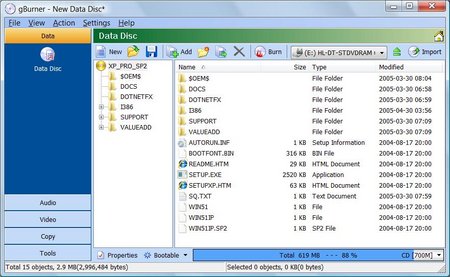
gBurner v3.2


gBurner is a powerful and easy-to-use CD/DVD burning tool, which allows you to create and burn data/audio CDs and DVDs, make bootable data CDs and DVDs, create multisession discs. Moreover, this software can be used as a disc image file processing tool, therefore it will allow you to create, extract, open, edit, convert or burn ISO/BIN image files.

Key features of "gBurner":
· Create and burn data / audio CD and DVD. gBurner supports the following disc types: CD-R, CD-RW, DVD-R, DVD-RW, DVD-R DL, DVD+R, DVD+RW, DVD+R DL, DVD-RAM
· Create multisession CD/DVD
· Make bootable CD/DVD
· Burn data, audio and video image file
· Copy CD/DVD
· Erase rewritable disc
· Optimize file layout to save disc space
· Open, create, extract, edit and convert ISO/BIN Image file. gBurner can convert almost all image file formats to ISO/BIN image file format
· Easy and friendly interface. gBurner supports context menu, drag and drop, clipboard copy and paste

OS : Win XP/2000/Vista/Win 7
Language : English

Sunday, August 12, 2012

Ashampoo.HDD.Control.2.10.Final


The hard drive is one of the most important components of your computer. Even if a hard drive works flawlessly, it should still be regularly checked and maintained. This way an imminent hard drive failure can be detected early and might be prevented. If suddenly major problems occur or if your hard drive even completely fails, data loss might be the result.

Make sure you are prepared for such a situation. Ashampoo HDD Control 2 can notify you early so that your valuable data won't become the victim of a hardware crash. Now Ashampoo HDD Control 2 offers even more functions to check the status of your hard drive(s). Use for example the S.M.A.R.T self-test or adjust the noise level and power management of your hard drive(s) (if supported). Furthermore you can restore accidentally deleted files and folders with Ashampoo HDD Control 2. Get to know the all-rounder for monitoring, maintenance and defragmentation, and check the health status and performance of your hard drive(s) today.

Software Highlights
Constant monitoring of your hard drive(s) (also for multi-user systems)
Extended user interface with extensive hints and information on health, performance and temperature of the hard drive(s)
Significantly extended support for external USB hard drives and solid state drives (SSDs)
Support of S.M.A.R.T self-test (if supported by the hard drive)
Adjustment of the noise level and power management of your hard drive(s) (if supported by the hard drive)
Data recovery recovering deleted files and folders
Fully automatic, proactive defragmentation of the hard drive(s)
Online retrieval of achieved benchmark results of your hard drive model(s)

Thursday, August 9, 2012

Samba 3.6.7 Officially Announced


Samba, a component that seamlessly integrates Linux/Unix Servers and Desktops into Active Directory environments using the winbind daemon, is now at version 3.6.7.

Highlights of Samba 3.6.7:

· Resolving our own "Domain Local" groups was fixed;
· Migrating printers while upgrading from 3.5.x has been fixed;
· Kernel oplocks when uid(file) != uid(process) have been fixed;
· A typo in set_re_uid() call when USE_SETRESUID is selected in configure, has been fixed;
· A bad call to data_blob_const has been repaired;
· Migrating printers while upgrading from 3.5.x have been fixed;
· Printing fails in function cups_job_submit have been corrected;
· Bugs in SMB2 credit handling code have been fixed.

A complete list of changes and updates can be found in the official announcement.


 Download Samba 3.6.7

Saturday, August 4, 2012

DivX Plus Pro v8 2 4 Build 10 3 3 Incl Keygen

Serial 1  MIWJTPZG38D2PMTJRSDP
Serial 2 RRPIZW9XFMSBVQFRMZPX
Serial 3 XQYMRVPSU5URRPZZPK3R

Sunday, July 15, 2012

How to Edit Your System PATH for Easy Command Line Access


Have you ever wondered why you can just type ipconfig into a command prompt and it works, but when you want to use a command line program you downloaded you have to navigate to its directory? Here’s how to fix that.

Adding a Folder To Your PATH

Open Computer and right-click on any white space, then select properties from the context menu.

When the System section of Control Panel opens, click on the Advanced system settings hyperlink in the left hand pane.

Then you will need to click on the Environment Variables button.

The variable we are looking for is a System variable called Path, once you have found it, click on the edit button.

In order to add an entry to your path, you need to precede the folder name with a semi-colon. For example, if i want to add the How-To Geek folder which is on the root of my C drive to my path i would the following to the end of the Variable value field:
;C:\How-To Geek

Now i can access any content within the How-To Geek folder without having to drill down into the directory.

Monday, July 9, 2012

How to Install Mass Effect 3 on Linux


The following tutorial will teach Linux users how to install the Mass Effect 3 game on their open source operating system.

The third installment in the Mass Effect franchise, Mass Effect 3, is an action role-playing game (RPG) developed by BioWare and published by Electronic Arts.

For more details about Mass Effect 3, you can check out the official home page or the Wikipedia article.

Editor's note: For this guide, we have used the latest version of the PlayOnLinux application. We've tested the tutorial on the current 32-bit release of the Ubuntu OS, 12.04 LTS (Precise Pangolin) with Wine 1.5.8.

Before anything else, please make sure you meet the minimum system requirements (especially the graphics card and CPU/RAM) for playing Mass Effect 3.

To install the Mass Effect 3 game on your Linux system, follow the next step-by-step (with screenshots) tutorial.

Step 1 – Install PlayOnLinux

The PlayOnLinux developers provide binary packages and repositories for many Linux operating systems, including Fedora, Debian, ArchLinux, Frugalware and Ubuntu, as well as a universal binary package.

We can't write instructions for all these Linux distributions here; therefore, if you use one of the aforementioned OSes, go HERE for detailed installation instructions.

Step 3 – Install the latest version of Wine

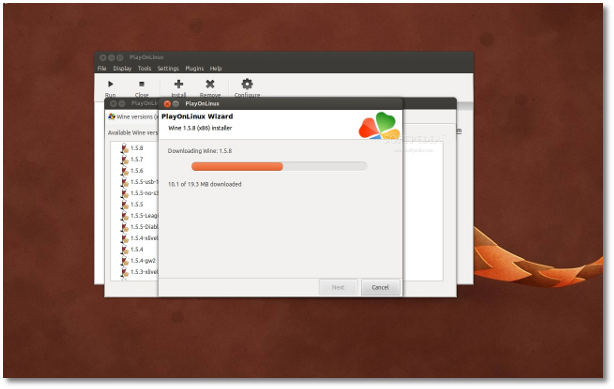
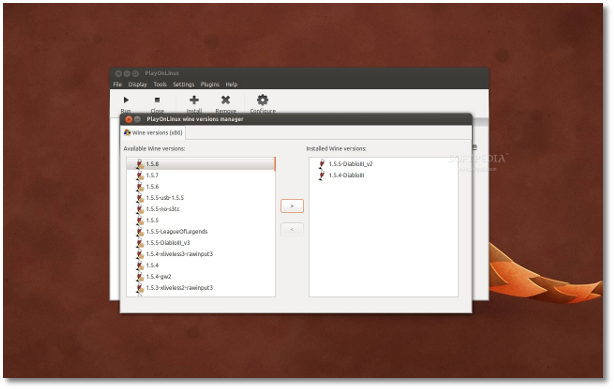
The PlayOnLinux developers provide an easy installation process of any Wine version, stable or development. So, all you need to do now is to go to the "Tools" menu, select "Manage Wine version" and you'll see a new dialog showing you available Wine versions on the left side, and installed Wine versions on the right side.

Select version 1.5.8 of Wine from the left side and click the middle arrow button to install it...

Review image

Wait for the installation to finish and close the window.

Review image

Step 3 – Install Mass Effect 3

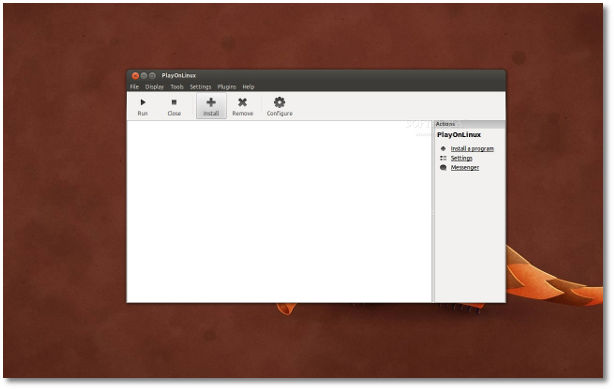
Assuming you have the PC DVD of Mass Effect 3, open the PlayOnLinux app and follow the first time instructions to setup the application. Once these are finished, you'll see the PlayOnLinux interface. Click the "Install" button...

Review image

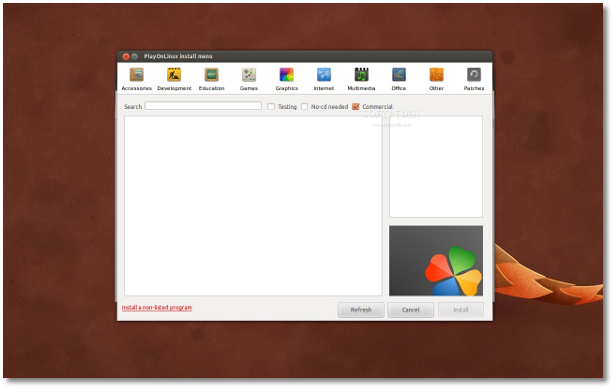
Now click the "Install a non-listed program" link at the bottom of the window...

Review image

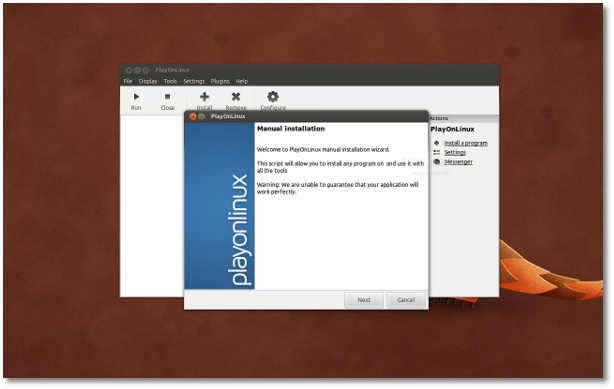
An installation wizard will appear, click the "Next" button...

Review image

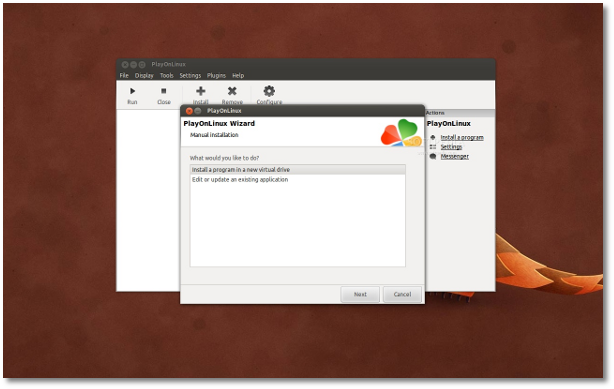
Click the "Next" button again when asked what would you like to do, leaving the "Install a program in a new virtual drive" option selected...

Review image

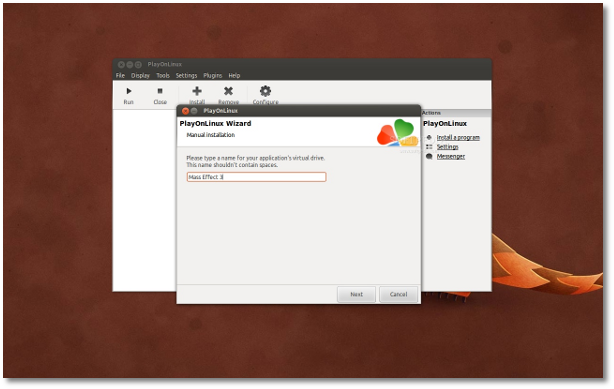
On the next step type the game's name in the field and click the "Next" button...

Review image

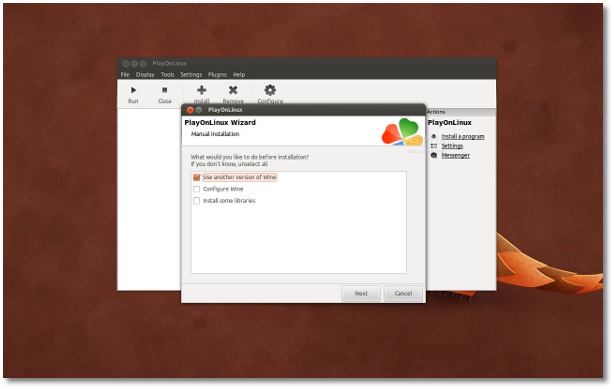
Now make sure you check the "Use another version of Wine" box and click the "Next" button...

Review image

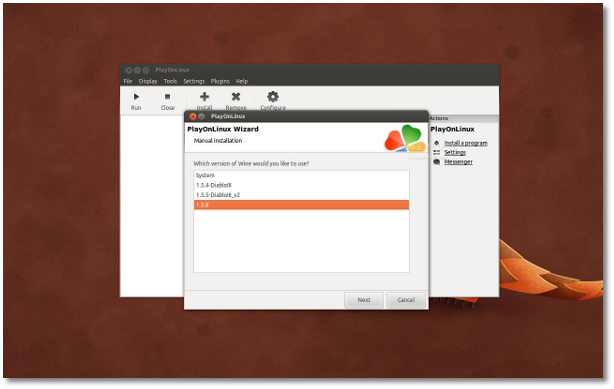
Select version 1.5.8 of Wine from the list and click the "Next" button...

Review image

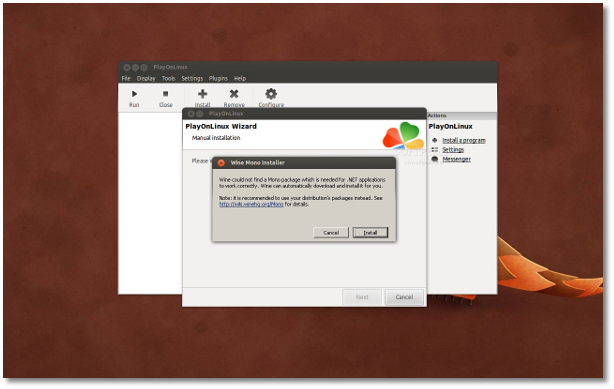
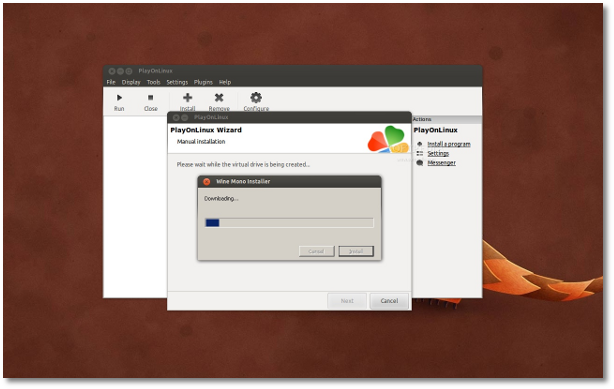
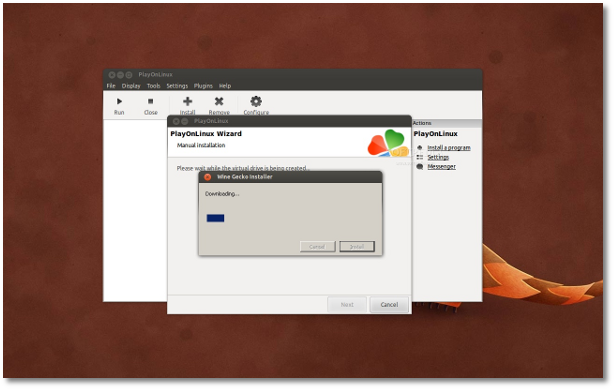
Now Wine will be configured and necessary packages will be installed, such as Mono and Gecko...

Review image

Review image

Review image

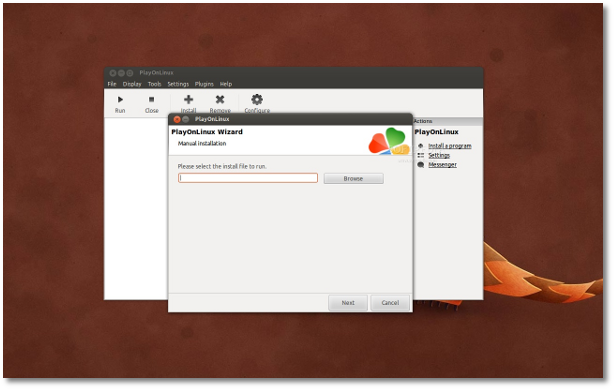
When the Wine version is fully configured, you'll need to select the Mass Effect 3 installer from the DVD, or from your computer if you copied the installer from the disc on your computer (but you will still need the DVD to play the game)...

Review image

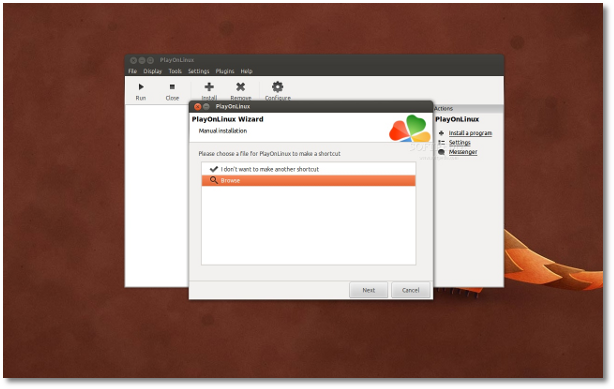
Wait for the installation to finish! Choose the "Browse" option and choose the Mass Effect 3 installer from the Binaries/Win32 folder. Close the wizard.

Review image

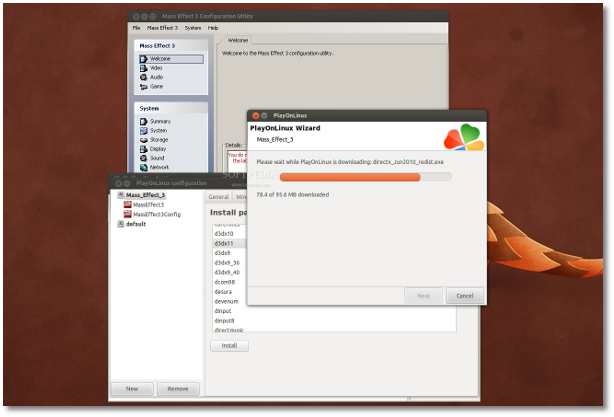
Now, you will see a Mass Effect 3 entry in the main PlayOnLinux window. We're not finished yet, as we have to install DirectX 11 by clicking the "Configure" button while the Mass Effect 3 entry is selected, and going to the "Install packages" tab, select the "d3dx11" entry and click the "Install" button. Let it install it and close the PlayOnLinux.

Editor's note: If the game asks you about the PhysX Engine, install it manually by clicking the "Configure" button while the Mass Effect 3 entry is selected, and going to the "Miscellaneous" tab, and clicking the "Run a .exe file in this virtual drive." Then search for the PhysX Engine installer in the /path_to_masseffect3_installation/_Installer/physx/redist directory.

Review image

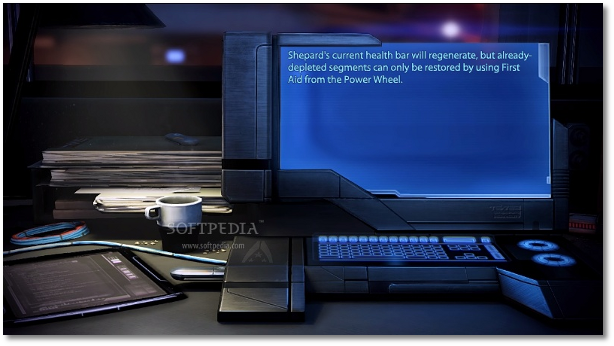
That's it! Open PlayOnLinux again, select Mass Effect 3 and click the "Run" button to play the game. Enjoy!

Review image

Review image

Review image

If you encounter any issues with the tutorial, do not hesitate to use our commenting system below.

Sunday, July 1, 2012

Use mencoder to make videos in slow motion


Making a video in slow motion is actually nothing special since there are plenty of video editing tools with a lot of cool features for you to use. However, if you just want to create a short video in slow motion to upload it to youtube, you can run a simple command in the terminal with the help of mencoder.
Mencoder is a command line video decoding, encoding and filtering tool and it can convert every format that can be run in MPlayer. To use mencoder, you will need to install it first. In Ubuntu and other Debian-based distro, the command to install mencoder will be:

 sudo apt-get install mencoder  

To use mencoder to convert a video into slow motion, the command will be:
 mencoder -speed 1/4 input.avi -ovc copy -nosound -o output.flv  

In this command, "-speed 1/4" is the parameter to determine the speed of the output video. If you want to have the output in faster motion, change 1/4 into another number that is bigger than 1. But when converting to faster motion, the video quality is not really good.

"-ovc copy" means frame copy for video encoder. To know more about the options for video encoder, you can run this command:
 mencoder -ovc help  

"-nosound" is to turn off the sound in the output video because after you change the video speed, the sound speed will be changed too.That's why I prefer no sound over a prolonged sound. But if you want to have sound, you can use "-oac" with an option for audio encoder. To know more about the option of audio encoder, you can run
 mencoder -oac help  

"-o" is for the output video. The format of the output video doesnt need to be the similar to that of the input video. You can pick any format you want as long as this video format can be run in MPlayer.

Here is an example of how it works. This is a funny video of a football fail:


And here is this vid in slow motion, I reduced the speed by a factor of 3 here:


Wednesday, June 27, 2012

CrossOver 11.2 Brings Microsoft Visio 2010 to Linux


CodeWeavers, through Josh Dubois, CrossOver product manager at CodeWeavers, proudly announced this morning in a press release that the CrossOver 11.2.0 software has been officially released for both Linux and Mac OS X platforms, bringing support for Microsoft Visio 2010 and Microsoft Project 2010.

Based on Wine 1.4.1, CrossOver 11.2.0 comes with lots of general improvements for various applications, as well as support for the upcoming Apple Mac OS X 10.8 (Mountain Lion) operating system.

"I am happy to announce that we at CodeWeavers have released CrossOver 11.2.0 for both Mac and Linux!"

"In addition, we have added support for Microsoft Visio 2010 and Microsoft Project 2010 on both Mac and Linux.  Another major feature is incorporation of Wine 1.4.1, which is a bug-fix release of Wine's stable 1.4 branch, and includes many improvements for a variety of applications," the press release stated.

Highlights of CrossOver 11.2.0:

· Based on Wine 1.4.1;
· Support for Microsoft Visio 2010;
· Support for Microsoft Project 2010;
· Improvements for Fedora 17 (including support for UDisks 2 and correct Perl detection);
· Improved detection of the libpng library on various Linux distributions, such as Arch Linux;
· Fixed an issue with uninstalling packages (and packages built with cxrepackage) from Ubuntu Software Center;
· zypper package manager is now suggested on SUSE Linux, instead of Yast;
· Fixed microphone detection issues for Rosetta Stone 3;
· Fixed a crash in PowerPoint 2010;
· Internet Explorer 7 Japanese input improvements;
· Graphics card detection improvements;
· Graphics driver detection is now allowed in CrossTie files;
· Better installation notes are provided during CrossTie installations.

CrossOver 11.2.0 comes with native packages for the Ubuntu/Debian, Red Hat/Fedora/SUSE/Mandriva operating systems, as well as a universal binary package for other Linux distros.


Download CrossOver 11.2.0

Tuesday, June 26, 2012

Ultrasurf Proxy :The Best Free Proxy Based VPN Solution


Proxy servers can be used to secure your online identity and unblock the limitation of your internet service provider.Ultrasurf is one of the best proxy solution to access blocked sites and free secure virtual private access.
Ultrasurf is a great tool to access blocked content in your country.I’m using it for a long time and found it is one of the first class free VPN service provider.You can use Ultrasurf with out any advanced technical skill,it is a simple software that can run instantly from your desktop or mobile.
Ultrasurf was founded by Ultrareach in 2002 by  a group of political students from china.But now become one of the best free tool to access blocked websites.Ultra surf will protect your internet privacy with anonymous netbrowsing ,hiding your real public ip address,locations and also it will clean your browser cookies,history and location information completely.
Ultrasurf
Presently Ultrasurf running version 12.01 and you can download it or the latest Ultrasurf version from the official website here.But if it is blocked in your country better do a google search to get the software or use Underget.com and put the ultrasulrf link to download it.

Configuring Ultrasurf

As I told before Ultrasurf will automatically configure all the settings you need to bypass your internet service provider setting if you are using Internet explorer and Google chrome but in some rare cases you need to configure the proxy settings for your browser.Go to your internet explorer proxy settings and put the ipaddress field 127.0.0.1 and the port number to 9666 or 3128 .
If you are behind a proxy firewall,you must change the ultrasurf options and add your manual proxy settings and port number in order to connect to the public internet.This scenario comes in some college and company networks.
Manual_Proxy_Settings
Ultrasurf is totally free and no registration required to use it,then why not give it a try!