
Showing posts with label FireFox. Show all posts
Showing posts with label FireFox. Show all posts
Wednesday, April 3, 2013
How to install Firefox 20.0 correctly in Ubuntu Or Linux Mint
Here is the Resource Page:http://www.ghacks.net/2013/04/02/fire...
Install:
sudo add-apt-repository ppa:mozillateam/firefox-next
sudo apt-get update
sudo apt-get install firefox
The Whistle Noise in the Video is my Dog Sleeping on my Desk Snoring next to me while I do my Linux Work lol......

Monday, November 12, 2012
5 Best Firefox Add-ons for Bloggers
Firefox is one of the best web browsers available today. The main reason for its popularity is the large community support and Add-ons/plugins which are available for the users. Firefox add-ons are available for nearly all user groups with different interests. There are a number of firefox add-ons or plugins which are available for bloggers. Some of The Best Firefox add-on for Bloggers are:
1. SEO Quake: This is a highly recommended firefox add-on for the bloggers. This plugin shows various ranks such as page rank, alexa rank etc of all the results which are shown in the Google for a particular search query. This add-on is best suited for both newbies and professionals who would be benefitted by the effectiveness and the competitive ability of the SEO efforts.


4. KGen:
This is great firefox add-on that would help you in analyzing the
keywords of the page you are viewing along with their distribution and
the weight of the keyword in the page. This tool can be a handy tool to
view your competitor’s keyword strategy. The plugin also generates
various statistics about your page so that you can improve your blog’s
quality. Kgen is a must recommended tool for the marketers/bloggers who
rely on keyword position and weighing for their business.

Sunday, October 28, 2012
Mozilla firefox 16.0.2 released

Mozilla firefox 16.0.2 final is now available for download.This is a security fix release.
what’s new in this firefox 16.0.2?
Fixed Security Vulnerability in Firefox 16.0.1.
Fixes for Location object issues.This is a critical Vulnerability.
Download Mozilla firefox 16.0.2
Tuesday, August 21, 2012
How to Install Firefox 15 on Ubuntu
The following tutorial will teach Ubuntu users how to "unofficially" update their systems to the Mozilla Firefox 15.0 web browser.
Mozilla Firefox 15 has not yet been released, it is in Beta state at the moment, but it will bring features such as initial native support for PDF files, support for SPDY networking protocol v3, better performance by enchancing WebGL (including compressed textures), better memory usage for add-ons, and much more.
Canonical will most likely update its supported Ubuntu operating system to Firefox 15 as soon as Mozilla releases it at the end of the month, but if you want it now, follow our step-by-step (with screenshots) tutorial.
Mozilla Firefox 15.0 can be installed in the following Ubuntu operating systems: Ubuntu 12.04 LTS (Precise Pangolin), Ubuntu 11.10 (Oneiric Ocelot), Ubuntu 11.04 (Natty Narwhal) and Ubuntu 10.04 LTS (Lucid Lynx).
Step 1 - Add the Firefox 15.0 repository
No matter what Ubuntu operating system (see above supported OSes) you are running, open a terminal and paste the following command:
sudo add-apt-repository ppa:mozillateam/firefox-next
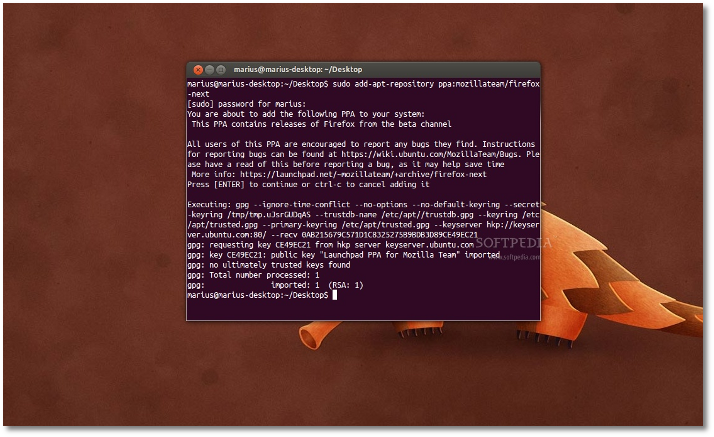 |
Hit the Enter key, type your password when asked and hit the Enter key. Hit Enter again when asked.
Don't close the terminal window! Proceed to the next step.
Step 2 - Install Firefox 15.0 on Ubuntu
Now paste the following command in the same terminal window:
sudo apt-get update && sudo apt-get install -y firefox
Your current Firefox installation will be overwritten. Wait for the installation to finish and close the terminal window.
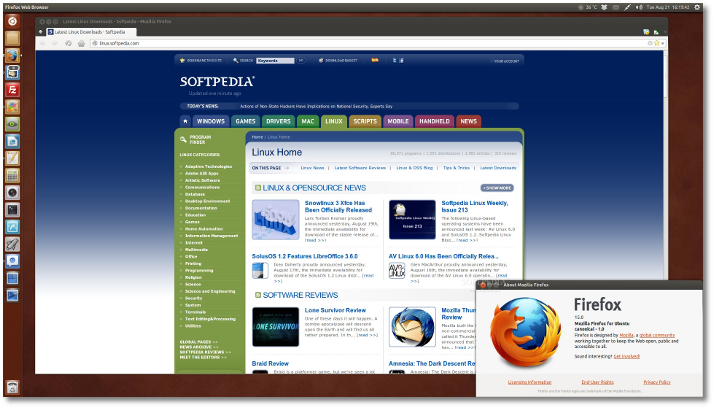
That's it! The new Mozilla Firefox 15.0 is now fully installed in your Ubuntu machine. You'll need to restart Firefox for the changes to take effect.
 |
In time, your Mozilla Firefox web browser will automatically upgrade to newer versions, so make sure you update your system regularly.
If you have problems with the tutorial, do not hesitate to comment below!
Monday, July 23, 2012
Firefox 15 Beta Tackles Memory Leaks
Mozilla has released a beta version of the next version of its Firefox browser with better memory management and significant speed improvements.
"Firefox 15 prevents most memory leaks caused by add-ons, including Firebug," Nicholas Nethercote writes in a Mozilla blog. Firebug is a Firefox add-on for debugging web pages.
"For many users with add-ons installed, this will significantly reduce Firefox’s memory consumption, without requiring upgrades to those add-ons," he adds. "For those users, Firefox 15 is likely to be faster (sometimes drastically so) and less likely to crash, especially if they have multiple add-ons installed and/or keep Firefox running for a long time between restarts."
Rest here
Friday, July 20, 2012
Vine Linux 6.1 RC2 Has Linux Kernel 3.0.37

Vine Linux, a distribution with a highly customized Japanese environment in which a lot of applications supporting Kanji-Strings are included, is now at version 6.1 RC2.
Highlights of Vine Linux 6.1 RC2:
· Linux kernel was updated to version 3.0.37;
· Mozilla Firefox was updated to version 14.0.1;
· Mozilla Thunderbird was updated to version 14.0;
· DRI in SandyBridge has been disabled from the Intel driver;
· A blacklist option has been added;
· Radeon has been added in the default blacklist;
· xorg-x11-drv-ati has been updated to support new hardware;
· libdrm has been updated to version 2.4.33;
· xulrunner has been removed;
· mkkpkg has been fixed;
· Various other updates have been implemented.
Download Vine Linux 6.1 RC2
Wednesday, July 18, 2012
Firefox 14 Officially Lands in Ubuntu

With today's updates, Canonical upgraded the default web browser and default email client in all its supported Ubuntu operating systems to Mozilla Firefox 14.0.1 and Mozilla Thunderbird 14.0, respectively.
The Firefox 14 web browser was officially released yesterday, July 17th, bringing Awesome Bar URL auto-complete functionality, HTTPS support for Google searches, plugins can be loaded only on click, improved site identity manager to prevent spoofing on SSL connections with favicons, Pointer Lock API, new API to prevent your monitor from sleeping, and text-transform & improved font-variant CSS for Turkic and Greek languages.
On the other hand, Mozilla Thunderbird 14.0 brings only one feature: support for the Ubuntu One cloud storage implemented in the Filelink feature.
All Ubuntu 12.04 LTS, Ubuntu 11.10, Ubuntu 11.04, and Ubuntu 10.04 LTS users can update their Firefox web browser and Thunderbird email client to version 14.0 right now, by using the Update Manager software.
Other Linux users can download Mozilla Firefox 14.0.1, as well as Mozilla Thunderbird 14.0 binary and source packages right now from Softpedia. Also, don't forget to visit our always up-to-date Firefox Extensions section and Thunderbird Extensions section for the latest add-ons!
Monday, July 16, 2012
Firefox 16 now with Address Bar Word Highlighting
Sometimes it is the little things that are worth talking about. When you enter a phrase or word in Firefox’s address bar, you receive a listing with suggestions in a menu that opens up automatically. Depending on your configuration of the feature, you may see history items or bookmarks listed in the window. We have previously detailed how you can modify the Firefox address bar so that nothing, only bookmarks or history items, or both are displayed in it. Privacy is one reason why you may want to modify the settings but there are others, for instance to load bookmarks faster in the browser by only displaying bookmarks in the results.
Search terms that you enter into the address bar are automatically highlighted.In Firefox 15 and earlier, the browser added an underline to the matching terms and changed the font style to bold automatically. You see an example of this behavior in the screenshot below.
Rest here
Subscribe to:
Posts (Atom)