Friday, July 27, 2012

Some small tips to use VLC


I have written an article about 4 tricks you can do with MPlayer. Today I will show you some tricks to do with another popular open source media player - VLC. VLC is a very versatile and rich in features media player, and these tricks will help you utilize VLC to its fullest potential.


Take screenshots of a video

When you watch videos, you may at times want to take screenshots of the favorite scenes. You can do it by using the Snapshot feature of VLC. Just right click on the VLC screen then hover the mouse on the "Video" menu and you will see the "Take Snapshot" option.

However, the most efficient way is to use the keyboard shortcut. Whenever you want to take a screenshot, just hit Shift + S. A thumbnail image will appear on the top left corner of the VLC screen with the link to the recently saved screenshot.

VLC take screenshot

By default, the screenshot will be saved in your Pictures folder as png format. If you want to edit the format and the saving folder, you go to Tools > Preferences then select the Video category on the Preferences window and you will see the customizing options for the snapshots:
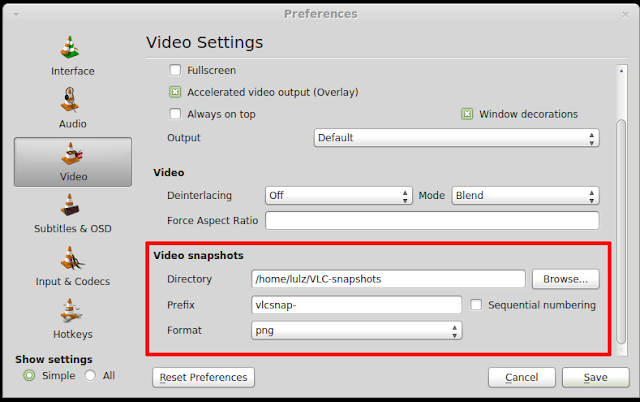
take screenshot vlc


Open a media in a specific time

You can just use the time bar to scroll to your favorite scene. However, if you want to open a media in a specific time, there is a more precise method than using the time bar. Just click on Media >  Open (advanced) and you will be presented to the Open Media window. On that window, check the "show more options" box and you will see the options to start a media in a specific time:

VLC jump to specific time

Convert files to other formats

Just like MPlayer, VLC has the converting feature as well. To start converting a file to another format, go to Media > Convert/ Save and the Open Media window will appear. On that window, select the file you want to convert by using the Add button. After you are done adding the file, hit the Convert/Save button and a new window will pop up to let you select the output filename, destination and format.After that, hit the Start button to start the converting process.


VLC convert

Play videos in ASII mode

As you have known from the other article, you can use MPlayer to play videos in the terminal in ASII mode. You can use VLC to play videos in ASII mode too. To watch video in ASII mode with VLC, go to Tools > Preferences ( or you can hit Ctrl + P) then select the Video category in the Preferences window.


Then click on the output tab to get the drop down menu. On that menu, you will see the options to watch videos in ASII with VLC.

Fedora is Giving Away Mini-PCs


If you ever wanted a free mini-PC capable to run a Linux distribution, then the Summer of Hardware event organized by Fedora might be just for you.

The Summer of Hardware sweepstakes made possible by Fedora puts up for grabs 200 mini-PCs, consisting of 150 Raspberry PIs, 50 OLPCs 1.75, and 20 Arduino + Shield mini PCs.

In order to qualify for the even, which is scheduled to run until August 15th, users must fulfill the following conditions:

1. You must have a Fedora Project Account;
2. You must have signed the Fedora Project Contributor Agreement;
3. You must be a member of at least one non-CLA / FPCA Fedora Group;
4. You are a legal resident of a participating country/region of at least the age of majority for your region (we'll help you figure this out below).

More details about the event, including a full list of the full contest rules and eligibility guidelines, can be found on the official website.

iOS 6 Does’nt Require Keying Password For Downloading Free Apps


As the release date of iOS 6 is approaching near, surfeit of updates are cropping up with each passing jiffy. To commemorate further, this time it has been pointed out by MAC Cult when peeking at the third beta iOS 6 that the new version will not demand passwords while downloading free apps from the app store.
  
This stance from Apple seems to ebb off the contention between user convenience and security or should it be said that Apple is trying to draw a fine line between gray areas of both the dimensions. Whatever the reason is, users must be elated over the inclusion of this defiant attribute. However, Users will have to input a password whilst downloading paid apps unlike the downloading of free apps which has been emancipated by Apple from the peeve of keying-in-password-everytime-you-trigger-a-download.

LuninuX OS 12.00


LuninuX OS 12.00, an Ubuntu-based distribution featuring a customised GNOME 3 desktop with GNOME Shell, has been released: "Release 12.00 stable. Code-named 'Purple Possum', 12.00 is based on Ubuntu's 12.04 LTS with the latest software upgrade and modifications; this release have great improvements in beauty, speed, responsiveness and reliability. While it was a demanding task, all the feedbacks and recommendations that were gained through the releases of beta 1 and beta 2 helped LuninuX OS 12.00 LTS get better - it will meet more of your needs and essentials than before. You will get great support for software and hardware in the future as well. Here are a few of the software packages included in this release: Chromium, Emerillon, Liferea, Pinta. Thank you and enjoy!" Here is the brief release announcement. Download links: LuninuXOS-12.00-Desktop-i386.iso (1,291MB), LuninuXOS-12.00-Desktop-amd64.iso (1,354MB).

5 BEST REDDIT APPS FOR ANDROID


None of us is unaware of the success that REDDIT has gained over a short time span. Well for those who don’t know, It’s a discussion based social network that lets its users submit any kind of content for which they want to get response from people around the world. Having embraced the success of Reddit, today iOS users have fully functional official client by the name of iREDDIT but same is not the case with Google mobile users, despite that it is not hard to say that Android addicts are bombarded by the many Reddit Clients & Reddit Apps. So in the article we’ll pinpoint the best Reddit apps that android users can use to levitate their Reddit experience;


BaconReader

It can be seen as the most complete, feature-packed  and thorough app that provides you with features like SubReddit groupings management & subscriptions, keyword & domain filtering, direct picture uploading, custom link, text and photo submission, complete inbox access, color-coded comments thread, multi-sized customizable home-screen widgets, day/night reading mode, real-time notifications, Karma points table and a fully customizable homepage. BaconReader is considered as the best Reddit client for Android because of the range of features it provides. Well, it is available in two versions for download. One is free and other one is $1.99 premium version which would be free of distracting ads else both of the versions share same features

Reddit Sync

This is relatively new for Android users however, despite that it has gained great amount of kudos for the users. The features it provides include a dedicated browser, easy SubReddit lookup, management & subscription, GIF viewer, inbox support, threaded comments, NSFW (Not Safe For Work) content filter, favorite content sharing, dark/light reading mode, karma points, and content sorting along with few handy aspects like the option to pick from as many as 5 different color schemes, preview embedded content inline, view images in full-screen and set the initial count for comments per post. Though it still lack few of the key features but it can be said that after mitigation of the rough edges it would turn up as one of the most famous and complete Reddit apps for Android. Moreover, the app required Android v2.2 to run and is also available in pro version for $2.44 to download along with extended features.


Reddit News

It is latest to the scene but, in short time-span, has turned up as a favorite app of many Android users due to the range of conventional & unconventional options it offer. Naming the important unconventional one is its very own Reddit action bar, which let you up/down vote – bookmark – hide – comment on the post or directly jump to the corresponding SubReddit to explore other relevant posts. Moreover, it has also creating ripples in the market due its beautiful ICS user-friendly interface which is worth having this app on your device. All the Reddit News features are available for free but you can also purchase paid ad-less version for $1.98. However, bare in mid that you will be needing Android v4.2 to run this app.

Reddionic

It can be said as one of the most stable and best in handling images compared to others. Despite the fe rough edges the app has, it still has managed to amass good user base which is an evident of its likeability and usability. The key features it provides include an eye-soothing ICS-style Holo theme, complete inbox access, extensive management of starred/bookmarked posts, threaded comments, built-in content browser, option to save comments, quick access to some of the most popular SubReddits, and a handful of elementary Reddit tools. All these features are enough in making it one of the most promising Reddit apps available for Android today. It is also available in free as well as paid versions. Choice is all yours how you’d like to trade off between the two.

Reddit is Fun

It is the only Reddit app that allows you to have a customizable home-screen widget. Its UI resembles to actual Reddit website, making it an absolute fun to use.  Like most of the apps appearing on this list, Reddit Is Fun also sports the Holo theme, lets you choose between the dark and light reading mode, supports simple content filtering, pagination, commenting and messaging, has a smart Subreddit search system, can pre-fetch images and supports a host of common Reddit tools. But the key of the app is the uniqueness it provides its users with. The app tries to keep you as close to the reality as possible be it casting votes method or SubReddit management mechanism, all are contributing in making it one of the kinds Reddit apps for Android users. Like many other apps, “Reddit is Fun” is also available in free and pro versions, the later would be notorious-ad free.

iOS And Android Users Can Make Free Calls To Mobile And Landline Numbers Via VONAGE MOBILE App


Astounded over the features provided by the Vonage Mobile, a voice-over-IP app which indulgently allows iOS and android users to make free calls and send free text messages to those who already have this app installed in their devices. For a limited time, however, you can use Vonage Mobile to make free calls to landline and mobile phones of the other app users in your contact list.
 
Moreover, the app works over Wi-Fi, 3G and 4G data networks worldwide which indicates, it can be of paramount use for touch iPod and Wi-Fi enabled iPad users. In addition, the app is new on the surface and is enriched with many heart touching and mind bogglingly flabbergasted features as mentioned below;


  • Make FREE HD calls and send FREE texts to anyone who has the app
  • Make hands-free calls while on the go with Bluetooth
  • Text photos, contact information and your location, directly from the app
  • Save on international calling to anyone who has not yet downloaded the app with per-minute rates on average 70 percent less than major mobile carriers and 30 percent less than Skype
  • Use your existing address book; no need to leave the app
  • Never miss a call or text, even when the app is closed
  • Easily invite multiple people right from your address book
  • Uses your mobile number as your caller ID
  • Easy in-app purchasing through your iTunes or Android Market account
  • Plus FREE calling to any Vonage home phone customer
  • Special limited-time offer. Get FREE calls to any mobile or landline phone in the U.S., Canada and Puerto Rico. (up to 3000 minutes per month)
Ain’t the features just simply amazing? Hurry up and grab the app right now for your iOS and android device as Everything Is Awesome-Most When Its FREE.
Download Link of Vonage Mobile App: 
Android: Download
iOS: Download