Wednesday, January 23, 2013
BackBox Linux 3.01
Raffaele Forte has announced the release of BackBox Linux 3.01, an updated version of the project's Ubuntu-based distribution and live DVD with a collection of penetration testing, incident response, computer forensics and intelligence gathering tools: "The BackBox team is pleased to announce an updated release of BackBox Linux, version 3.01. This release includes features such as Linux kernel 3.2 and Xfce 4.8. The ISO images (for 32-bit and 64-bit architectures) can be downloaded from the download page. What's new? System improvements; upstream components; bug corrections; performance boost; improved auditing menu; improved Wi-Fi drivers (compat-wireless Aircrack patched); new and updated hacking tools (e.g. backfuzz, Beef, Bluediving, cvechecker, HTExploit, Metasploit, set, sqlmap, WebSploit, Weevely, WPScan, zaproxy, etc.)" Read the full release announcement for system requirements. Download (MD5): backbox-3.01-amd64.iso (1,381MB, torrent).
SolusOS 2 Alpha 7
The seventh alpha of SolusOS 2 has been released for testing. SolusOS is a Debian-based distribution project that has recently forked the GNOME 3 Fallback mode into a brand-new Consort desktop environment. From the release announcement: "The SolusOS team is pleased to announce the release of SolusOS 2 Alpha 7. This release is intended to demonstrate the Consort desktop, which will be the flagship desktop of SolusOS 2. Please note that this is an alpha release and should not be used in a production environment. Currently only the 32-bit PAE ISO image is available for testing. New features and addressed issues: Consortium (Metacity fork) now has side-by-side window tiling; issues with 'shadow trails' and 'latent shadow boxes' left behind by tool tips, DND icons and menus are gone; Consort Panel is now fully usable; gnome-applets has also been forked into consort-applets to undergo active development...." Download: SolusOS-2-A7.iso (995MB, MD5, torrent).
Tuesday, January 22, 2013
Install Linux Kernel 3.7.4 in Ubuntu/Linux Mint
Another update for Kernel 3.7 series has been made available recently which brings various bug fixes and improvements. As usual, we have updated our simple bash script to be able to install Linux Kernel 3.7.4 with just a few commands on the terminal.
But let's first see some of the changes and fixes in this latest kernel taken from the changelog:
- USB: io_ti: Fix NULL dereference in chase_port()
- drm/radeon: fix a bogus kfree
- drm/radeon: fix NULL pointer dereference in UMS mode
- ALSA: usb - fix race in creation of M-Audio Fast track pro driver
- s390/time: fix sched_clock() overflow
- sh: Fix FDPIC binary loader
- mxs: uart: fix setting RTS from software
- staging: vt6656: Fix inconsistent structure packing
- staging: wlan-ng: Fix clamping of returned SSID length
Linux Kernel 3.7.4 Installation
To install Linux Kernel 3.7.4 (Ubuntu 12.10/12.04 or older and Linux Mint 14/13 or older) in your system, open the terminal and enter these commands at your own risk:
cd /tmp
wget http://dl.dropbox.com/u/47950494/upubuntu.com/kernel-3.7.4 -O kernel-3.7.4
chmod +x kernel-3.7.4
sudo sh kernel-3.7.4
sudo reboot
If you have encountered any troubles while installing this kernel in a system having the Nvidia driver installed, you can try to fix it by enabling text mode (CTRL+ALT+F2) and executing these commands:
cd /usr/src/linux-headers-3.7-030704/arch/x86/include
sudo cp -v generated/asm/unistd* ./asm
sudo apt-get install --reinstall nvidia-current
In case you want to uninstall Linux Kernel 3.7.4, issue this command:
sudo apt-get purge linux-image-3.7.4*
Monday, January 21, 2013
Install Ubuntu Server Manager Utility in Ubuntu/Linux Mint
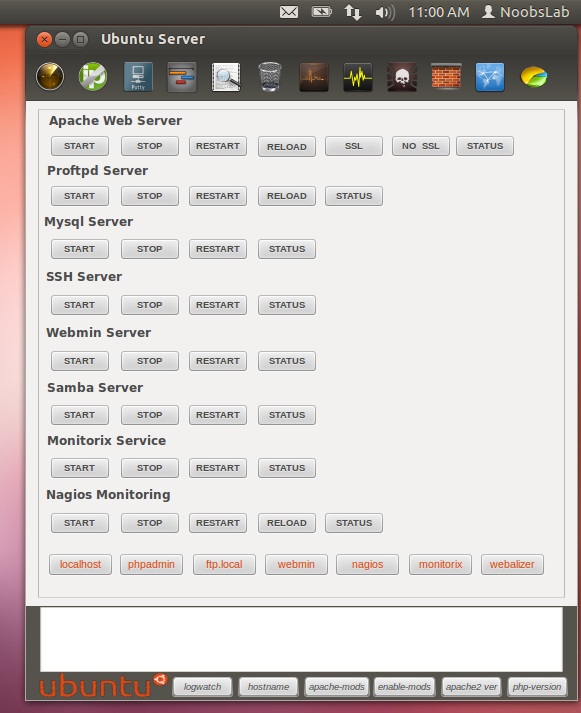
Ubuntu Server Manager is a Graphical-User-Interface to install and manage (Apache 2, MySQL, Proftpd, Samba, Monitorix, SSH, Nagios, Webmin) and to monitor the server log activity.
There are several other options for services like: Net activity viewer, Update dynamic IP, Putty for ssh, Open Ports to see server open connections, Logs, Clear logs option, Localhost scan using Nmap, Perform scan of IP/Domain name using Nmap, RKhunter to check if system is effected with rootkit, Firewall configuration option, Open apache www default folder as root, Webalizer to generate report of site.
This utility only manage local machine.
To install services Go to Help & Install > About & Install Servers
Installation and removal of services
To install Ubuntu-Server-Manager in Ubuntu/Linux Mint open Terminal (Press Ctrl+Alt+T) and copy the following commands in the Terminal:
That's it
- wget -O usm.deb http://goo.gl/QECjX
- sudo dpkg -i usm.deb && sudo rm usm.deb
Source: Ubuntu Server Mananger
Wine 1.5.22
A new development release of Wine has been announced bringing us to version 1.5.22. The new items in this release include:
- New version of the Gecko engine.
- Beginnings of the Mac graphics driver.
- Support for ARM64 platforms.
- Fixes for RTL text in Uniscribe.
- Various bug fixes.
Snowlinux 4 "Xfce", "E17"
Lars Torben Kremer has announced the availability of two new editions of the Debian-based Snowlinux 4: "The team is proud to announce the release of Snowlinux 4 Xfce and E17. Snowlinux 4 Xfce is based upon Debian GNU/Linux 7.0 'Wheezy' and uses Linux kernel 3.5. Snowlinux 4 Xfce and E17 are available in two ISO images. The Xfce edition contains Xfce 4.10 and the E17 edition contains Enlightenment 0.17. While the Xfce edition fits on a CD, the E17 edition doesn't. Both use Firefox, Thunderbird, AbiWord, Shotwell and Pidgin by default. New features: LightDM; Snowlinux LightDM greeter; Snowlinux Plymouth theme; improved Snowlinux Metal theme and icons; SnowMount; Firefox 17; Thunderbird 17; Snowlinux HD backgrounds; updated software; improved speed and response; system improvements." Read the rest of the release announcement for more information and screenshots. Download links (MD5): snowlinux-4-xfce-amd64.iso (697MB, snowlinux-4-e17-amd64.iso (853MB).
Subscribe to:
Posts (Atom)