Wednesday, July 11, 2012
X Server 1.13 Will Have Better Support for Hybrid GPUs
Keith Packard announced earlier today, July 10th, the immediate availability for download and testing of the first Release Candidate of the upcoming XOrg Server 1.13.
The final version of XOrg Server 1.13 will be available in September, and it will have features like support for PRIME DRI2 offloading, RandR 1.5 with support for provider object, support for GLX_ARB_create_context in OpenGL 3.0, new GLX extensions, DDX driver API improvements, USB GPU hot-plugging, better GPU hybrid support, and much more.
Support for XAA acceleration will be removed from XOrg Server 1.13 making the size of the archive much smaller.
The complete changelog for XOrg Server 1.13 RC1 can be found on the official release announcement.
Download XOrg Server 1.13 RC1
OS4 12.5
Roberto Dohnert has announced the release of OS4 12.5, a custom Linux distribution previously known as PC/OS that is based upon Ubuntu and is built for fun, compatibility, security, and mobility: "OS4 12.5 has been designed from the ground up to satisfy the needs of casual PC users all the way to the professional user. It is available in 32 and 64 bit releases. Built for the professional: With OS4 you have a quality multi processing core in your system, and with support for 3D graphics and audio, everyone from the digital animator, video editor, musician all the way to the researchers studying DNA sequencing to working in clusters, OS4 will fit your needs. With a fine set of standard applications, to the extensibility of installing thousands of more applications, OS4 was built for you." Read the rest of the release announcement for further information. Download: os4-12-5x86.iso (1,405MB, MD5), os4-12-5-x64.iso (1,548MB, MD5).
Tuesday, July 10, 2012
Navsop A ‘Could Be’ Successor Of GPS
NAVSOP has been developed by UK defense firm BAE SYSTEMS with a view of complementing rather than replacing the GPS technology. But the way it would work endorses that it will be a better piece of positioning system that might lower the value of GPS for the western world in the forthcoming time.

The prototype of NAVSOP is a big box like piece of hardware which has been placed at the back of BAE’s car which has a radio antenna at the roof. The makers also said that once the system is out in the market it would be as tiny as a GPS dongle – slight bigger than a coin – However, BAE SYSTEM’s does not consider this new technology a rival of GPS rather they take it as a technology which would compliment the existing system as said by BAE’s Dr. Ramsey Faragher to BBC “Let’s be clear – for NAVSOP to start learning, you have to have a GPS signal, to know where you are on the face of the Earth”. Whatever they say it cannot be denied that NAVSOP could be revolutionary, once out in the market, may be even more than the GPS.
Etichete:
GPS
Install Nitrux OS Icon Theme From PPA On Ubuntu 12.04/Linux Mint 13 (Maya)
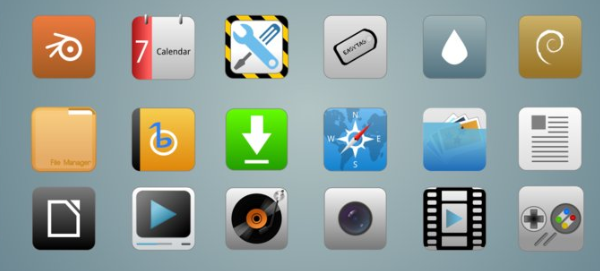
We have previously seen the manual installation of the Nitrux OS icon theme under Ubuntu. To make the installation of this icon theme easier, I have uploaded it to a custom PPA. The theme is compatible with both Ubuntu 12.04/11.10 (Unity & Gnome Shell) and Linux Mint 13 Maya.
Nitrux OS is available in three versions, you can enable them as described below. Here is a screenshot of the theme under Ubuntu Unity:

Nitrux OS Installation
Open the terminal and run the following commands:
sudo add-apt-repository ppa:upubuntu-com/themes
sudo apt-get update
sudo apt-get install nitruxos
You can enable the three versions of NitruxOS using Gnome Tweak Tool, or run simply one of these commands:
Version 1
gsettings set org.gnome.desktop.interface icon-theme 'NITRUX'
Version 2
gsettings set org.gnome.desktop.interface icon-theme 'NITRUX-BTN'
Version 3
gsettings set org.gnome.desktop.interface icon-theme 'NITRUX-W'
Credits for Nitrux OS go here.
Enjoy!
SecureCRT 7.0 Officially Released
Maureen Jett, a product Director from VanDyke Software, has announced that SecureCRT 7.0 is now available for Linux, for both Ubuntu and Red Hat Enterprise Linux.
SecureCRT 7.0 provides terminal emulation for computing professionals, raising productivity with advanced session management and a host of ways to save time and streamline repetitive tasks.
Highlights of SecureCRT 7.0:
· Automatically start the TFTP server when a session connects, then use TFTP to deploy firmware upgrades on network equipment;
· Connect dialog performance has been improved;
· "Skip" button has been implemented; skip authentication methods such as PublicKey or GSSAPI that might not be supported;
· Button hover text: has been added;
· Mappable functions have been implemeted; Map "Always on Top" to a key and map items on the "Tools" menu to either a button or key.
Download SecureCRT 7.0
Etichete:
Linux
Fedora 18 Will Have 256-Color Terminal Support
The Fedora Project developers approved yesterday, July 9th, in a FESCo meeting the 256-color terminal support for their upcoming Fedora 18 operating system.
OK, so what does 256-color terminal support mean, right? Well, it enables terminal programs to use the enhanced color capabilities of modern terminals, by default. At the moment, terminals use a color palette of 8 colors. More details can be found in this article.
Among other features approved for Fedora 18 in yesterday's meeting, we can mention improved CIM management, PowerPC ppc64p7 subarch support for RPM and YUM, Rails 3.2, Fontconfig 2.10, and Perl 5.16.
Dubbed Spherical Cow, the Fedora 18 Linux distribution will see the light of day sometime in November 2012. We will keep you up to date with other upcoming features of the Fedora 18 operating system.
Subscribe to:
Posts (Atom)