Monday, August 13, 2012

How To Install Dropbox In Xubuntu And Get Thunar Integration (Xfce)

 
The Ubuntu deb package available for download via the official Dropbox website requires Nautilus. But if you're using Xubuntu (Xfce), you'll probably want to use Dropbox with Thunar, the default file manager, instead of Nautilus.

So here's how to install Dropbox in Xubuntu/Xfce without Nautilus and get some basic Thunar integration (you won't get file emblems, but you'll get options to browse the file on the Dropbox website, get shareable link and view previous revisions, like in the screenshot above).


Install Dropbox and a Dropbox Thunar plugin in Xubuntu


1. Firstly, let's install Dropbox without the Nautilus dependency:

In Ubuntu Oneiric, Precise and Quantal, the "nautilus-dropbox" package available in the official repositories (it's not the same as the deb downloaded from the Dropbox website) doesn't depend on Nautilus, so you can install it on Xubuntu too:
 
sudo apt-get install nautilus-dropbox
 
That's it for Xubuntu Oneiric, Precise and Quantal users. Now simply open Dropbox from the menu (it's under Internet) and follow the setup wizard, then skip to step 2.


For those who are using an older Xubuntu version or another Linux distribution, you can manually install Dropbox without the Nautilus dependency using the commands below:
 
32bit:
 
cd && wget -O - "http://www.dropbox.com/download?plat=lnx.x86" | tar xzf -
 
64bit:
 
cd && wget -O - "http://www.dropbox.com/download?plat=lnx.x86_64" | tar xzf - 
 
 
To start the Dropbox daemon (and the setup wizard if this is the first 
time you're installing Dropbox), use the following command in a 
terminal:
 
~/.dropbox-dist/dropboxd
 
2. Install the Dropbox Thunar extension.  


Crunchbang provides thunar-dropbox deb packages that work with Xubuntu 12.04 - download the debs below:


I've tested the above packages with Xubuntu 12.04 and they work, but they may not work with other Xubuntu versions, so if you're not using Xubuntu 12.04, grab the Dropbox Thunar extension source from HERE (you'll have to compile it). Obviously, they also work if you're using Thunar in another desktop environment, like GNOME (Unity).

Arch Linux users can install thunar-dropbox from AUR.

Note: Dropbox needs to be running for the Thunar context menu items for Dropbox to show up.


Red Hat Announces a Preview OpenStack Distribution


Red Hat has annunced that a preview release of Red Hat's OpenStack distribution-based open-source OpenStack framework for building and managing private, public and hybrid Infrastructure-as-a-Service (IaaS) clouds, is now available.

The future is in the cloud and Red Hat wants to make sure they get there first. In case you have forgotten, OpenStack is an open source framework for building private and public IaaS clouds that complements Red Hat's portfolio of open source cloud solutions.

"Through our expanding involvement with OpenStack, we've seen a thriving community develop and are excited in reaching this milestone along the way to delivering an enterprise-class product based on this open cloud technology”, said Brian Stevens, CTO and vice president as Red Hat.

According to the developers, The unsupported public preview version of Red Hat's OpenStack distribution is available on the official website.

Vendetta Online 1.8.223 Officially Released


Vendetta Online, an MMORPG (massively multiplayer online role-playing game) from Guild Software Inc, in which thousands of people can play together, at the same time, in a single, persistent universe, is now at version 1.8.223.

Just a couple of weeks ago, Vendetta Online has celebrated its 10th anniversary and the developers are still making changes to the space MMO.

Highlights of Vendetta Online 1.8.223:

• An idle-timeout of 30 minutes and a captcha challenge every 6 hours in the training sectors for free-to-play accounts has been added;
• The ability to enter promotional keys to the in-game new account signup menu for the Android version has been added;
• To reduce lag problems, the training sectors are now instanced when they fill up too many players or the load exceeds a certain value;
• Subscription support through the Google Play Store. Android 2.3 (Gingerbread) or higher and an app update is required for full support.

A complete list of changes can be found in the official announcement.


 Download Vendetta Online 1.8.223

Ubuntu Tweak 0.7.3 Supports Linux Mint 13

 
Ubuntu Tweak, an application designed to config Ubuntu easier for everyone, providing a lot of many useful desktop and system options which the default desktop environment doesn't provide, is now at version 0.7.3.

We reviewed Ubuntu Tweak a while ago and we were ecstatic that there is a software out there that does something that should be implemented by default into Canonical's operating systems.

Ubuntu Tweak 0.7.3 comes with a few important changes and new features. The most important one is the addition of an option to turn on/off Guest account. This is really important, especially for Ubuntu.

Another thing we have to mention is the fact that the application now officially supports Linux Mint 13 and partially Ubuntu 12.10, although it could be unstable as the latest version of Ubuntu is just an alpha.

The last important feature is for Ubuntu 12.10 Alpha 3. linux-image-extra has been added to the old kernel clean list.

Some other highlights of Ubuntu Tweak 0.7.3:

• QuickList Editor no longer loses Edits;
• utdata url has been updated;
• The import module no longer gives an error;
• The Tweak tab now works properly;
• LightDM plugin is now active if lightDM is the DM;
• Screen edges actions are no longer reversed in right to left locals;
• Janitor no longer crashes when users try to select apt cache checkbox;
• An Error message when clicking on “Session indicator” when indicator-session is not installed, is now displayed properly;
• AttributeError: ‘NoneType’ object now has the proper attribute;
• Several ubuntu tweak scripts have been implemented.

A complete list of changes and updates can be found in the official announcement and a comprehensive review can be found on our website, if you want to learn more about the application.


Download Ubuntu Tweak 0.7.3

Sunday, August 12, 2012

Android PC vs Hackberry A10


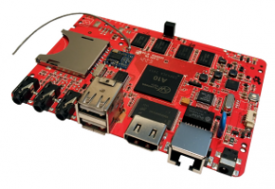
After the Raspberry Pi, the APC and Hackberry A10 are the latest entrants in the hugely popular line of ultra small motherboards designed to run any thing from the Android OS to trimmed down Linux distributions. But keep in mind that these are development boards, not mobos that you can buy and build a standard desktop computer from.
No wonder they are popular with tinkerers, developers and wannabe DIYers. No doubt that they will eventually go mainstream, but for now, these boards are a hacker’s delight. This article presents a casual comparison of the Android Personal Computer (APC) and the Hackberry A10.


FeaturesAndroid PC (APC)
APC
Hackberry A10
A10
CompanyA product of VIA Technologies Inc., a manufacturer of integrated circuits based in Taipei, TaiwanA product of Miniand, a technology company based in Canberra, Australia.
ProcessorVIA 800MHz ProcessorAllwinner A10 ARM Cortex A8 clocking at 1.2GHz
This is obviously a more powerful system than the APC.
Graphics (GPU)Hardware 2D/3D Graphic.
Resolution up to 720p
Not as powerful a graphics processing power as the A10
Mali 400 (4 max GPU cores). Hardware 3D acceleration and video decoding.Resolution 1080p
Memory512 MB DDR3 512 MB to 1 GB DDR3
There are two different models, one with 512 MB of RAM and another with 1 GB.
ConnectivityHDMI
VGA
USB 2.0 (x4)
microSD Slot
HDMI
VGA
USB 2.0 (x2)
microSD Slot
4-pin serial port
Storage2 GB NAND Flash. 4 GB NAND Flash. SDHC card slot supporting up to 32 GB
Networking10/100 Ethernet10/100 Ethernet, Realtek 802.11n WiFi
Supported OScustom Android systemAndroid 4.0 ICS, Linux
Comments/
Resources
The price tag for the APC is USD $49, but because of overwhelming demand, the company has stopped taking pre-orders - for now.

Home page. Download the kernel and boot loader from
here.
The price tag for the 512 MB model of the A10 is USD $60, but is currently out of stock. The 1 GB model is due at the end of this month and the published price tag is USD $65.

Home page

Ashampoo.HDD.Control.2.10.Final


The hard drive is one of the most important components of your computer. Even if a hard drive works flawlessly, it should still be regularly checked and maintained. This way an imminent hard drive failure can be detected early and might be prevented. If suddenly major problems occur or if your hard drive even completely fails, data loss might be the result.

Make sure you are prepared for such a situation. Ashampoo HDD Control 2 can notify you early so that your valuable data won't become the victim of a hardware crash. Now Ashampoo HDD Control 2 offers even more functions to check the status of your hard drive(s). Use for example the S.M.A.R.T self-test or adjust the noise level and power management of your hard drive(s) (if supported). Furthermore you can restore accidentally deleted files and folders with Ashampoo HDD Control 2. Get to know the all-rounder for monitoring, maintenance and defragmentation, and check the health status and performance of your hard drive(s) today.

Software Highlights
Constant monitoring of your hard drive(s) (also for multi-user systems)
Extended user interface with extensive hints and information on health, performance and temperature of the hard drive(s)
Significantly extended support for external USB hard drives and solid state drives (SSDs)
Support of S.M.A.R.T self-test (if supported by the hard drive)
Adjustment of the noise level and power management of your hard drive(s) (if supported by the hard drive)
Data recovery recovering deleted files and folders
Fully automatic, proactive defragmentation of the hard drive(s)
Online retrieval of achieved benchmark results of your hard drive model(s)