Monday, April 8, 2013

Curlew Multimedia Converter Install on Ubuntu and Linux Mint from PPA


You know there are many media converters in Linux that helps to convert video and audio files to any other formats we want. Curlew is one media converter that comes with an easy-to-use GUI written in Python. With the help of this converter via the Advanced menu options you can add subtitles to your videos.
Following are the some of Curlew supports media formats.
  • MP3 - M4A - 3G2 - WAV - OGG
  • AVI – MP4 – FLV – MOV – MKV – 3GP
  • WMV - Google WebM, etc.
The latest version of Curlew is 0.1.12 that will bring some new improvements. It can also convert files for some portable devices like iPhone, iPad, Nokia, LG, PSP, Xbox, PS3 etc.
You can see how to install Curlew from PPA in this article. The distributions are:

  • Ubuntu 13.04/12.10/12.04
  • Linux Mint 14/13
Curlew Multimedia Converter Installation
  • Enter these commands by open the terminal
sudo add-apt-repository ppa:upubuntu-com/multimedia
sudo apt-get update
sudo apt-get install curlew

  • From the Unity Dash you can start Curlew
Or
  • You need to run this command from the terminal
curlew
Curlew Removal
  • You have to enter these commands to uninstall Curlew from Ubuntu/Linux mint.
sudo add-apt-repository –remove ppa:upubuntu-com/multimedia
sudo apt-get remove curlew
sudo apt-get update

Sunday, April 7, 2013

My-Weather indicator for Ubuntu 13.04/12.10/12.04/Linux Mint


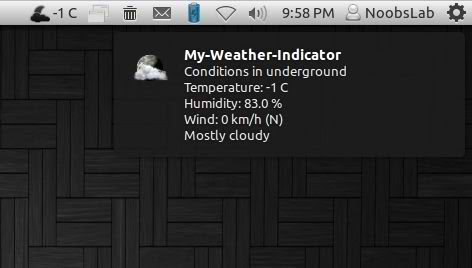
It displays weather of location on panel, You can add up-to 2 locations in this indicator. It shows weather in complete details. There is forecast map option to choose location from map.

weather indicator
You can add up to two locations in this indicator, there are option for show temperature on panel and show notifications about weather. Also you can select "Auto location" for Main location, It will auto detect your current location.
There are three weather sources available: Yahoo, Open Weather Map and World Weather Online. You can choose whatever you want.
You change settings of temperature and details for weather.
In General Options you can select "Auto-start" option to start automatically at login. You can change weather refresh time from "Refresh Frequency" and You can choose light or dark icon for panel.

To install My-Weather indicator in Ubuntu/Linux Mint open Terminal (Press Ctrl+Alt+T) and copy the following commands in the Terminal:
  • sudo add-apt-repository ppa:atareao/atareao
  • sudo apt-get update
  • sudo apt-get install my-weather-indicator
That's it, Enjoy

Source: noobslab

Monitor Laptop Battery Life with LXDE on Ubuntu or Linux Mint


If you install and activate the LXDE desktop environment in Ubuntu / Linux Mint, you will notice that the status icon of the battery life is lacking, which prevents users from knowing the battery level of their laptops. In this article, we will see how to use fdpowermon – a simple tool for monitoring battery power of mobile computers with ACPI -. To view the battery status icon in the taskbar life To install fdpowermon 12.10/12.04 in Ubuntu or Linux Mint 14/13, open the terminal and run the command:

sudo apt-get install fdpowermon
We will now configure fdpowermon to start automatically after logging on to your desktop. To do this, edit this file (replace gedit with your favorite text editor):
gksu gedit / etc / xdg / lxsession / LXDE / autostart
Add this line: @ fdpowermon

Save the file and exit. The status icon will show the battery automatically at system startup:


Install Tor Browser Bundle 2.3.25-6 From PPA in Ubuntu/Linux Mint


Tor Browser Bundle 2.3.25-6 has been released recently bringing updates for the following features:


  •     Update Firefox to 17.0.5esr
  •     Update NoScript to 2.6.59


As a reminder, Tor Browser Bundle isa  multiplatform software that allows users to browse the web in anonymity. You can check for more information about it here. In this tutorial, we will see how to install Tor Browser Bundle from PPA which is supported by these Ubuntu/Mint distros:


  • Ubuntu 13.04/12.10/12.04
  • Linux Mint 14/13
If you prefer a manual installation, you can download it from here.

Tor Browser Bundle 2.3.25-6 Installation

Open the terminal and enter these commands for 32-bit architectures:

sudo add-apt-repository ppa:upubuntu-com/tor 
sudo apt-get update 
sudo apt-get install tor-browser 
sudo chown $USER -Rv ~/.tor-browser/
For 64-bit architectures, run these commands:

sudo add-apt-repository ppa:upubuntu-com/tor64 
sudo apt-get update 
sudo apt-get install tor-browser 
sudo chown $USER -Rv ~/.tor-browser/
Use now Unity dash to search and open the software:


GStreamer 1.0.6 Release with Fixes and Updates


If you are searching for a good development framework for crafting apps like video editors, media players and such, you have here the new Gstreamer version 1.0.6.
The GStreamer project officially declared that it has new API and ABI-stable 1.x series with the new 1.0.6 version which enables the GStreamer multimedia framework.

If you are searching for a good development framework for crafting apps like video editors, media players and such, you have here the new Gstreamer version 1.0.6.
The GStreamer project officially declared that it has new API and ABI-stable 1.x series with the new 1.0.6 version which enables the GStreamer multimedia framework.

Here you can Download GStreamer 1.0.6: http://linux.softpedia.com/get/Multimedia/Audio/GStreamer-2569.shtml

Saturday, April 6, 2013

A lot of improvements in 0 A.D. Magadha


The game developer Wildfire Games has recently released a new version of the free real-time strategy game 0 A.D. Magadha. The new alpha version includes a variety of improvements and so achieves a further milestone on the way to the final game release.
The most important changes include the introduction of Indian civilization, including typical units and buildings of this nation. The game AI has been improved greatly and has been extended by several difficulty levels. In addition, many graphics and sound improvements have been made in the new version.
 

0 A.D. can be downloaded here.