Saturday, September 1, 2012

How To Install Mate 1.4 On Ubuntu 12.10/12.04/11.10


In this tutorial we will help you install the Mate 1.4.0 desktop environment on Ubuntu 12.10/12.04/11.10. If you want to see what has been improved or fixed in this latest version of Mate, you can go here.

Mate 1.4.0 Installation

To install Mate 1.4.0 on Ubuntu 12.10/12.04/11.10 or any Ubuntu-based system, open the terminal and run the following commands:

sudo add-apt-repository "deb http://packages.mate-desktop.org/repo/ubuntu precise main"
sudo apt-get update
sudo apt-get install mate-archive-keyring mate-core mate-desktop-environment gdebi

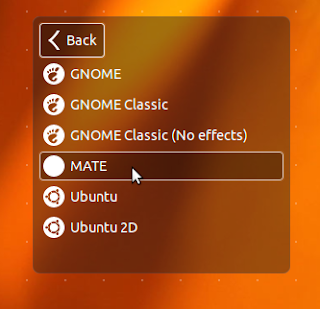
After finishing the installation of Mate, log out and select Mate from the session menu, then log back in to start the Mate desktop:


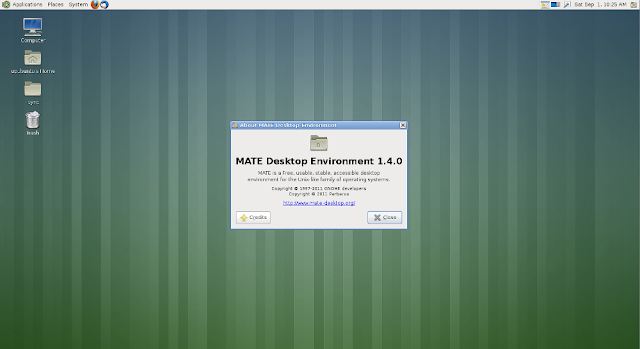
Here is a screenshot of Mate 1.4.0 under Ubuntu 12.04 Precise Pangolin:

Before we finish this tutorial, there is also a bug that needs to be fixed which causes icons to disappear due to the conflict between mate-settings-daemon and gnome-settings-daemon. To fix it, edit /etc/xdg/autostart/mate-settings-daemon.desktop with this command:

sudo pluma /etc/xdg/autostart/mate-settings-daemon.desktop

Replace now this line:

Exec=/usr/bin/mate-settings-daemon

with this one:

Exec=bash -c "/usr/bin/mate-settings-daemon --no-daemon &"
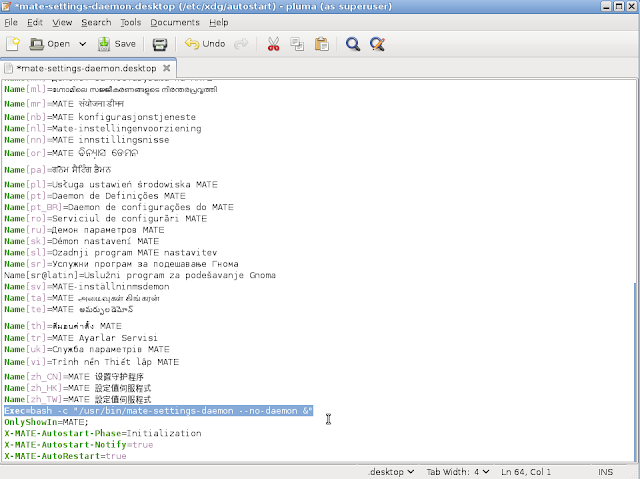

Save and exit, then edit /etc/xdg/autostart/gnome-settings-daemon.desktop with this command:

sudo pluma /etc/xdg/autostart/gnome-settings-daemon.desktop

Replace now all text inside this file with the following:

#!/usr/bin/env xdg-open

[Desktop Entry]
Type=Application
Name=MATE Settings Daemon
Exec=/usr/bin/mate-settings-daemon
OnlyShowIn=MATE;Unity;
NoDisplay=true
X-GNOME-Autostart-Phase=Initialization
X-GNOME-Autostart-Notify=true
X-GNOME-AutoRestart=true
X-Ubuntu-Gettext-Domain=gnome-settings-daemon
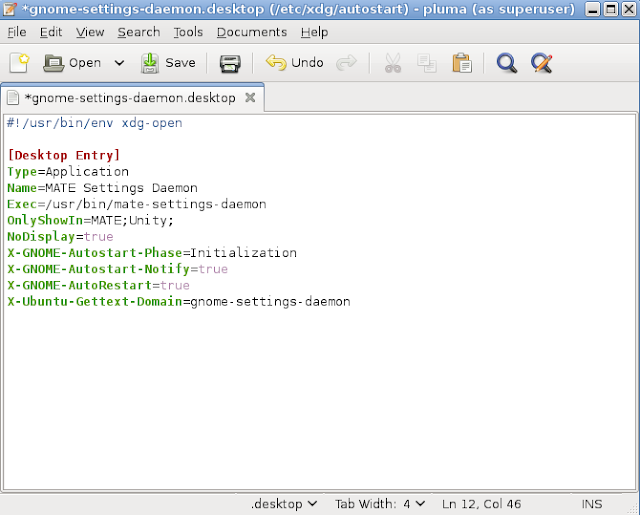

Save your file and restart your computer.

ROSA 2012.1 Alpha


Konstantin Kochereshkin has announced the availability of the first alpha build of ROSA 2012.1 "Desktop" edition, a desktop Linux distribution originally forked from Mandriva Linux: "In this alpha release the main emphasis was made on libraries and core system software. We have successfully rebuilt packages from the main repository with new libraries and adopted our package base to RPM 5.4.x requirements. Versions of system components included in the alpha release: RPM 5.4.9, GCC 4.7 Linaro, glibc 2.15, KDE 4.9.0, Perl 5.14, Linux kernel 3.5.1, systemd 189, Qt 4.8.2, GTK+ 3.4.4, FFmpeg 0.11.1, PHP 5.4.6. Currently GRUB 0.97 is used as bootloader, but it will be replaced with GRUB 2 at next stages of ROSA Desktop 2012 development. Note: this alpha release only supports KDE 4!" Read the complete release announcement for more details and relevant links. Download: ROSA.2012.1.Alpha.i586.iso (1,484MB, MD5), ROSA.2012.1.Alpha.x86_64.iso (1,495MB, MD5).

Slackware Linux 14.0 RC4


Release candidate four for Slackware Linux 14.0 is out: "Well, we fixed a lot of bugs and took some upgrades that we pretty much needed to take since they were important bug and/or security fixes, so it looks like we'll need to have a 14.0 release candidate 4 and another (last?) round of testing. Hopefully the fourth time is the charm!" One of the critical security patches were applied to glibc: "Patched multiple integer overflows in the strtod, strtof, strtold, and strtod_l functions in stdlib in the GNU C Library allow local users to cause a denial of service (application crash) and possibly execute arbitrary code via a long string, which triggers a stack-based buffer overflow." See the distribution's changelog for a full list of changes. Download links to the daily unofficial DVD installation images built by Eric Hameleers: slackware-current-install-dvd.iso (2,320MB, MD5), slackware64-current-install-dvd.iso (2,274MB, MD5).

Friday, August 31, 2012

Archey: Display Distribution Logo And System Information On The Terminal - Ubuntu/Linux Mint/Debian


Archey is a tool written in Python that allows users to preview system information along with your Linux distribution logo on the terminal. In this tutorial we will help you install it on Ubuntu, Linux Mint and Debian.

Archey Installation

Let's firstly install some dependencies with this command:

 sudo apt-get install scrot lsb-release 

Install now Archey with these commands:

cd /tmp
wget -O archey-0.2.8.deb http://goo.gl/a9ku4
sudo dpkg -i archey-0.2.8.deb

Start now Archey with this command:

archey

For Ubuntu, you will get this:


For Linux Mint:


If you want to start Archey automatically once you launch the terminal, then do the following:

- Edit .bashrc with this command:

sudo gedit ~/.bashrc

For Linux Mint:

sudo pluma ~/.bashrc

- At the end of the file, add these two lines:

# Archey
archey

- Save your file and exit, then open a new terminal window to test Archey.

Archey Home Page

More Nice GTK3 Themes For Unity And Gnome Shell - Ubuntu 12.04/11.04/Linux Mint 13 (Maya)


Today we will introduce three GTK3 themes for Ubuntu/Linux Mint that can be used with Unity or Gnome Shell. These themes will help you beautify your desktop and give your system a good impression for those who may see it. We have already covered many GTK+ themes for Ubuntu, you can find them here.

To be able to install these themes, you need first to add our PPA with these two commands:

sudo add-apt-repository ppa:upubuntu-com/gtk3
sudo apt-get update

Note: You can either use MyUnity or GNOME Tweak Tool to enable these themes or use simply the terminal commands given with each theme below.

1. MIUIv4+


To install MIUIv4+ on Ubuntu 12.10/12.04/11.10 and Linux Mint 13 (Maya), open the terminal and issue this command:

sudo apt-get install miui-gtk3

gsettings set org.gnome.desktop.interface gtk-theme 'MIUI+'

gconftool-2 --set --type string /apps/metacity/general/theme 'MIUI+'

2. Autumn GTK3 Theme


sudo apt-get install autumn-gtk3

gsettings set org.gnome.desktop.interface gtk-theme 'Autumn'

gconftool-2 --set --type string /apps/metacity/general/theme 'Autumn'

3. Violet GTK3 Theme


sudo apt-get install violet-gtk

gsettings set org.gnome.desktop.interface gtk-theme 'Violet'

gconftool-2 --set --type string /apps/metacity/general/theme 'Violet'

Theme sources:

- MIUIv4+
- Autumn GTK3 Theme
- Violet GTK3 Theme

NetBSD 6.0 RC1

NetBSD 
 Jeff Rizzo has announced the availability of the first release candidate for NetBSD 6.0: "On behalf of NetBSD developers, I'm happy to announce the availability of the first release candidate of NetBSD 6.0. A number of improvements and fixes have been made since NetBSD 6.0_BETA2. Here's a sampling: fixed bugs in iscsid target handling and with large writes to iscsi devices; fixed some amd64 trap-handling issues; lots of fixes and improvements for npf(4); renamed wake(8) to wakeonlan(8); pass 'boothowto' from the bootloader to the kernel on sparc/sparc64; various PUFFS/libperfuse fixes in support of glusterfs on NetBSD; update BIND to 9.9.1-P2...." Read the rest of the release announcement and the project's virtual appliances page for a full changelog, list of known issues and bug reporting notes. Installation CD images for nearly 50 processor architectures can be downloaded from the project's FTP server; quick links to the i386 and amd64 ISOs (MD5): NetBSD-6.0_RC1-i386.iso (313MB, torrent), NetBSD-6.0_RC1-amd64.iso (330MB, torrent).