Showing posts with label Coreutils. Show all posts

Monday, January 21, 2013

Install Ubuntu Server Manager Utility in Ubuntu/Linux Mint


Ubuntu Server Manager is a Graphical-User-Interface to install and manage (Apache 2, MySQL, Proftpd, Samba, Monitorix, SSH, Nagios, Webmin) and to monitor the server log activity.
There are several other options for services like: Net activity viewer, Update dynamic IP, Putty for ssh, Open Ports to see server open connections, Logs, Clear logs option, Localhost scan using Nmap, Perform scan of IP/Domain name using Nmap, RKhunter to check if system is effected with rootkit, Firewall configuration option, Open apache www default folder as root, Webalizer to generate report of site.
This utility only manage local machine.
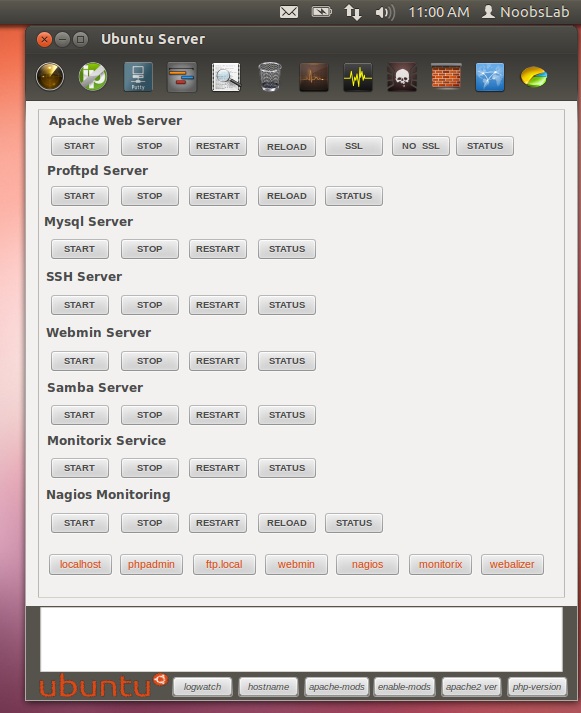

To install services Go to Help & Install > About & Install Servers 
ubuntu server manager

Installation and removal of services
ubuntu server

To install Ubuntu-Server-Manager in Ubuntu/Linux Mint open Terminal (Press Ctrl+Alt+T) and copy the following commands in the Terminal:
  • wget -O usm.deb http://goo.gl/QECjX
  • sudo dpkg -i usm.deb && sudo rm usm.deb
That's it

Sunday, September 2, 2012

Linux From Scratch 7.2


Bruce Dubbs has announced the release of Linux From Scratch (LFS) 7.2, a book of instructions on how to build a base Linux system from scratch by utilising an existing Linux system or a live CD: "The Linux From Scratch community is pleased to announce the release of LFS Version 7.2. It is a major release with toolchain updates to both glibc 2.16.0 and GCC 4.7.1. In total, 28 packages were updated from LFS 7.1 and changes to boot scripts and text have been made throughout the book." Other updates in this release include Linux kernel 3.5.2, GRUB 2.00, Perl 5.16.1, udev 188 (extracted from systemd 188), Coreutils 8.19 and most other GNU utilities, switch from module-init-tools to kmod. Visit the project's news page to read the release announcement. As always, the book is available as an online resource, but it can also be downloaded in PDF and HTML formats. The 352-page publication serves primarily as an educational exercise for those who would like to learn about Linux internals in a hands-on, practical manner.