Showing posts with label Skype. Show all posts
Thursday, October 25, 2012
Skype 6 released
Skype 6 is now available for download. Whats new in this version?
Microsoft and Facebook Account Integration
IM friends on Messenger
Now Skype in Thai, Croatian, Slovenian, Serbian, Catalan and Slovak (total languages Skype supports to 38)
Visual user interface refresh
Removal of online user count
Display previously created profile pictures
Improved telemetry
Download Skype 6
Tuesday, September 18, 2012
Can't Install Skype 4 Or Wine From Terminal/Ubuntu Software Center Under Ubuntu 12.04 [SOLVED]
If you are having troubles installing Wine (including Wine 1.5) or Skype 4 from the official repository of Ubuntu whether from the terminal or Ubuntu Software Center, you can try the solution described below to fix this problem. This issue is very common after a new install of Ubuntu in which the installation of these software are interrupted due to missing dependencies.
To solve dependencies problems, you need to switch the server your system downloads packages from to the main server by following these simple instructions:
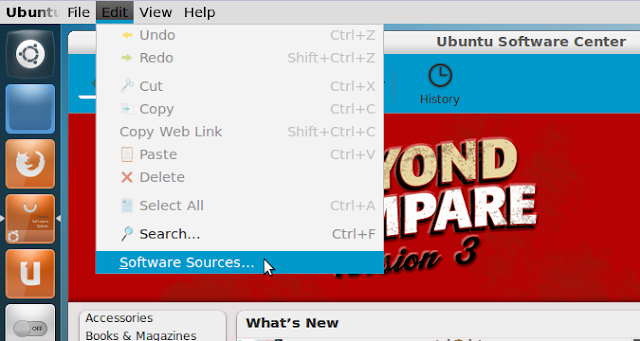
- Open Ubuntu Software Center and head to Edit > Software Sources:

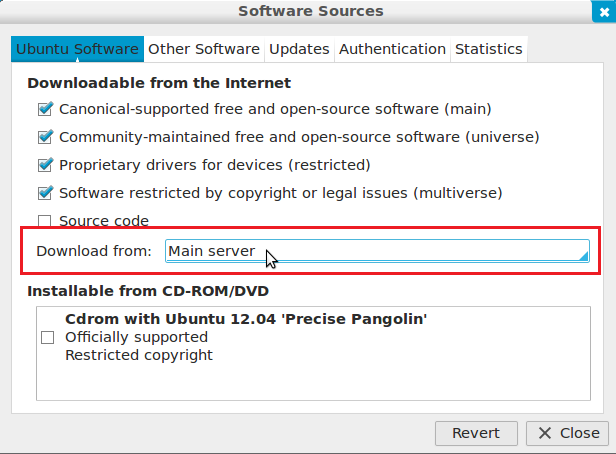
- In the option that says "Download from:", select "Main server" from the dropdown menu (user password required):

- Close now the Software Sources window and open the terminal and run this command:
sudo apt-get update
You can now install Skype 4 or Wine from the terminal or Ubuntu Software Center without errors.
Wednesday, July 18, 2012
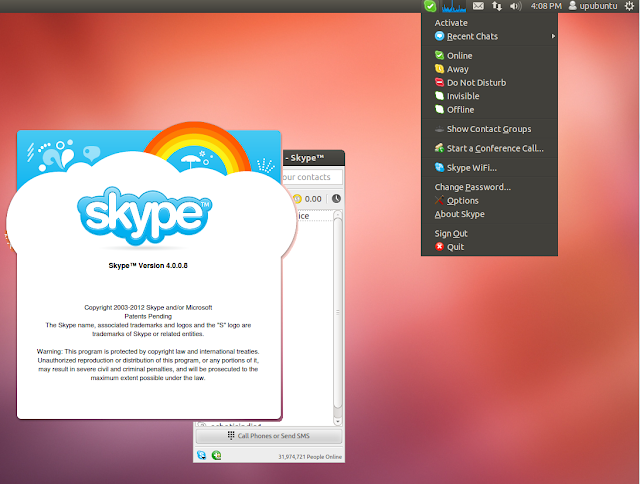
Install Skype 4.0.0.8 From PPA On Ubuntu 12.04/Linux Mint 13
A new update for the Skype application has been made available recently by Microsoft for Linux users. The update is in fact a hotfix that addresses some known issues to make Skype more stable and secure. Here are some of the issues resolved in this latest version:
Fixing Skype client crashing during a Skype IM session
Adding support for saving files on FAT32 hard drives
Marking all conversations viewed crashed

You can find here release notes for Skype 4.0.0.8. In this tutorial, we will see how to install Skype 4.0.0.8 on Ubuntu 12.10/12.04/11.10/11.04 or Linux Mint 13 (Maya) via PPA. For other distros, you can get the appropriate package from the download page here.
Skype 4.0.0.8 Installation
Let's first uninstall the old version of Skype with these commands:
sudo apt-get purge skype skype-bin
sudo apt-get autoremove
Install now Skype 4.0.0.8 with these commands (i386 & amd64 systems):
sudo add-apt-repository ppa:upubuntu-com/chat
sudo apt-get update
sudo apt-get install skype
That's it!
Etichete:
Linux,
Linux Mint,
Skype,
Ubuntu
Friday, June 22, 2012
Pinguy OS 12.04
Antoni Norman has announced the release of Pinguy OS 12.04, an Ubuntu-based desktop Linux distribution with a customised GNOME Shell user interface: "Here is the final release of Pinguy OS 12.04 LTS. We have fully embraced GNOME Shell here and wanted a modern, updated site to go with the new look of the desktop. In this release we have: Linux Kernel 3.2, GNOME 3.4.1, WINE 1.5.6, Skype 4.0, TeamViewer 7, XBMC-PVR 11.0 Eden, GNOME Shell Extension Updater and everything else that was present in the previous beta release. The GDM login is now themed to match the desktop. The distro comes with two menus - Cardapio (eefault) but also includes the Axe menu that is disabled." Read the release announcement which includes notes about known issues, including one about a problematic VLC player. Download the live DVD images from SourceForge: Pinguy_OS_12.04-shell-i686.iso (1,689MB, MD5), Pinguy_OS_12.04-shell-x86-64.iso (1,767MB, MD5).
Thursday, June 21, 2012
Netrunner 4.2 Has Skype 4.0
Netrunner, a GNU/Linux distribution based on Kubuntu, featuring KDE as the default desktop environment, and integrating many GNOME/GTK+ programs to make it Ubuntu compatible, is now at version 4.2.
Netrunner 4.2 comes with mostly updates, but most of them are quite important, as we can see below.
Highlight Netrunner 4.2:
· KDE SC was updated to 4.8.3;
· Firefox-KDE integration was refined;
· GIMP was updated to version 2.8;
· Skype was updated to version 4.0;
· Samba Mounter for easy NAS setup was added;
· Webaccounts for integrating your social accounts were added;
· Runners-ID for free and libre cloud storage and music streaming are now available;
· Muon Discover is now available.
A complete changelog with all the updates can be found in the official announcement.
Download Netrunner 4.2 right now from Softpedia, either for 32-bit or 64-bit platforms.
Thursday, June 14, 2012
Skype 4.0 Stable for Linux Officially Released
Skype proudly announced today, June 14th, that Skype 4.0 for Linux operating systems has been released and it’s available for download.
After so many years in development, Skype comes with a major stable release of its amazing software, Skype 4.0, bringing lots of new features that already existed on other supported platforms.
Highlights of Skype 4.0:
· Unified window thanks to the new Conversations View, allowing users to easily track their chats (the old view can still be enabled from the Chat options);
· A brand new Call View;
· Better call quality;
· Improved video call quality;
· Support for more webcams;
· Better chat synchronization;
· New emoticon icons and presence;
· Ability to store and view phone numbers on a contact's profile;
· Faster load times of chat history;
· Support for Czech and Norwegian languages;
· Fixed overall stability.
Download Skype 4.0 for Linux
Subscribe to:
Posts (Atom)