
Showing posts with label Games. Show all posts
Showing posts with label Games. Show all posts
Wednesday, June 5, 2013
Football Manager 2014 is coming to Linux
Over a year ago, Sports Interactive has informed me that due to small number of users they have no plans to release Football Manager for Linux.
Since the release of Steam for Linux, more and more game companies go into business with Linux games and, recently, the director of the studio Sports Interactive Miles Jacobson has announced via Tweeter that the next version of Football Manager will also be released for Linux.
As Football Manager is probably the most popular and most realistic football manager at the moment, a lot of football fans among Linux users will surely be very happy with this announcement. However, Football Manager 2014 will initially be only released for Ubuntu 12.04 LTS and also, the game can not be purchased in every country (e.g. Germany).

Thursday, April 11, 2013
Ubuntu Apps Charts for March 2013

While Steam is currently probably the most downloaded application on Ubuntu, a tower defense game War in a Box - Paper tanks is storming the Ubuntu Apps Charts. In March, the game was on the 4th place in the Top 10 of commercial applications in the Ubuntu Software Center.
Other popular commercial games in March were Machinarium, Braid and Legend of Grimrock.
Here is the complete list of the most popular applications in the Ubuntu Software Center in February:
Top 10 kommerzielle Anwendungen
- Stormcloud
- Machinarium
- Fluendo DVD Player
- War in A Box – Paper Tanks [NEW!]
- Filebot
- Quick ‘n Easy Web Builder
- Braid
- Legend of Grimrock
- Mini Minecraft Launcher
- Linux Tycoon [NEW!]
Saturday, April 6, 2013
A lot of improvements in 0 A.D. Magadha

The game developer Wildfire Games has recently released a new version of the free real-time strategy game 0 A.D. Magadha. The new alpha version includes a variety of improvements and so achieves a further milestone on the way to the final game release.
The most important changes include the introduction of Indian civilization, including typical units and buildings of this nation. The game AI has been improved greatly and has been extended by several difficulty levels. In addition, many graphics and sound improvements have been made in the new version.
0 A.D. can be downloaded here.
Friday, March 29, 2013
New Racing Game for Linux

While racing games for Linux are still in short supply, a new racing game Monster Mnis Extreme Off-Road has been published for Linux on Desura. In this game, the player controls a monster truck on 90 different, both realistic and futuristic, race tracks.
The game is well suited for casual racing gamers and is similar to the popular racing game RC Mini Racers from the Ubuntu Software Center.
While playing these games is fun, we hope that the Racing games collection for Linux will be filled with more sophisticated titles in the near future. Currently, however, we are still reliant on CrossOver and Co. by playing successful racing games on Linux.
Monday, March 11, 2013
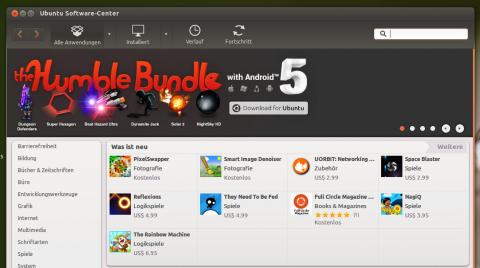
Humble Bundle V with Android Released

Humble Bundle V has been released with 6 games for Linux and Android and can be purchased in the next 10 days. The price for the bundle, as usual, sets everyone by himself.
All games can be redeemed and downloaded in Steam and Ubuntu Software Center.
This time, the following games are included in the bundle:
- Dungeon Defenders
- Super Hexagon
- Beat Hazard Ultra
- Dynamite Jack
- Solar 2
- NightSky HD
Ubuntu Apps Chart for February 2013
Although Steam is surely the most popular platform for purchasing games for Linux today, a lot of commercial software applications and games are available in Ubuntu Software Center as well. Ubuntu Developer Center monthly publishes a list of the most popular commercial and free applications in the Ubuntu Software Center.
In February the most popular commercial games were Machinarium and Braid. At the same time, as expected, Steam has become No. 1 among the free applications in the USC Chart.
Here is the complete list of the most popular applications in the Ubuntu Software Center in February:
Top 10 kommerzielle Anwendungen
- Stormcloud
- Machinarium
- Braid
- Fluendo DVD Player
- Quick ‘n Easy Web Builder
- Legend of Grimrock
- Bastion
- RC Mini Racers
- Drawers
- Filebot [NEW!]
Wednesday, March 6, 2013
Free to Play MMORPG Champions of Regnum comes to Linux

Following the recent release of the real-time strategy game Wargame: European Escalation for Linux, a new Linux MMORPG, Champions of Regnum, has been released on Steam by the publisher NGD Studios. In the game, developed by the indie game studio, players battle on the side of one of three epic empires, with its special environment and abilities.
A major advantage of the game, compared to many other games of this kind, is the fact that it's Free to Play.
What do you think, what game genre do Linux gamers miss now?
Source:SteamForLinux
Friday, February 22, 2013
The Cave and Guns of Icarus support Linux

After the official release of Steam for Linux, the next wave of new games for Linux has been launched on this gaming platform.
The first new game is the adventure game The Cave, from Monkey Island creator Ron Gilbert. The game has full gamepad support, and is therefore perfectly suited for Steam Big Picture.
Another exciting game title coming to Linux, is a team-based online game Guns of Icarus Online.
Please note, both games have been marked as games supporting Linux in the internal Steam database, but can not be installed under Linux yet.
Source : steamforlinux
Saturday, February 16, 2013
Steam for Linux has been officially launched

Linux users rejoice! Valve has just released the official Steam client for Linux. At the same time, a huge celebration sale of all Linux games hast been started on Steam. There are 50% to 75% discounts on all games for Linux.
Moreover, Valve advertises Linux as a gaming platform and recommends using Ubuntu.
The time for Linux players has never been so beautiful before!
Steam for Linux can be downloaded here. Enjoy it!
Friday, February 8, 2013
Wine 1.5.23
A new development release of Wine 1.5.23 has been announced. Changes in this release include:
- HTTPS support no longer dependent on OpenSSL.
- Support for event handling in the Mac driver.
- A functional Netstat built-in application.
- A bunch of C++ runtime math functions.
- Various bug fixes.
Wednesday, February 6, 2013
See you soon Cyber-Cowboy…
As for why I chose to make Quadrilateral Cowboy, a lot of games have hacking minigames where you match colors together or whatever. But I’ve always wanted to just type commands into a terminal. That’s a very risky and niche design choice, so it’s understandable why people don’t do that. But I figured that I can do what I want, so I might as well give it a shot.I can’t wait to punch deck.
Second reason is that I felt like there hasn’t really been a game that really, really deep dives into pure cyberpunk. I mean, you have Deus Ex with really strong cyberpunk themes and tones, but I wanted to make a game based completely on cyberpunk [activities].
Anodyne
Anodyne, a retro-themed top-down adventure game which received praise from various quarters, including the IGF, has been released:
Anodyne is an adventure game that focuses on immersing the player through a combination of 16-bit era visual and audio aesthetics, Zelda-esque action/adventure gameplay mechanics, and exploration of the human Young’s dream world, which contains urban, natural, and abstract themed areas.
You can also vote for the game’s inclusion on Steam at Greenlight.
Tuesday, February 5, 2013
Crusader Kings II: The Old Gods
Paradox Interactive has announced another expansion for Crusader Kings II:
NEW YORK — February 4, 2013 — Paradox Interactive, a publisher of games and a proponent of all religions, and Paradox Development Studio, today announced a new expansion to the world of Crusader Kings II, the critically acclaimed RPG strategy title. The forthcoming expansion, titled Crusader Kings II: The Old Gods, will add a number of widely requested features to the game, including the ability to play as a Pagan or Zoroastrian ruler, expanding empires through war, pillaging, and ruthless brutality. Players will also be able to begin their in-game reign as far back as the year 867 AD, making The Old Gods officially the Paradox title that spans the longest period in history.The base game and its current expansions/DLC are available for Linux on Steam.
Morning Miscellany
- Vendetta Online has launched a campaign Greenlight to bring the game to Steam; head over to give your support if you want the space combat MMO to be able to integrate the community and achievement features from the platform.
- TTimo has posted his thoughts on his last years at id Software, Linux support, and Wine over at Reddit.
- I really need to play Crusader Kings 2.
- Heroes of Newerth has hit version 3.0!
Sunday, January 27, 2013
Counter-Stike and X3: Reunion Support Linux

The wave of new games coming to Linux doesn't stop after the release of Steam Beta for Linux. Recently Counter-Stike and X3: Reunion were activated for Linux and can be played on Linux now, even if they are not labeled as such on Steam.
But not only older titles are released for Linux. One of the most successful strategy games of the last time, Crusader Kings II, was published for Linux recently.
And what's coming next?
Vendetta Online Kickstarter
Help fund the creation of “Vendetta Online 1.9″ by late 2013, with drastically expanded and polished gameplay. This will include improved graphics, sound and rendering technology, advancements to our universe, economy and conquerable territory, plus improvements to player-owned capships and other areas (detailed further below). Your support will make this timeline possible!
Valve Promoting Linux

Quick note that Valve hasn’t just introduced Steam for Linux; they’re actually promoting it very prominently, even to the point of linking Ubuntu itself on the Steam about page.

Saturday, January 26, 2013
Half-Life for Linux is available

Valve has released next title of the company, after Team Fortress 2, on Steam for Linux - Half-Life. The first part of the series appeared in 1998, it won over 50 Game of the Year awards and is undoubtedly one of the most successful video games of all time.
The game can be purchased on Steam Beta for Linux.
Wednesday, January 9, 2013
Retro Game Boy Modified into an Android Gamepad
Courtesy of Chad Boughton, this hack merged the guts of a Wiimote with the case of an old Gameboy. Just clip your phone into the bracket in the top of the Game Boy case, link the two by Bluetooth, and enjoy a beefier and more tactile controller for your games.
If you want the same experience without the destruction of a perfectly good Wiimote and all the DIY work involved, you may want to check out the MOGA system, a very similar (but commercially produced) system for Android phones–just make sure to download the unlock app to use it with the emulator of your choice.
Monday, November 19, 2012
How to Run Steam Inside a Container LXC on Ubuntu
We are talking about now days Steam beta version of Ubuntu and we also learned to bypass the limits imposed by the beta program. You may notice that Steam, , however, is 32-bit version and Valve is recommended for use only on Ubuntu 12.04 LTS. Personally I also tried Steam beta of Ubuntu 12.10 32-bit and found no major problems, but it seems my luck has been : I have heard several complaints from users <strong > Ubuntu 12.10 64-bit , as Steam refuses to work on that operating system (probably because of multiarch support that seems to still some problems).

Running Steam in a virtual environment complete (which
could be VirtualBox or VMWare ) be a real blow for your operating system
and your brain , as you would be required to configure the virtual
machine to the smallest detail, so not have problems to access the 3D
rendering direct host and to enjoy your favorite games, audio direct.
Why, then, do not use a so-called “container”, a virtual environment
(rather complex to use) that uses few system resources and can be
accessed without any problem at all system devices?
Stéphane Graber has done by writing a program in Python,
this Steam-LXC that allows you to automatically configure a container –
to run Steam on Ubuntu – using a virtual Ubuntu 12.04 32-bit capable to
access hardware acceleration and direct audio system. The container is
chosen by Steph LXC , virtual environment that uses hardly any system
resources, used mainly in mechanisms of testing (I LXC used quite often
too), especially during the development of kernel / modules /
applications in general that need testing on multiple architectures. LXC
turns out to be, in fact, one of the containers more scalable and
reconfigurable on the existing scene, earning the alter-ego of “chroot
on steroids.”
Before continuing I want to let you know that Steam-LXC has been tested only
of <strong > Ubuntu 13.04 64-bit Raring using a video card Intel ,
and there is a possibility of have some problems of video hardware that
are used proprietary drivers ( the nVidia or Catalyst, so to speak),
there should be no problems, however, with the open drivers Nouveau or
Radeon. In all cases .. any feedback is welcome!
Ubuntu – Installation of Steam-LXC
Install the preconfigured container is absolutely simple!
Stéph provides us with a convenient PPA (for Ubuntu 12.04, 12.10 and
13.04) to proceed. All you have to do is open a terminal, and type
Into Then, it is the first time we use LXC , we need to create the directory dedicated to the container, with the commandsudo add-apt-repository ppa: ubuntu-lxc/stable
sudo apt-get sudo update
apt-get install steam-LXC
sudo mkdir -p / var / lib / LXC / var / cache / LXC
After that we prepare the environment and download
everything you need (including Steam) to test it, do not worry, things
will be done automatically! Also from the terminal, type
sudo steam-LXC create
and wait for the completion of the process (the time will
vary depending on the speed of your internet connection, it may take up
to an hour). Without this there is nothing left to run Steam virtual
environment just created with the command
Into Enjoy!sudo steam-LXC run
[geeks] as you can see doing so you will not be able to
run Steam bypassing the limitations of the beta. I gave a fleeting look
at the code of the script and I concluded that, in order to be able to
bypass the limitations of the beta, you should change the boot command
Steam inside the python script. To do this, from the terminal, type
sudo gedit / usr / bin / steam-LXC
located this piece of code
self.run_command ("DISPLAY =% s =% s PULSE_SERVER steam"%
and turn it into
self.run_command ("DISPLAY =% s =% s PULSE_SERVER steam steam :/ / open / games"%
Then start Steam in LXC with the command
sudo steam-LXC run
should work perfectly!
NB: you can also use the
container to run Steam on the official Ubuntu variants (X / K / L /
Edubuntu) – making sure that the dependencies are installed inside the
container and not on your operating system .
Subscribe to:
Posts (Atom)