Showing posts with label Theme. Show all posts

Friday, March 29, 2013

Install Zukitwo theme on Ubuntu 13.04/12.10/12.04/Linux Mint (GTK + Gnome Shell)


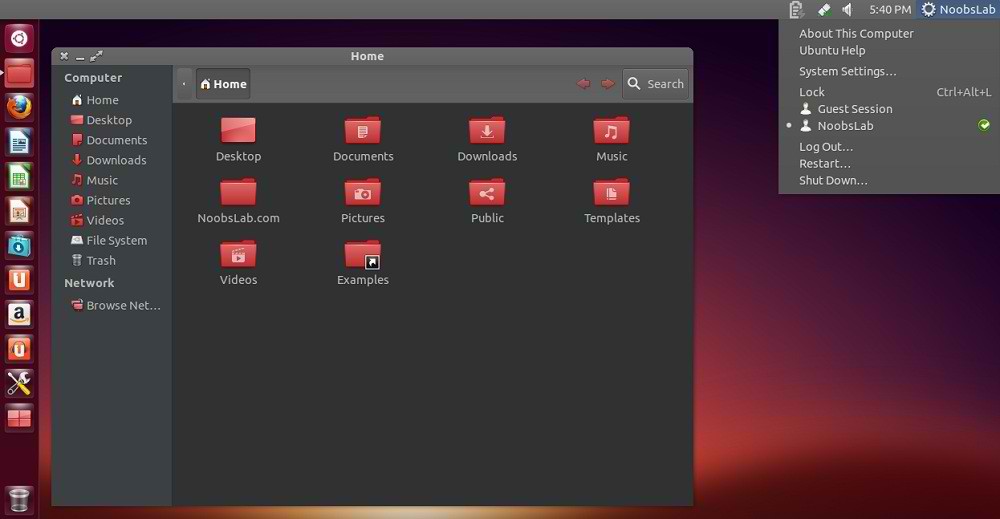
Zukitwo is well designed great light theme, Basically aim of this theme is to make GTK and Gnome-Shell looks better like Gtk theme(Adwaita Cupertino). This theme perfectly works with all resolutions bigger screens or you can use this with smaller screen. This theme support GTK 3.6/3.4 and Gnome Shell 3.8/3.6/3.4.

zukitwo

zukitwo

zukitwo gtk
Theme tested on Ubuntu 12.10/12.04 with GTK 3.6/3.4 and Gnome Shell 3.6/3.4
Awoken icons used in screenshots.
You can use Gnome-tweak-tool or Ubuntu-Tweak to change icons and themes.

To install Zukitwo theme in Ubuntu/Linux Mint open Terminal (Press Ctrl+Alt+T) and copy the following commands in the Terminal:
  • sudo add-apt-repository ppa:noobslab/themes
  • sudo apt-get update
  • sudo apt-get install zukitwo
That's it

Source:noobslab

Monday, February 25, 2013

Install Mountain Lion Theme (GTK 3.6) and Icons from PPA in Ubuntu 12.10 (Quantal Quetzal)


If you prefer to make Ubuntu 12.10 (Quantal Quetzal) look like OS X Mountain Lion, I suggest that you try the Mountain-Lion GTK 3.6 theme, Mac OS X icons are also provided. The theme is compatible with Unity and Gnome Shell and can be easily installed in Ubuntu via our PPA. Here are two screenshots of Mountain-Lion theme under Unity:


Mountain-Lion Theme Installation

Under Ubuntu 12.10, open the terminal and enter these commands:

sudo add-apt-repository ppa:upubuntu-com/gtk+3.6 
sudo apt-get update 
sudo apt-get install mountain-lion-theme

Use now Gnome Tweak Tool to enable this theme.

Mac OS X Icons Installation

Via the terminal, issue these commands:

sudo add-apt-repository ppa:upubuntu-com/icons2 
sudo apt-get update 
sudo apt-get install ilinux-icons

Enable the set of icons with this command:

gsettings set org.gnome.desktop.interface icon-theme 'iLinux-icons'

Enjoy!

Monday, February 11, 2013

Mediterranean themes for Ubuntu 12.10/12.04/Linux Mint 14/13 (GTK 3/2)


Mediterranean is dark theme series, it is designed for users who like dark themes. This series has 11 different variants and available for GTK 3 + 2, it is currently pre-release 2.0 version. In this series all the themes are same but with different color variants and some bitmaps.

Mediterranean-Dark
ubuntu themes

Mediterranean-Darkest
Mediterranean themes

Mediterranean-Gray-Dark
Mediterranean gtk

Mediterranean-Light
Mediterranean ubuntu themes

Mediterranean-Light-Darkest
gtk themes

Mediterranean-Night
ubuntu gtk themes

Mediterranean-Night-Darkest
linux gtk themes

Mediterranean-Tribute
themes gtk

Mediterranean-Tribute-Blue
ubuntu gtk themes

Mediterranean-White
ubuntu themes

Mediterranean-White-Night
Mediterranean themes
Theme tested on Ubuntu 12.10 Quantal with Gtk 3.6 and Ubuntu 12.04 Precise with Gtk 3.4

1st: zonColor Wallpapers used in screenshots, Also checkout Black Wallpapers
2nd: zonColor-Icons used in screenshots, Also checkout icons collection
3rd: You can use Gnome-tweak-tool or Ubuntu-Tweak to change icons and themes.

To install Mediterranean themes in Ubuntu/Linux Mint open Terminal (Press Ctrl+Alt+T) and copy the following commands in the Terminal:
  • sudo add-apt-repository ppa:noobslab/themes
  • sudo apt-get update
  • sudo apt-get install mediterranean-theme
That's it

Thursday, January 31, 2013

OmgSuite theme for Ubuntu 12.10/12.04/Linux Mint 14/13 (GTK + Gnome Shell)


Omg-Suite based on myColors and Silent Night gtk2 theme. This theme is clean, elegant designed for those who like dark themes and three versions of GTK3 available (black, dark grey, and light grey), two versions of GTK2 available, author also made theme for Gnome Shell.

ubuntu themes

ubuntu gtk

ubuntu themes

omgsuite themes
Themes tested on Ubuntu 12.10/12.04 with GTK 3.6/3.4 and Gnome Shell 3.6/3.4

1st: OmgSuite theme for Chrome/Chromium (Click Here)
2nd: zonColor Wallpapers used in screenshots, Also checkout Black Wallpapers
3rd: zonColor-Icons used in screenshots, Also checkout icons collection
4th: You can use Gnome-tweak-tool or Ubuntu-Tweak to change icons and themes.

To install OmgSuite theme in Ubuntu/Linux Mint open Terminal (Press Ctrl+Alt+T) and copy the following commands in the Terminal:
  • sudo add-apt-repository ppa:noobslab/themes
  • sudo apt-get update
  • sudo apt-get install omg-suite
That's it

Tuesday, January 1, 2013

MediterraneanDark/FlatStudioDark: Two Amazing Dark GTK 3.6 Themes For Ubuntu 12.10/Linux Mint 14


Today, we will see two nice themes that were already ported to GTK 3.6 and are compatible with Ubuntu 12.10 or Linux Mint 14. The first theme is MediterraneanDark and the second is FlatStudioDark which will be enjoyed by fans of dark themes. You can use them with Unity or Gnome Shell.


MediterraneanDark 
----
FlatStudioDark 

 In this tutorial, we will help you install them via PPA, you can add it with these commands:

 sudo add-apt-repository ppa:upubuntu-com/gtk+3.6 
 sudo apt-get update

To install MediterraneanDark, enter this command:

sudo apt-get install mediterranean-dark-gtk

For FlatStudioDark, run this command:

sudo apt-get install flatstudiodark-gtk

Use Gnome Tweak Tool to enable the two themes.

MediterraneanDark/FlatStudioDark Removal

If you want to remove these themes, enter these commands:

sudo apt-get remove flatstudiodark-gtk 
sudo apt-get remove mediterranean-dark-gtk
sudo add-apt-repository --remove ppa:upubuntu-com/gtk+3.6 
sudo apt-get update

Friday, December 28, 2012

Beautify your Desktop with Potenza, a New Icon Theme for Ubuntu/Linux Mint


Potenza is the name of the new icon theme that has been created by the Mystras team. This beautiful icon theme comes in two different colors for folders (blue and orange). In this article, we will see how to install this icon set in Ubuntu Unity or Gnome Shell, but the Potenza's author is working hard to make it compatible with most Linux desktop environments, you can support him here.


The PPA is available for these Ubuntu/Linux Mint distros:

  • Ubuntu 13.04/12.10/12.04
  • Linux Mint 14/13
Potenza Icon Theme Installation

To install Potenza and Potenza Orange in Ubuntu/Linux Mint, open the terminal and issue these commands:

sudo add-apt-repository ppa:upubuntu-com/potenza 
sudo apt-get update 
sudo apt-get install potenza-icons

You can use Gnome Tweak Tool to enable the different variants of Potenza, or enter these commands from the terminal:

- Potenza (default)

gsettings set org.gnome.desktop.interface icon-theme 'Potenza'

- Potenza Orange

gsettings set org.gnome.desktop.interface icon-theme 'Potenza-Orange'


Here are some screenshots of Potenza under Ubuntu Unity:


Potenza Removal

In case you want to uninstall Potenza from your system, enable another icon theme then run these commands:

sudo apt-get remove potenza-icons 
sudo add-apt-repository --remove ppa:upubuntu-com/potenza 
sudo apt-get update

Friday, December 7, 2012

Top 15 Desktop Environments for Ubuntu 12.10 Quantal Quetzal (Alternatives to Unity)


In this article, I have collected 15 best desktop environments available for Ubuntu 12.10 (Quantal Quetzal) that can be used as a replacement for Unity. If you are interested in good design and look for your desktop, you may try the first seven desktop environments given below. If you want speed with no interest in design and desktop look, you may start from the eighth desktop environment.

Additionally, instead of installing various desktop environments on Ubuntu 12.10, you may try the different Ubuntu flavors which are:


  •     Xubuntu - XFCE desktop environment
  •     Kubuntu - K Desktop environment
  •     Lubuntu - LXDE
Let's now see the various desktop environments available for Ubuntu 12.10 or older:

1. GNOME Shell


sudo apt-get install gnome-shell

2. KDE


sudo apt-get install --no-install-recommends kubuntu-desktop

3. Xfce


sudo apt-get install xfce4

4. LXDE


sudo apt-get install lxde

5. Cinnamon


sudo add-apt-repository ppa:gwendal-lebihan-dev/cinnamon-stable 
sudo apt-get update 
sudo apt-get install cinnamon

6. Mate


sudo add-apt-repository "deb http://packages.mate-desktop.org/repo/ubuntu precise main" 
sudo apt-get update 
sudo apt-get install mate-archive-keyring 
sudo apt-get update 
sudo apt-get install mate-desktop-environment

7. E17


sudo apt-add-repository ppa:hannes-janetzek/enlightenment-svn 
sudo apt-get update 
sudo apt-get install e17

8. Awesome WM


sudo apt-get install awesome

9. WindowMaker


sudo apt-get install wmaker

10. Fluxbox


sudo apt-get install fluxbox

11. Blackbox


sudo apt-get install blackbox

12. Openbox


sudo apt-get install openbox

13. jwm


sudo apt-get install jwm

14. IceWM


sudo apt-get install icewm

15. fvwm


sudo apt-get install fvwm
Extra DEs

Here are some other desktop environments suggested by our readers:

- Razor-qt


sudo add-apt-repository ppa:razor-qt 
sudo apt-get update 
sudo apt-get install razorqt

Note: You may also install these DEs on Linux Mint 14 or older.

Thursday, November 29, 2012

The DeLorean-Dark Theme Adds Support For Gnome 3.6 - PPA Installation Available For Ubuntu 12.10/Linux Mint 14


DeLorean-Dark is an amazing GTK3 dark theme for Ubuntu/Linux Mint systems. The theme has been updated for Gnome Shell 3.6, that means you can now install it in Ubuntu 12.10 or Linux Mint 14 (Nadia).


Ubuntu 12.10

Linux Mint 14

DeLorean-Dark Installation

To install DeLorean-Dark in Ubuntu 12.10/Linux Mint 14, open the terminal and run these commands:

sudo add-apt-repository ppa:killhellokitty/themes.ppa 
sudo apt-get update 
sudo apt-get install delorean-dark-theme-3.6

To enable it, use any of your favorite programs (MyUnity, Gnome Tweak Tool, etc.). The icons used in the Ubuntu screenshot are from NITRUX OS Icons. Credits for this theme go here.

Tuesday, November 13, 2012

Install 15 Best Ubuntu 12.10 Themes For Unity And Gnome Shell


In this article, we will introduce 15 best GTK3 themes for Ubuntu 12.10 (Quantal Quetzal) compatible with Unity and Gnome Shell. The installation of the different themes will be from our PPA which can be added with these commands:


sudo add-apt-repository ppa:upubuntu-com/gtk3 
sudo apt-get update
To enable the themes given below, you can use Gnome Tweak Tool. To install it in Ubuntu 12.10, run this command:

sudo apt-get install gnome-tweak-tool

1. ClearNIX


sudo apt-get install clearnix 

2. reNIX


sudo apt-get install renix

3. Autumn GTK3 Theme


sudo apt-get install autumn-gtk3

4. Enyx Theme


sudo apt-get install enyx-theme 
5. DeLorean Dark Theme


sudo apt-get install delorean-dark-theme 
6. Win2-7 Remix


sudo apt-get install win2-7-remix-theme 

7. Nowa Theme


sudo apt-get install nowa-theme 

8. GtkDroid


sudo apt-get install gtkdroid

9. Zukiwi


sudo apt-get install zukiwi 

10. GnomishGray


sudo apt-get install gnomishgray-theme 

11. MediterraneanNight


sudo apt-get install mediterranean-theme 

12. DarkMint


sudo apt-get install darkmint-theme 

13. malys - rought


sudo apt-get install malys-rough-theme 

14. DeLorean varNaM Theme


sudo apt-get install delorean-varnam-theme 

15. Mac OS X Lion 


sudo apt-get install macx-lion