Wednesday, July 4, 2012

Nautilus eXtreme Makeover ;)


The following designs are extremely tentative art and things are probably going to change. But it is always nice to have a look to the uncertain future ;) 
First off a quick look in some minor changes for Nautilus 360. Compact view is gone, extra panel is gone and tree view will be replaced by a list view.  But all these are just details of what is coming next. Nautilus is gonna merged to Content Selection pattern, and if you don’t know what content selection is, you better check this before you continue reading.. or at least check it after, decision is totally up to you ;)
McCann uploaded the latest Nautilus designs for 3.8 most likely, but unfortunately in a very bad quality. Anyway here there are..

Enjoy :)

All our files
Our home folder
A second drive if we have
Our pictures folder
Select content view. If you read the link above you should be familiar with it
Our file preferences, which is currently empty. It needs more design I guess..
..and design just came. Damn Gnome development goes fast ;)
Set our file permissitions
And some advanced options like show hidden files, enable direct delete etc. This is really nice!
Set grid view preferences that we can modify the size of icons and the sort order
And the list view options, we can select what information will be visible and sort the files display order
And some folder options, permissions, selecting default applications for files etc
This is how we will interact with our files in the future. The five buttons on bottom make totally clear that you gonna use your finger on them ;)
I will re-review on this when I get newer and better quality images.

Install Blender On Ubuntu – Free 3D Modeling Application + Tutorials


Blender is a free suite of 3d content creation applications openly available on most operating systems including Ubuntu. You can download Blender through the software manager or by clicking this link, if all else fails you can just type the following in your terminal.
sudo apt-get install blender

Install Blender On Ubuntu   Free 3D Modeling Application + Tutorials
Blender Render (Source: Blender.org)
For some blender tutorials check out the links below:
If anyone else has some links to tutorials or related information about Blender feel free to comment, I will also approve links to personal blogs that have tutorials or other goodies for Blender.

Get A Dark Panel With The Radiance Theme For Ubuntu 12.04/11.10


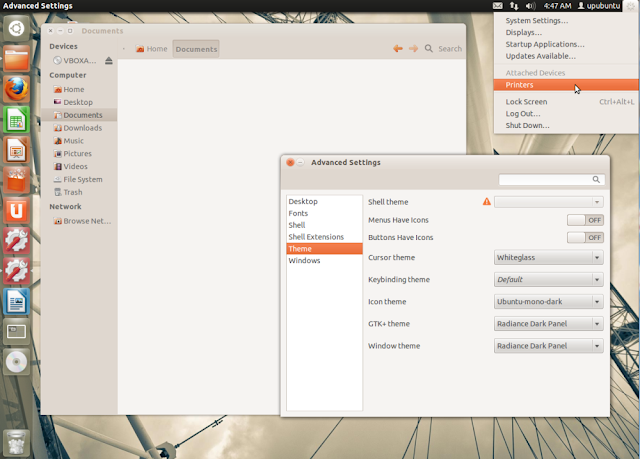
Radiance Dark Panel is a theme derived from the default Ubuntu Radiance theme. What has been changed from the original is that users will get a dark upper panel instead of the bright one. Here is a screenshot of Radiance Dark Panel under Ubuntu 12.04:


The theme can be installed manually from this link, or you can use our custom PPA below. The PPA currently supports Ubuntu 12.04/11.10.


Radiance Dark Panel Installation

To install Radiance Dark Panel under Ubuntu 12.04/11.10, open the terminal and run the following commands:

sudo add-apt-repository ppa:upubuntu-com/themes
sudo apt-get update
sudo apt-get install radiance-dark-panel

Enable it now with these commands:

gsettings set org.gnome.desktop.interface gtk-theme 'Radiance-Dark-Panel'


gconftool-2 --set --type string /apps/metacity/general/theme 'Radiance-Dark-Panel'

Enjoy!

Build your own linux hosting server on the cloud


There are all kinds of Linux hosting servers. The most complicated of these require you to be a Red Hat Certified Engineer (RHCE). Many of them require you to do more than download a distro, burn a CD, and install and boot up your new bare-bones servers. But, say you have a particular job for a server and the boss wants it done yesterday, what do you then? Well, one excellent choice is TurnKey Linux.

With TurnKey Linux the only hardware you need is any device that can support a Web browser and a credit card. That's because, while you can run TurnKey Linux on an ordinary dedicated server or on VMWare, OpenStack, or OpenVZ, the mindlessly simple and fast way to do it is to spin up your own server on the Amazon Elastic Compute Cloud (EC2).

Here's how it works.

TurnKey Linux, until recently, was built on Ubuntu Linux 10.04. Now, the core TurnKey Linux is in the process of being migrated to old, but rock solid Debian Squeeze (6.0.4) Linux distribution. But, you as someone who just needs a server Right Now don't need to worry about what's happening in the background. No, all you have to do is pick the appropriate TurnKey Linux server.

Read the rest of the article on ITworld.com

Valve Confirms Steam for Linux, Blizzard Bans Linux Users

Here are two interesting gaming news for Linux users, as Valve director confirmed Steam for Linux, and Blizzard started banning Diablo III users who use Linux.

In the short video posted above, Valve's managing director, Gabe Newell, is interviewed by the Norwegian site DagBladet.no at E3 2012, talking briefly about their upcoming plans with Steam and support for the Linux platform.

Thanks to Michael Larabel from phoronix.com we already knew that Steam will be available for Linux users by the year's end.

In other news, it appears that lots of Linux users, who installed the Diablo III game via Wine or PlayOnLinux apps, are getting banned from the Battle.net system.

Contacted by lots of angry Diablo III owners, Blizzard response was negative: we will not un-ban accounts and we won't issue a refund to users.

Calculate Linux 12 Beta


Alexander Tratsevskiy has announced that the first public beta release of Calculate Linux 12, a Gentoo-based distribution for desktops and servers, is available for testing: "We're happy to announce that Calculate Linux 12 has entered its final phase - a beta-testing version is now available. Main features: network client-server solutions via SOAP/WSDL are supported; both console and graphical interfaces are implemented; multiple installations are supported - you can install CL on several storage media at once, locally as well as remotely; system settings can now be configured either from the command line or in a graphical environment; the Xfce edition has a better appearance with the new Adwaita theme." See the release announcement for further details and screenshots. Quick links to download the desktop editions with KDE (CLD) or GNOME (CLDG); for other flavours please see the mirror list: cld-20120702-i686.iso (2,164MB, MD5), cld-20120702-x86_64.iso (2,332MB, MD5), cldg-20120702-i686.iso (1,740MB, MD5), cldg-20120702-x86_64.iso (1,904MB, MD5).