Wednesday, July 18, 2012

Android-X86 4.0.4 (ICS) RC2 Released With ARM Translator, More [Android For Netbooks Or Laptops]

Android-x86 4.0.4 RC2, based on Android Ice Cream Sandwich 4.0.4 has been released today with a few exciting changes, like an ARM translator that lets you run some ARM applications on Android-X86.

Changes in Android X86 4.0.4 RC2 (since Android-x86 4.0 RC1):
  • Kernel 3.0.36 with more drivers and bug fixes.
  • Enable Dalvik JIT compiler support which should make apps faster
  • Support some 3G modem.
  • Ready to run arm translator. (You still need to install Intel’s libraries manually)
  • Physical keyboard layout selection.
  • Support two cameras.
  • Fake SD card is replaced by internal storage support.

Since the latest Android-X86 uses an ARM translator, not all ARM applications will work, for instance, Google Chrome won't work. Angry Birds (as well as Amazing Alex) on the other hand, worked in my test using a custom Android-X86 build in VirtualBox, though it was kind of slow (probably because of VirtualBox):

android-x86 4.0.4 RC2 angry birds

I'm sure there are readers who are wondering if Netflix works with this new Android-X86 release, but unfortunately I can't answer to this question because Netflix doesn't work in my country so if you try Netflix with Android-X86 4.0.4 RC2, let us know if it works in the comments!


Here is a video and a few more Android-X86 4.0.4 RC2 screenshots:


(direct video link)


android-x86 4.0.4 RC2

android-x86 4.0.4 RC2

android-x86 4.0.4 RC2

android-x86 4.0.4 RC2


Get ARM translator to work in Android-X86 4.0.4 RC2


To get the Intel ARM translator working in the latest Android-x86 4.0.4 RC2, you need to download 3 libraries from Buildroid and copy them into the system folder (so make sure you select to install the /system directory as read-write while installing Android-X86!):

  • Download libhoudini.so and copy it to /system/lib/
  • Download libdvm_houdini.so and copy it to /system/lib/
  • Download the arm libs, extract the downloaded archive and copy the files to /system/lib/arm/

Download for VirtualBox


The official Android-X86 builds do not have Ethernet support, so you won't have an Internet connection while running Android-X86 in VirtualBox. You can, however, use a custom Android-X86 4.0.4 RC2 build that adds Ethernet support: DOWNLOAD (thanks to Ron M for this build!). 

This build has the ARM translator libraries build-in. This is a debug build so a red frame is displayed sometimes - the only way to avoid this is to compile Android-X86 from source and apply the Ethernet patch yourself (or search for a different Android-X86 4.0.4 RC2 ISO with Ethernet patch).

Important: if the mouse isn't working, select from the VirtualBox menu: Machine > Disable Mouse Integration.


Download Android-x86


Android-x86 4.0 has been tested / it should work on AMD Brazos (MSI 110W), Asus EeePC or some Asus laptops/tablets and Tegav2 / Viewpad 10. These are the officially supported devices, but Android-x86 should work on others too. An old list of supported devices / hardware can be found HERE.

An Introduction-Overview of Unity in Ubuntu 12.04 for Beginners [Video]

Are you or someone you know new to the Unity UI in Ubuntu? Perhaps you or the person you know prefer video demonstrations rather than reading about or looking at images for learning. This video by Alan Pope serves as an excellent informal guide to using Unity in Ubuntu 12.04 for those who have not used the new UI before.

Amnesia: The Dark Descent Review


Amnesia: The Dark Descent is not your average game. It’s not made for children and it’s not made for elderly people. It’s a game made to do one thing: scare the players down to their core. You might think we are ready for it, after all these years of gaming, but nothing will prepare us for this experience.

Frictional Games have made a name for themselves with the Penumbra series – Penumbra: Overture, Penumbra: Black Plague, and Penumbra: Requiem. They have perfected over time a type of horror game that has no real competitor.

Sure enough, we have played a lot of horror games by now, and the sensitivity of the gamers around the globe has been diminished to a point where it's actually hard to scare people, unless you are using really graphical images and disgusting, violent scenes. Even then, it is no longer a scare, it’s more disgust than anything else.

The Penumbra series tried to change the way we think about horror games and it managed to peak an interest when they were published. Frictional Games wanted you to be scared, but not because of the game, and because of your imagination.

One fact is certain, developers have long lost the ability to scare us, but we can still scare ourselves. Some of us gamers are in our thirties and we are not supposed to be afraid of the dark, but alone in a forest, in a moonless night, or in a creaking basement, our imagination goes array. We can think of the worst and most unimaginable stuff, and this is the making of a real terror.

Installation

Frictional Games provide a single .sh file for Amnesia: The Dark Descent. We have installed the game in Ubuntu 12.04 LTS without any problems. Just open a terminal and enter the following commands, one by one (the name of the file might vary if it's updated):

sudo chmod a+x amnesia_tdd-1.2.1-3.sh
./amnesia_tdd-1.2.1-3.sh


Follow the instructions of the installer and there shouldn't be any problems.

Gameplay

The player awakes in a castle (the Brennenburg Castle to be later revealed) and has little recollection of who he is, with the exception of his name, and what he's doing there. I would be revealing too much about the game if I explain more than this.

I can only tell you that you must go deeper into the castle and defeat a great enemy that dwells there. He has his malformed servants patrolling the halls, and they will kill you.

The one great thing about Amnesia: The Dark Descent is the fact that there are no weapons for the player. You can only hide or put temporary obstacles in front of the enemies, but you won’t be able to do much else. You must always remember the rooms behind you and know the places that can be used for hiding.

The mechanics of the game is really helpful for this type of gameplay. Players can control the elements from the world with the mouse, such as doors, tables, and so on. When you open a door you don’t just press a key to do it, you have to pull or push with the mouse. This is very helpful when you want to check out a room or if you want to peek from inside a wardrobe.

Amnesia: The Dark Descent also features an interesting gameplay twist that I’ve only seen once before in Cthulhu: Dark Corner of the Earth. Just like in that game, the player mustn't expose the character he’s controlling to too many atrocities, as he will lose his mind.

In Cthulhu: Dark Corner of the Earth, the developers went even a step further making the main character to eventually commit suicide in various ways, usually depending on what he was holding at the time (knife, gun, etc).

The only way to keep the character sane is by exposing him to light. Unfortunately, the light also makes him a lot more visible, and the sources of light are quite scarce, so you will have to balance the exposure to light really carefully.

The Bad

The game is about tension, so I can understand that some of the interludes between action scenes need to vary, but sometimes you can go a long way without anything happening, especially at the beginning.

The story also has a really slow development and has to be put together by the player. I’m not saying that a narrative voice was needed, as it would have totally disturbed the atmosphere, but I would have loved some more books in the game, or other clues to what is actually happening.

The Good

I don’t know if it’s the scariest game I’ve ever played. I’m more mature now and I’m harder to influence, but you should watch some of the YouTube videos about people playing. They are hilarious and they actually represent what most people feel about it.

The fact that people record themselves while being scared is the best ad a game could possibly want, and it's a testament of its quality.

The developers also recommend playing the game Amnesia: The Dark Descent with the lights off and using a headset. This is the first time I heard a developer saying this, although this is how gamers recommend horror games for friends.

Conclusion 

I find it hard to imagine what they can do after Amnesia: The Dark Descent. They’ve used every trick in the book: doors squeaking, heavy breathing, unforgettable monsters, and light manipulation. I’m officially impressed and I have to say no one should miss this game if they want to know how a game should scare you, in order to make you like it, if that makes any sense.


Download Amnesia: The Dark Descent

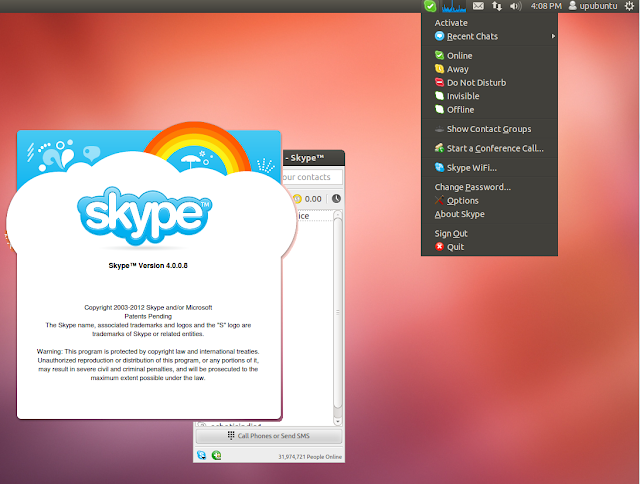
Install Skype 4.0.0.8 From PPA On Ubuntu 12.04/Linux Mint 13


A new update for the Skype application has been made available recently by Microsoft for Linux users. The update is in fact a hotfix that addresses some known issues to make Skype more stable and secure. Here are some of the issues resolved in this latest version:

Fixing Skype client crashing during a Skype IM session
Adding support for saving files on FAT32 hard drives
Marking all conversations viewed crashed 

You can find here release notes for Skype 4.0.0.8. In this tutorial, we will see how to install Skype 4.0.0.8 on Ubuntu 12.10/12.04/11.10/11.04 or Linux Mint 13 (Maya) via PPA. For other distros, you can get the appropriate package from the download page here.

Skype 4.0.0.8 Installation

Let's first uninstall the old version of Skype with these commands:

sudo apt-get purge skype skype-bin

sudo apt-get autoremove

Install now Skype 4.0.0.8 with these commands (i386 & amd64 systems):

sudo add-apt-repository ppa:upubuntu-com/chat
sudo apt-get update
sudo apt-get install skype

That's it!

Ubuntu 12.10 Allows Users to Sort Time Zones

With yesterday's updates, Canonical made some changes to the upcoming Ubuntu 12.10 (Quantal Quetzal) operating system, regarding the Date and Time Indicator.

After revamping the Session menu Indicator last week, the Ubuntu developers added sorting support to the multiple time zones function in the Date and Time Indicator of the upcoming Ubuntu 12.10 operating system.

Therefore, users who have added multiple time zones can now easily sort them by name or by time, accessing the "Time & Date Settings -> Clock tab -> Choose Locations" dialog.

Moreover, it appears that a new function has been added to the Date and Time Indicator, called Time in auto-detected location.If checked, it will automatically insert the current location of the Ubuntu machine.

However, considering that Ubuntu 12.10 is in Alpha development stage, everything is subject to change. We will keep you informed about future changes.

Two New Kernel Vulnerabilities Affect Ubuntu 8.04 LTS


Canonical announced on July 16th, in a security notice, that a new kernel upgrade for its Ubuntu 8.04 LTS (Hardy Heron) operating system is available, fixing two vulnerabilities found by various developers in the kernel packages.

These are the two vulnerabilities found in the Linux kernel packages by various developers: CVE-2012-1601 and CVE-2012-2744.

You can click on each one to see how it affects your system, or go here for in-depth descriptions, as it affects other Linux operating systems as well.

The security flaws can be fixed if you upgrade your system(s) to the linux-image-2.6.24-32 (2.6.24-32.104) package.

Don't forget to reboot your computer after the upgrade!

ATTENTION: Due to an unavoidable ABI change, the kernel packages have a new version number, which will force you to reinstall and recompile all third-party kernel modules you might have installed. Moreover, if you use the linux-restricted-modules package, you have to update it as well to get modules that work with the new Linux kernel version.