Monday, August 27, 2012

wattOS R6


Biff Baxter has announced the release of wattOS R6, a lightweight and energy-efficient, Ubuntu-based Linux distribution (with LXDE) designed for older computers: "wattOS R6 is based on Ubuntu 12.04.1 and the latest updates from the repositories. It is a simple and fast desktop that will likely bring your old computer back to; updated all packages to latest 12.04.1 version; updated to Linux kernel 3.2; changed to VLC for video player; added Xfburn for simple fast CD-ROM and image creation; updated all power management utilities; updated Jupiter and included the latest powertop and Xfce power manage; changed from Midori browser to Chromium with Flash support; added LXFinder - a simple search utility; added LXScreenshot utility...." Read the rest of the release announcement for more information. Download: wattOS-R6x86.iso (675MB, MD5), wattOS-R6-AMD64.iso (695MB, MD5).

Audacity 2.0.2 Released, Installation From PPA Available For Ubuntu 12.04/Linux Mint 13


Audacity 2.0.2 is the latest version that has been released recently bringing more improvements and bug fixes. This powerful audio editor and recorder has known some more features and changes compared to the previous version, here are some of the notable changes in this latest stable release:


  • Duration controls when generating at a point now default to hh:mm:ss + milliseconds format. Selection Toolbar also defaults to that format on first installation or resetting preferences.
  •     Toolbars visual improvements:
  •         "Snap To" in Selection Toolbar now has an explanatory tooltip
  •         Device Toolbar tooltips now display the selected device
  •         Increased default width of Device Toolbar and Meter Toolbar.
  •     Improvements and some bug fixes to Nyquist effects, including:
  •         Delay (new option to prevent duration change)
  •         Sample Data Export (new "L-R on Same Line" layout option)
  •         Risset Drum (new "Amplitude" slider).
  •     Importing a labels file writes the file name to the name of the Label Track, and exporting a labels file offers the name of the last Label Track in the project.
  •     Removed the "Audio cache" option from Directories Preferences due to frequent crash reports. All data operations will now be written to disk and not to RAM.
  •     Removed the FFmpeg "On-Demand" option from Libraries Preferences (this fixes Audacity not building if configured --without-ffmpeg).
  •     Compilation: Progress on making the Modules feature mainstream. Modules can now be individually enabled and disabled in Preferences. 

To see the full release notes of Audacity 2.0.2, you can go here.

  Audacity 2.0.2 Installation

To install Audacity 2.0.2 from PPA on Ubuntu 12.04 or Linux Mint 13, open the terminal and run these commands:

sudo add-apt-repository ppa:n-muench/vlc
sudo apt-get update
sudo apt-get install audacity

PPA credits go to Nate Muench.

Sunday, August 26, 2012

Happy 21st Birthday, Linux


Well, another year has passed and Linux is getting older and older, as it now turns 21 years old, today, on August 25th.

Actually I like to think that Linux is getting younger by the year, as it gains more and more new technologies and support for newer hardware, all in order to catch up with its competition.

What is Linux? How Linux is built? These questions are easily answered by the video posted above, courtesy of The Linux Foundation.

Why use Linux? Simply because it has FREEDOM written all over it! Freedom in everything you do every day and freedom for all your electronic devices.

But let’s not be selfish here and think about all the big companies that use Linux everyday to make your life easier and most likely cheaper, starting with major airlines and finishing with your usual bus operating companies. Hell, the whole Internet is powered by Linux!

Happy Birthday, Linux!

Saturday, August 25, 2012

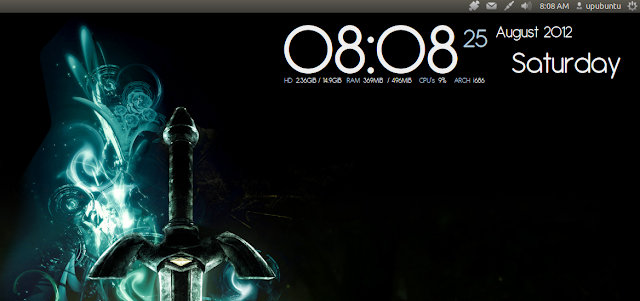
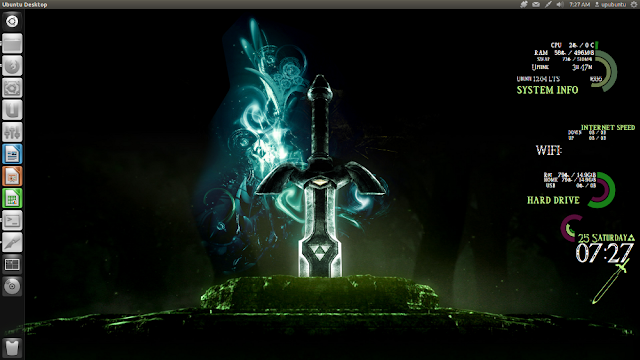
Spice Up Your Desktop With These Two Amazing Conky Scripts - Ubuntu 12.04/Linux Mint 13


In this tutorial we will see two amazing conky desklets that can render your desktop more attractive, but make sure you choose a wallpaper that fits with the design of each conky desklet. These conky scripts can run on many desktop environments such as Gnome Shell, Unity, Cinnamon, etc. If you haven't already installed Conky on Ubuntu 12.04/Linux Mint 13 or older, use the following commands from the terminal:

sudo apt-get install conky conky-all

1. Gotham Conky Mod


a.  Installation For Multi-core Processors

Open the terminal and run the following commands:

cd ~/ && wget -O gothma_conky.zip http://goo.gl/x2Gho

unzip -q gothma_conky.zip && cd gothma_conky

mkdir -p ~/.fonts

cp Antipasto.ttf ~/.fonts

You can start the script with this command:

conky -c ~/gothma_conky/conkyrc

b. Installation For Single Core Processors

Run these commands:

cd ~/ && wget -O gothma_conky_single.zip http://goo.gl/yVdci

unzip -q gothma_conky_single.zip && cd gothma_conky

mkdir -p ~/.fonts

cp Antipasto.ttf ~/.fonts

You can start the script with this command:

conky -c ~/gothma_conky/conkyrc

2. The Legend of Zelda Conky


You can install this desklet with these commands:

cd ~/ && wget -O conky-zelda.zip http://goo.gl/Los2A

unzip -q conky-zelda.zip && cd conky-zelda

mkdir -p ~/.fonts

cp Triforce.ttf ~/.fonts

mkdir -p ~/conky

cp rings-v1.2.1.lua ~/conky

To start the script, run this command:

conky -c ~/conky-zelda/.conkyrc

To kill all running Conky desklets, you can use this command:

killall conky

Conky Sources:

- Gotham Conky Mod
- The Legend of Zelda Conky

Slackware Linux 14.0 RC3


The third (and probably last) release candidate for Slackware Linux 14.0 is ready for testing: "This is Slackware 14.0 release candidate 3 and it is hopefully the last stop on our long road to a stable Slackware release soon. After hearing that the 3.4.x kernel series will have long-term support, I tested 3.4.9 hoping that it would prove stable enough to use that as the release kernel, but there are problems with an oops in clocksource.c every few boots. Given that the 3.2.x series has been very stable, it seems prudent to stick with that for release, and 3.2.28 is going to be the release kernel. So, one more round of testing." See the distribution's changelog for this announcement and notes about recent updates and several security corrections. Quick links to the unofficial weekly builds of Slackware "Current" dated 21 August: slackware-current-21_Aug_2012-DVD.iso (2,329MB, MD5), slackware64-current-21_Aug_2012-DVD.iso (2,284MB, MD5).

Chakra GNU/Linux 2012.08


Anke Boersma has announced the of Chakra GNU/Linux 2012.08, a major new release incorporating the KDE 4.9.0 desktop: "The Chakra project team is proud to announce the first 'Claire' release; this codename will follow the KDE SC 4.9 series and will be dedicated to the memory of Claire Lotion. Claire 2012.08 is bringing some exciting new features, like the port of the excellent Pardus tool 'Kaptan' to Chakra named 'Kapudan', it will allow the user to easily make all kinds of selections on first boot into their newly installed system. We are also very proud to show the excellent work the Art team has done with the new 'Dharma' theme, which even carries over into the latest GRUB 2, which now has a graphical theme. A Simple Pacman update notifier named 'spun' was also added." Check out the release announcement if you need more details or if you'd like to see the distribution's new default look. Download (64-bit computer systems only): chakra-2012.08-Claire-x86_64.iso (1,576MB, MD5).